Unlock significant revenue growth by running iterative A/B tests on high‑traffic e‑commerce pages, using lift benchmarks to guide optimization and personalization. Learn how pairing these experiments with Adobe Target’s sample size calculator helps you identify high‑opportunity pages and turn winning variants into long‑term personalization that drives sustained growth.
The core of A/B testing is comparing two different user experiences to make confident, data‑driven decisions. Whether you’re optimizing landing pages or product detail pages, A/B testing gives organizations the insights they need to move beyond guessing what customers want. Instead, it enables teams to make choices that truly resonate with customers and support key business objectives.
When combined with Adobe Target’s sample size calculator, A/B testing becomes a powerful driver of your personalization strategy—helping you test smarter, learn faster, and unlock significant revenue potential.
A/B testing with iterative badge experiments (e.g., “Ships free,” “Best seller,” “Almost gone”) on category, product detail pages, cart, and other high-traffic pages can unlock significant revenue by systematically improving conversion rates and informing long-term personalization. Using Adobe Target’s sample size calculator ensures that tests are statistically sound, helps prioritize which pages to test first, and turns winning variants into always-on personalized experiences that scale growth.
Unlocking revenue growth: The impact of iterative A/B test tweaks
A/B testing is a powerful technique to optimize various aspects of your e-commerce site. Making tweaks to each iteration of an A/B test can result in millions of dollars of revenue for your organization. Consider implementing the following tweaks in your A/B tests, focusing on badges and their placement on your site pages:
Badges on category vs. PDP pages
One meaningful A/B experiment is to test whether adding badges (e.g., “Best seller,” “New arrival,” “Limited stock”) impacts user engagement and conversions more substantially on category pages or on product detail pages (PDPs).
For instance, one hypothesis for the difference in these tests may be that badges on category pages may encourage exploration, while PDP badges can influence purchase decisions.
Multiple types of badges
Test different badge types simultaneously:
-
Most popular: Highlight top-selling products to increase desirability.
-
Ships free: Emphasize free shipping to make the deal more appealing to customers.
-
Almost gone: Create urgency to drive quick purchase decisions.
-
Free next business day shipping: Highlight fast delivery to encourage immediate purchases.
-
Ready to ship: Assure availability for potential buyers.

Using this technique, you can observe which combination of badges drives substantial results or identify which single badge is driving the most impact on checkouts or orders.
Deciding which badges to test first depends on the flexibility of your site or app. For instance, an organization may face certain limitations with implementing ‘Almost gone!’ badges, as their inventory is not synced with their site/app in a timely manner that can be used to inform visitors.
You can interpret the results to inform future experiments or personalization by understanding the test’s lift. For instance, you will want to see around a 2-3% increase to ensure that the test is truly valuable. If you do not see such a lift, iterate on the original test by swapping out the original badge for a new one.
Discounted pricing badge placements
Test badge placement on both category pages and PDPs:
- Category pages: Display badges next to product listings or within product cards.
- PDPs: Show badges near the product price or add-to-cart button.
This technique enables you to measure the impact on conversion rates and user behavior to see which page drives the desired results.
Success depends entirely on what your organization deems as key metrics. For instance, some may want to see a higher click-through from category to PDP, while others want to see more adds to cart, or a higher overall conversion. Regardless of the primary success metric your organization uses, having specific KPIs as a benchmark is the best way for an organization to grow and evolve their optimization and personalization strategies.
Free shipping badge placements
Test where to display free shipping badges:
- Cart page: Show users which products related to ones in their cart offer free shipping to drive additional cart additions during the checkout process.
- PDPs: Encourage conversions by placing badges near product prices.
- Category pages: Highlight free shipping options.
Using this technique, you can evaluate which badge placement drives the most conversions.
For instance, you can consider adding a ‘Free shipping’ badge on items $50 or more. Seeing this perk on a PDP will likely influence the customer’s behavior by making them more likely to complete a purchase. Free shipping badges can also differ in impact by segment or product category.
Using the Adobe Target sample size calculator to identify opportunities for personalization
The Adobe Target sample size calculator ensures that your activity has sufficient visitors to achieve your goals. When running a manual A/B test activity, as opposed to Auto-Allocate, the Target sample size calculator helps to determine the sample size required for a successful test. As a manual A/B test is a fixed horizon test, the Adobe Target sample size calculator provides a rough estimate of the sample size needed.
Once you know what you want to test, like badges, the sample size calculator helps you identify where you can test effectively on your site or app.
How to use the Adobe Target sample size calculator
- Navigate to the Adobe Target sample size calculator.
- Set confidence level to 95%. Meaning, if you repeated the same study many times, using the same method, about 95 out of 100 of those studies would give you a result that includes the true answer.
- Set statistical power to 80%. Meaning, if the effect is real and at least as large as what you care about, your test has about an 8 out of 10 chance of finding it.
- Set the appropriate number of offers, including control. Usually, this will be set to 2.
- After identifying pages with high traffic and conversion rates, take the Unique Visitors value for the page and divide this value by the number of days in your date range (i.e., If the date range encompasses the last full 30 days, divide the number of unique visitors by 30). You will enter the resulting value under “Total number of daily visitors.”
- To identify the baseline conversion rate value, take the number of Form Successes per page and divide it by the number of Unique Visitors to the page (i.e., form success/unique visitors).
- After inputting all the data values, check to see how many weeks it will take to complete the test. Focus on identifying pages with values that will take at most 20 weeks to complete the test.
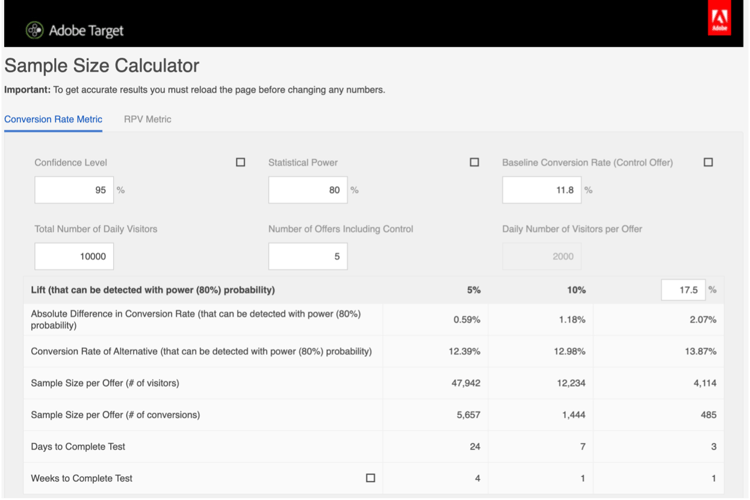
Turning calculator output into a testing & personalization roadmap
After creating a table similar to the above, you can identify pages with the highest conversion rates to uncover specific pages that show potential opportunities for personalization. For instance, if a page shows a high form success conversion rate, consider leveraging this page to run an A/B test. Moreover, you can continue to uncover opportunities for personalization on specific pages by monitoring the changes in conversion rates.
To identify and prioritize which pages to test first, you want to start with your highest traffic pages. Your highest traffic pages will ensure the test has a large enough sample to reach confidence so you’re not waiting an unnerving number of weeks to reach a conclusion. However, if you have a strong test idea for a certain one that is not one of the most trafficked, I would still encourage you to try it out!
Next, you’ll want to connect badge experiments to those pages. For instance, you may decide to place ‘Ships free’ badges on the homepage to entice visitors to stay on the site and browse the inventory that has free shipping.
Lastly, you will want to ensure that your winning A/B tests evolve into longer-term personalization. For instance, if you see that the ‘Ships free’ badge continues to drive orders and revenue week over week, and it has reached a 2-3% lift with a complete sample size, you will want to ensure this test continues running for the long-term.
Bringing it all together
To reiterate, first, use the sample size calculator to find high-potential pages. Then, you’ll want to use iterative badge tests to unlock revenue. Lastly, use those learnings to drive personalization and iterate as needed. Iterating based on your findings will ensure the continuous growth of your organization and drive optimization and personalization at scale.