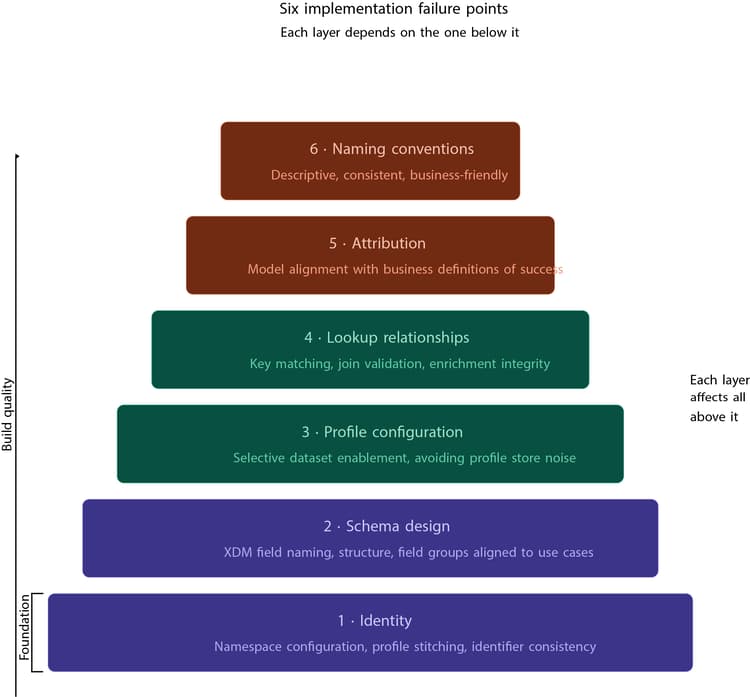
Implementing AEP and CJA is exciting. The promise is powerful real-time customer profiles, unified journeys, and deep cross-channel insights. But in reality, most implementations don't fail because the platform lacks capability. They struggle because of small foundational decisions that were made too quickly or without full context.
The identity problem: when profiles don't mean what you think
Identity is the backbone of AEP. Everything, including segmentation, journeys, and personalization, depends on it. And yet, it can be the first place things go wrong.
A common scenario is where email, CRM ID, or device ID are ingested correctly, but not configured properly as identity fields or namespaces. Sometimes the same identifier is split across multiple namespaces. Other times, identifiers aren't marked as identities at all.
Nothing breaks immediately. Data flows in. Dashboards populate. Journeys run. But underneath, profiles are fragmented. Instead of a single unified customer, you end up with multiple partial profiles. Audiences become unreliable. Personalization loses accuracy.
The fix is not technical complexity, it's clarity. Define your identity strategy upfront:
-
Decide what truly identifies a user across systems.
-
Keep namespaces consistent.
-
Validate stitching early, not after go-live.
The 'enable everything' trap in profile
AEP gives you the option to enable datasets for Real-Time Customer Profile. The temptation is obvious, just enable everything. After all, more data should mean better personalization, right?
Not quite. When every dataset is profile-enabled, you start pushing unnecessary data into the profile store. This leads to heavier profiles, slower segmentation, and sometimes even performance issues. More importantly, it creates noise. Not all data is meant for activation. Some of it is purely analytical.
The more effective approach is selective:
-
Only enable datasets that directly support segmentation or personalization.
-
Keep analytical or high-volume event data out of Profile unless it's truly needed.
Schema design that works technically — but fails practically
Schemas are often treated as a one-time technical task: map fields, align with XDM (Adobe's Experience Data Model), and move on. But schema design is not just about structure. It's about how the business will use the data later.
Poor schema design usually shows up in subtle ways. Fields are named inconsistently. Structures are too flat or too complex. Field groups don't align with actual use cases. Everything works, until reporting begins in CJA. Then suddenly, analysts struggle to find fields. Business users don't understand dimensions. Metrics require workarounds. At that point, fixing schema becomes expensive.
The better approach is to design schemas with the end in mind. Ask: How will this appear in reporting? How will someone use this in a segment or dashboard? Good schema design reduces friction everywhere else.
Lookup datasets that don't actually enrich anything
Lookup datasets are meant to enrich event data by adding context like product names, categories, or campaign details. But they only work if the relationship is correct.
An issue is mismatched keys. The event dataset might have a product ID in one format, while the lookup dataset uses another. Or the join field isn't properly defined. The result? Enrichment silently fails. Reports miss critical context. Product-level analysis becomes incomplete. And debugging takes longer than it should.
The solution is simple but often skipped:
-
Validate joins early.
-
Test lookup logic on small datasets.
-
Ensure keys match exactly across sources.
-
Treat lookup relationships as critical, not optional.
Attribution settings that change the story
In CJA, attribution is powerful but can be misconfigured. Many teams rely on default settings without questioning them. Others set attribution windows or models that don't align with how the business actually operates.
The impact is significant. Different attribution models can completely change which channel gets credit for conversions. That, in turn, affects marketing decisions, budget allocation, and performance evaluation.
Getting this right requires alignment, not guesswork. Work with stakeholders. Understand how success is defined. Compare models before finalizing one. Attribution is not just a setting, it's a business decision.
Naming standards: the small detail that scales poorly
Naming feels like a minor concern at the beginning of a project. Until the number of datasets, fields, and reports starts growing. Without a consistent naming convention, teams interpret data differently, onboarding becomes slower, and reporting layers become cluttered.
What starts as a small inconsistency becomes a long-term usability problem. A simple, clear naming convention goes a long way. Keep names descriptive, consistent, and business-friendly. Think about how they will appear in reports — not just how they look in setup.
Key takeaways
-
Identity strategy first: Define what truly identifies a user across systems, keep namespaces consistent, and validate stitching before go-live, not after.
-
Selective profile enablement: Only enable datasets for Real-Time Customer Profile if they directly support segmentation or personalization; analytical data creates noise.
-
Schema design is a business decision: Design with the end in mind. How fields will appear in reporting and how they will be used in segments determines whether the platform delivers value.
-
Lookup relationships are critical: Mismatched keys cause enrichment to silently fail; validate joins early and treat lookup configuration as essential, not optional.
-
Attribution is not just a setting: Different models change which channel gets credit for conversions; align with stakeholders and compare models before finalizing one.
-
Naming conventions compound over time: What starts as a small inconsistency becomes a long-term usability problem as datasets, fields, and reports grow.