Marketing campaigns rarely produce a single deliverable, and managing the related emails, graphics, and assets often forces teams to re-enter the same information again and again. Here is how two organizations built scalable Workfront frameworks that capture information once and reuse it from intake through delivery.
One challenge, two organizational approaches
Marketing campaigns rarely result in a single deliverable. One initiative may include emails, social graphics, web banners, landing pages, print collateral, digital advertising, videos, and translated assets. Although those deliverables support the same campaign, each may have its own specifications, workflow, approvals, stakeholders, and production timeline.
At our two organizations, we faced the same fundamental question: How do you manage multiple related deliverables without multiplying manual effort or forcing teams to re-enter information that has already been provided?
We approached that question from different starting points and at different companies. At Baptist Health, the solution was designed before Planning was available and focused on managing execution inside one Workflow project. At Natixis Investment Managers, the solution centered on Planning, Fusion and redesigned campaign intake, metadata governance, and downstream project creation at scale.
Approach 1: Baptist Health
Managing multiple deliverables in one Workflow project
At Baptist Health, a single campaign project may include 15 to 20 deliverables submitted through separate requests. From a project-management perspective, those assets belong together, but each still needs its own specifications, assignees, approvals, and production workflow.
The team wanted to keep the campaign together without turning every request into an independent project. The solution was intentionally designed to stay as native to Workflow as possible, using project templates, task templates, custom forms, and calculated fields before introducing automation.
Converting requests into deliverable-level parent tasks
Consider a campaign that receives four separate requests for four different assets:
-
A social media graphic
-
An email
-
A web banner
-
A print flyer
Instead of converting each request into its own project, the project manager converts all four requests into parent tasks within one campaign project. Each converted task represents one deliverable and retains the asset-specific information collected during intake.
The project manager then attaches the appropriate reusable task template beneath each parent task. The template generates the standard subtasks required for that asset, such as copywriting, design, review, approval, revisions, and final production. Each deliverable has its own workflow, while the overall campaign schedule, documentation, and reporting remain together in one project.
Using calculated fields to bring information to the assignee
Creating the workflows was only part of the solution. The more important challenge was ensuring that the people assigned to the subtasks could see the information they needed without asking the project manager to copy it again.
Campaign-level information - including the creative brief, objectives, target audience, key messaging, and shared deadlines - was stored on a project-level custom form. Deliverable-level information - including size, language, copy, format, channel, version, and other asset specifications - was captured on the parent task created from the request.
Calculated fields on the subtasks pulled information from both levels:
-
Shared campaign information from the project
-
Asset-specific information from the parent task
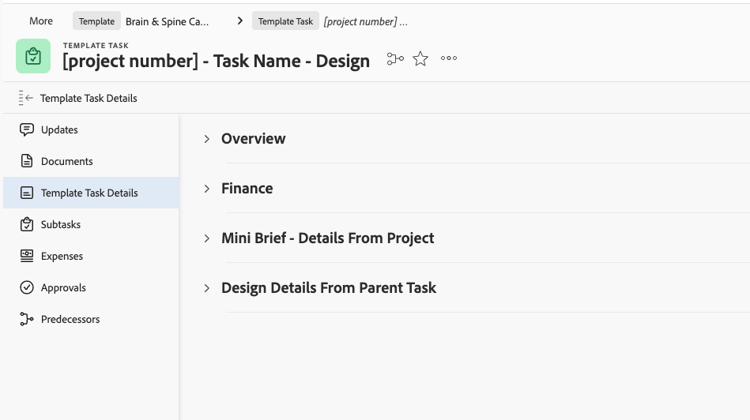
Custom forms with calculated fields are attached to the project template at the task level.
When a designer opened an assigned design task, the relevant creative brief and asset specifications were already visible. The project manager did not need to retype the information in the task description, recreate it on another form, or send it separately through Slack, Teams, or email.
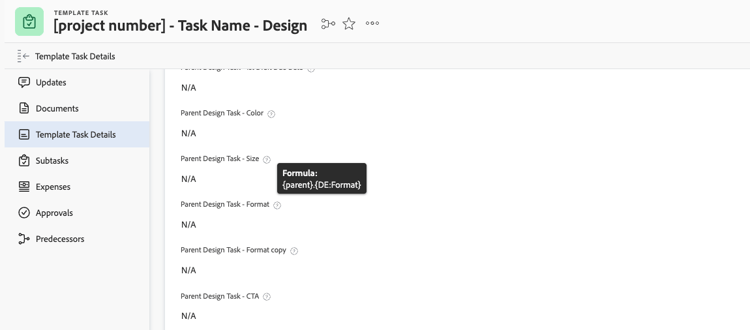
Calculated fields pull data from forms located at the Project level and Parent Task Level.
This solved a significant adoption problem. Users had already entered the information during intake, but the people doing the work could not consistently see it. When information was missing from the task, teams worked around the system. Making the information visible where the work happened restored confidence that Workflow could remain the central place for execution and collaboration.
Using Fusion selectively to move supporting documents
Although the process was designed to remain native wherever possible, targeted automation improved the experience where configuration alone was not enough. Fusion was introduced to move relevant supporting documents automatically to the tasks where they were needed.
For example, reference images attached to the campaign project could be copied to the appropriate design task. The assigned designer no longer had to search the project, ask the project manager to resend the files, or rely on documents being shared through another channel.
Together, calculated fields and document automation ensured that both the information and the supporting materials followed the work.
Starting with a focused use case
The discovery process was highly collaborative because project managers and creative teams were already frustrated and understood that something needed to change. However, trying to include every team and every exception at once created too much competing feedback.
A more effective approach was to begin with a smaller representative group, develop a strong use case, gather feedback, and then expand. That made it possible to establish a repeatable foundation before accounting for every variation and helped the broader organization align around a process that had already demonstrated value.
Approach 2: Natixis Investment Managers
Redesigning campaign intake and project creation with Planning
Natixis investment managers faced the same broad multi-deliverable challenge, but the starting point was further upstream. A campaign could potentially require seven or more different intake requests, each generating separate projects and workflows that project managers and teams had to manage independently. That created significant manual effort, duplicate work, and inconsistencies across deliverables.
By standardizing the intake process and automating project creation, the organization consolidated that effort into a single, scalable integrated intake request form and workflow. The conversion now takes about 15 to 20 seconds instead of requiring someone to manually build and configure each project or campaign. Just as importantly, it improves accuracy because the mapping, metadata, and planning have already been established behind the scenes.
Standardizing intake without overwhelming the requestor
Standardizing metadata and intake requirements was one of the most important parts of the initiative, and honestly, one of the most time-consuming. The team conducted a detailed audit of its deliverables, workflows, and business requirements to identify what information was truly needed to execute and govern projects effectively.
There is a balance between collecting enough information to support planning, reporting, and automation without overwhelming users with unnecessary fields. Natixis Investment Managers also implemented AI form autofill capabilities to streamline the experience, but the goal was never to create larger forms. The goal was to establish a governed, scalable intake process that captures the right information once and makes it available throughout the project lifecycle.
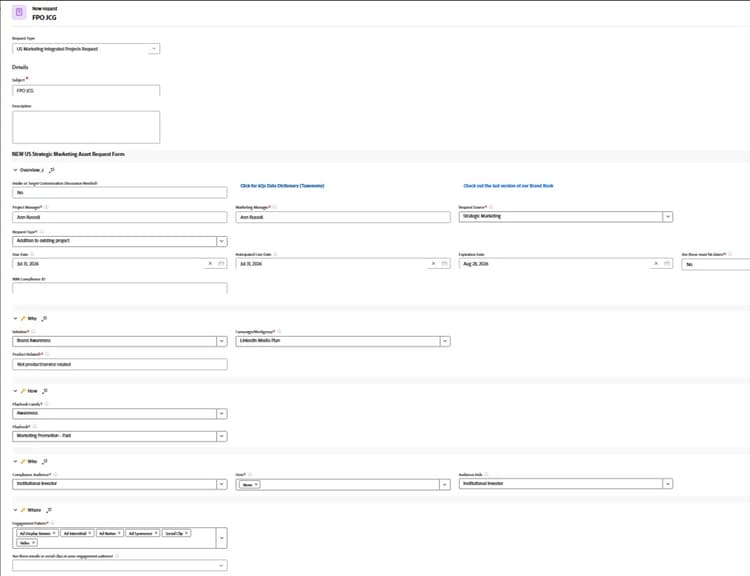
A fully integrated intake request captures campaign and deliverable information through one governed experience.
The heavy lifting is in discovery and governance
The organization partnered with an external agency to assess its processes and identify areas for improvement. Leadership recognized that growing project volumes, increasing complexity, manual processes, and inconsistent metadata were creating challenges for both efficiency and reporting.
Before building anything, the team conducted extensive discovery sessions with stakeholders across multiple teams and business units to understand requirements, identify common pain points, and establish standardized processes. That is where the real work happens. Technology is only part of the solution. The heavy lifting is aligning teams, defining governance, and creating a shared vision for how work should flow.
The resulting Planning model includes more than 40 taxonomy tables and more than 60 deliverable types connected to standardized workflow patterns. That structure provides a governed foundation for linking campaign intent, audiences, products, channels, formats, deliverables, and downstream work.
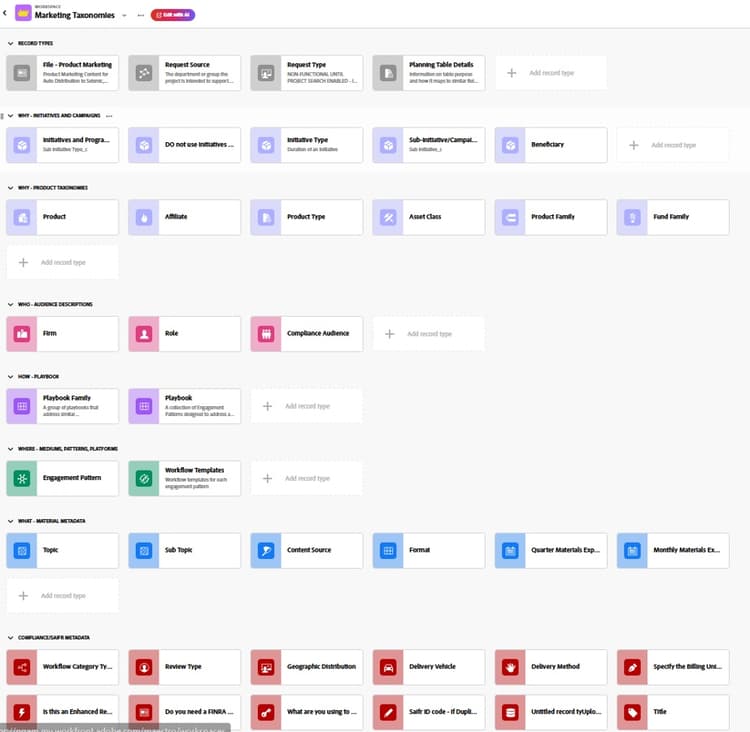
Planning taxonomy tables create a governed model for campaign, audience, product, workflow, and material metadata.
Improving planning and accuracy, not only speed
The time savings were significant, but the improvements in data quality and planning have been just as valuable. By using a single integrated intake process, teams are encouraged to think through the broader campaign and all associated deliverables upfront rather than submitting individual requests as needs arise.
That has improved planning, reduced last-minute additions, and increased metadata consistency across projects. The team also standardized task naming conventions and project structures, which improved visibility, reporting, and governance.
Ultimately, this was not just about eliminating manual effort. It was about creating a more predictable, scalable, and accurate process for managing marketing work.
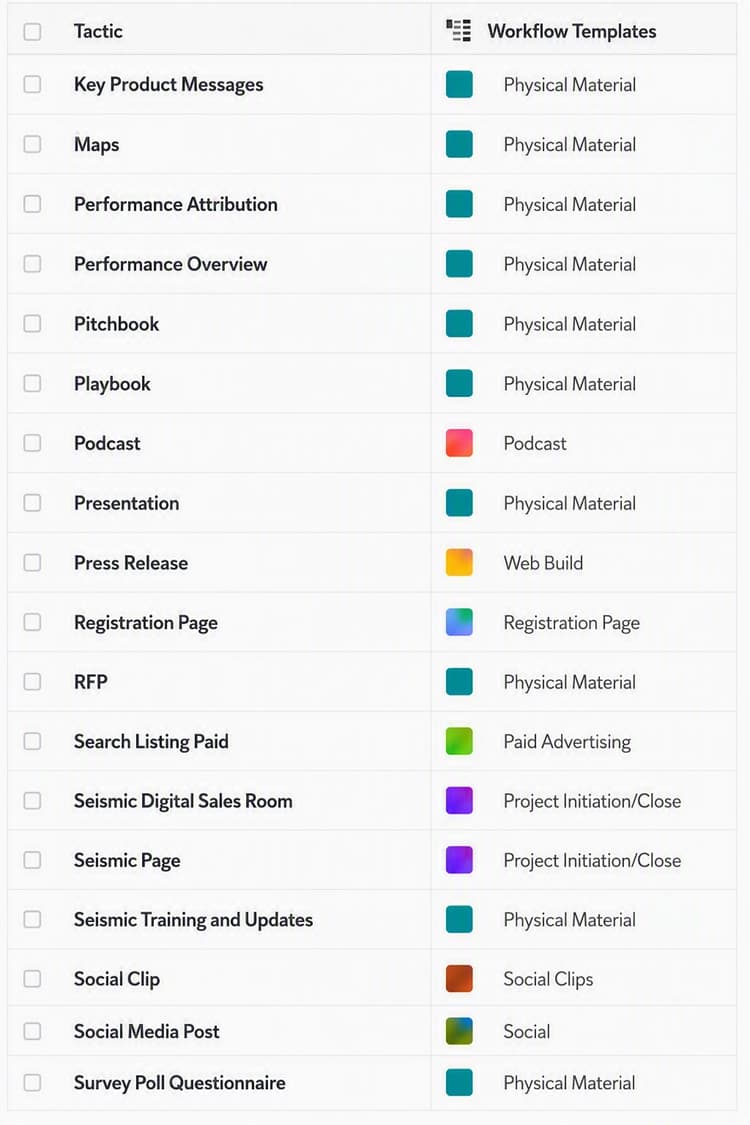
Deliverable types are connected to predefined workflow templates so selections made during intake can drive consistent downstream work.
Learning and maintaining a new platform
Natixis Investment Managers adopted Planning in January 2025, only a few months after it became available. Like any new platform, there was a learning curve, and the team continues to learn as Adobe evolves the product.
What is most promising is how Planning strengthens metadata governance and provides a foundation for future automation and integrations. At the same time, these solutions require significant work behind the scenes. The team does not have a large group dedicated solely to this effort. Much of the planning, design, testing, governance, and optimization is invisible to end users, but that work is what enables scalable, long-term success.
Launching as an MVP and continuing to improve
When the solution launched, the organization approached it as a minimum viable product and focused on delivering value quickly rather than waiting for perfection. If you wait until something is 100 percent complete, you will likely never launch.
The goal was to build a strong, usable solution, get it into production, gather feedback, and continue enhancing it over time. The phased approach was critical: deliver the core functionality first, prove the value, and then refine and expand the solution based on user feedback and evolving business needs. Continuous improvement is far more effective than trying to achieve perfection before go-live.
Different approaches, shared foundations
The two organizations did not implement the same solution, and one approach should not be presented as the next stage of the other. They solved different layers of the same multi-deliverable challenge.
Despite the differences, both organizations reached the same foundational conclusions:
-
Capture information once and reuse it throughout the lifecycle.
-
Keep related deliverables connected without removing the workflow each asset needs.
-
Make information and documents visible where people perform the work.
-
Standardize before automating.
-
Use native configuration where it solves the need and automation where movement or orchestration adds clear value.
-
Invest in discovery, taxonomy, and governance.
-
Launch a strong minimum viable solution, then learn and iterate.
Continuing to evolve
Neither implementation should be viewed as permanently finished. Natixis Investment Managers continues to expand its use of Planning as Adobe evolves the product. What started as a project-creation challenge ultimately became a foundation for broader marketing transformation. By standardizing intake, metadata, and governance, the organization created the framework needed to support automation, reporting, Planning, downstream integrations, and future AI-driven capabilities.
Baptist Health is now also in the process of introducing Planning. Planning will change how campaigns and deliverables are planned upstream, how taxonomy is governed, and how information moves between Planning and Workflow. However, it does not change the foundational concept behind the existing multi-deliverable solution.
Whether campaign information originates in a Planning record, on a Workflow project, or through an intake request, it should still be captured once and made available wherever the work happens. Reusable templates, calculated fields, and targeted Fusion automation will continue to support execution by ensuring that assignees receive both the information and the supporting documents they need at the task level.
Final thoughts
At the execution level, scalable multi-deliverable project management depends on keeping related work together and ensuring that information reaches the people responsible for completing it. At the operational level, it depends on standardized intake, governed metadata, shared taxonomy, and repeatable workflows.
When those principles guide the design, Workflow becomes more than a place to track tasks. It becomes a scalable framework for coordinating complex marketing work from intake through delivery - even as the technology used to plan, automate, and connect that work continues to evolve.
Frequently asked questions
When should I use native Workfront configuration versus automation like Fusion?
Standardize first and use native configuration where it solves the need, such as project and task templates, custom forms, and calculated fields. Add Fusion where movement or orchestration adds clear value, for example copying supporting documents to the task where they are needed.
Should I use Workfront Planning or manage deliverables inside a single Workflow project?
They solve different layers of the same challenge. Baptist Health managed execution inside one Workflow project because the solution was designed before Planning was available. Natixis Investment Managers centered its solution on Planning for upstream intake and project creation. One approach is not a later stage of the other.
How do I keep related deliverables together without creating a separate project for each?
Convert each request into a deliverable-level parent task within one campaign project, then attach a reusable task template beneath each parent task to generate the standard subtasks. Each deliverable keeps its own workflow while remaining part of one project.
How do I make sure the people doing the work can see the campaign information?
Store campaign-level information on a project-level custom form and deliverable-level information on the parent task, then use calculated fields on the subtasks to pull from both levels. The brief and specifications are then visible where the work happens, with no retyping or resending.
Do I need to fully build the solution before launching?
No. Both teams recommend launching a strong minimum viable product, delivering the core value first, and then gathering feedback and iterating over time.