This article explains how rethinking Adobe Commerce extensibility through Adobe Developer App Builder and replacing large portions of custom PHP with a more scalable architecture can improve scalability, stability, and maintainability, designed for long-term growth in a real production environment.
Introduction
For years, PHP extensibility has been the backbone of Adobe Commerce customization. But as cloud-native architectures mature, so do better alternatives. In a recent implementation for a leading European mobility and financial services provider, we replaced a significant portion of traditional Adobe Commerce module development with App Builder – Adobe’s cloud-native extensibility platform. We accomplished this by leveraging runtime actions (serverless functions), events, and APIs to deliver a more scalable and maintainable solution. This article breaks down the reasons behind that decision, the architecture structure, and learnings.
Overview
An API-first approach with Adobe Commerce can be adopted incrementally by evaluating which features would be the most beneficial running as cloud-native apps outside the core Adobe Commerce platform and migrating those features first.
This process led to a clear outcome:
-
~70% of the functionality was implemented using App Builder
-
~30% remained as native Adobe Commerce PHP customizations
This balance allowed us to keep native and checkout-related logic close to Commerce, while offloading integrations, validation, background processing, and orchestration to App Builder where scalability, isolation, and deployment flexibility shine.
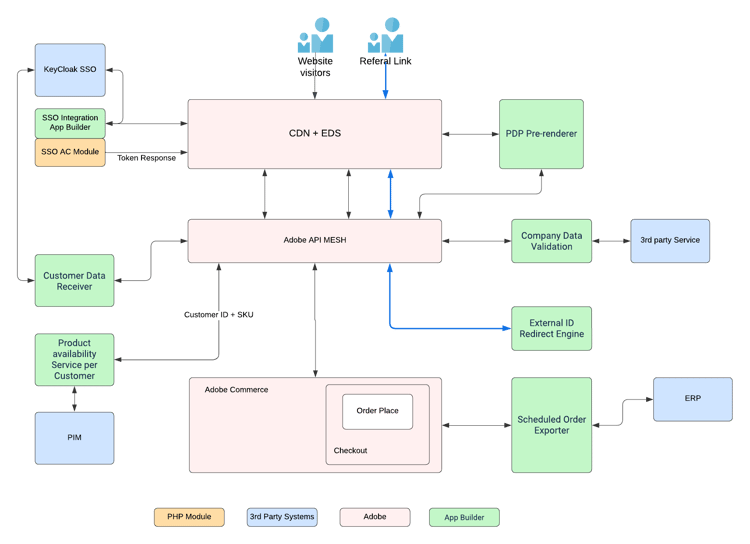
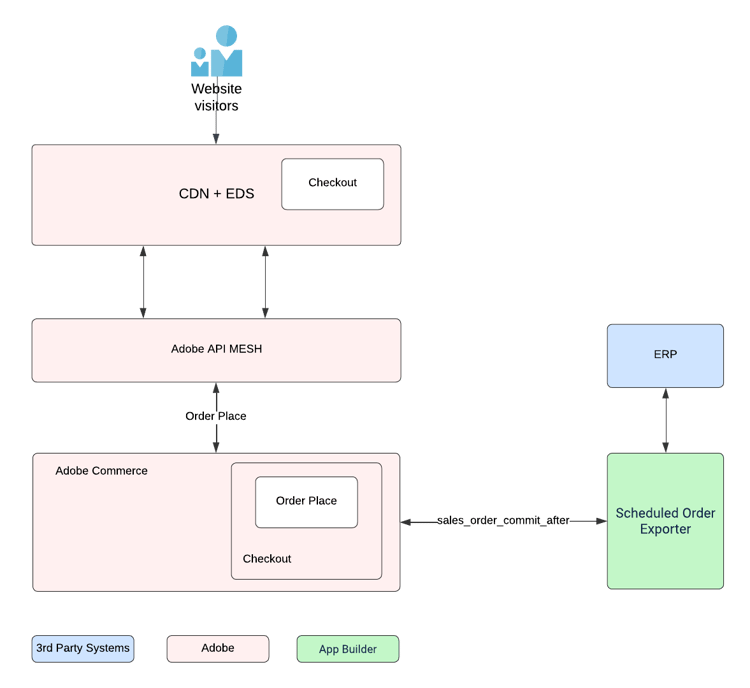
The resulting architecture (see the diagram below, outlining only App Builder extensions) reflects this hybrid approach: Adobe Commerce remains the transactional core, while App Builder acts as the integration and automation backbone. This strategy connects identity (SSO), PIM, ERP, third-party services, and custom business logic through event-driven flows and API Mesh (Adobe’s API Orchestration service).
Architecture walkthrough: How the hybrid model works
At the heart of the solution sits Adobe Commerce, doing what it does best: catalog, pricing, cart, checkout, and order placement. We deliberately kept the transactional core clean and stable, avoiding unnecessary customization inside the Commerce runtime.
Everything around that core – identity, data validation, availability logic, background processing, and third-party integrations – is handled through App Builder and Adobe API Mesh.
The shopper experience is built on the new Commerce Storefront (Powered by Edge Delivery Services).
1. Entry layer: CDN, Commerce Storefront & Identity
All traffic from regular website visitors first lands on the CDN + Edge Delivery Service, which ensures optimal performance, security, and global delivery before any request reaches backend systems.
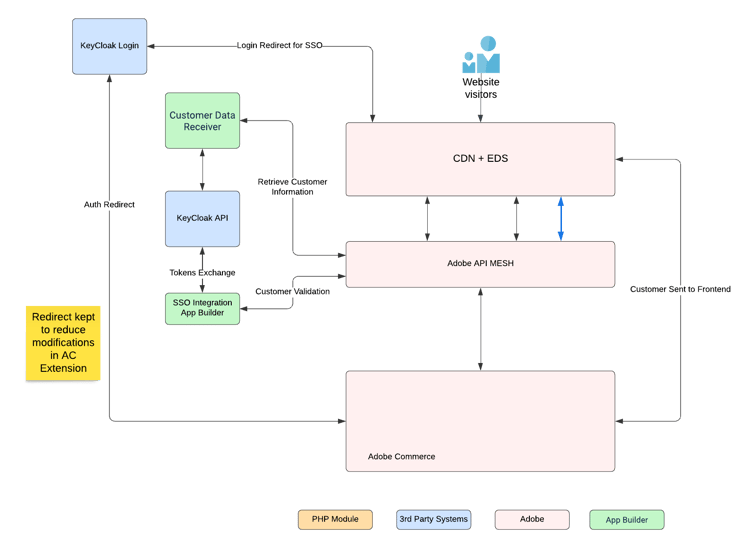
Authentication is handled through Keycloak SSO, integrated via:
-
An App Builder SSO integration
-
A standard Adobe Commerce PHP module from the Marketplace for core SSO configuration and setup
-
This setup allows us to combine platform stability with cloud-native flexibility.
Key advantages of this approach
-
Centralized identity management via a proven Marketplace module
We rely on a well-supported Adobe Commerce extension for SSO configuration, user mapping, and core authentication flows, which avoids maintaining custom authentication logic inside the Commerce runtime.
-
Minimal modification, maximum safety
Instead of rewriting or forking the SSO module, we only apply small, targeted extensions via App Builder, keeping the original module fully upgradeable.
-
API-first integration model
Since all communication relies strictly on SSO APIs, we are decoupled from internal implementation details of the PHP module. Even if the module changes internally, our integration remains stable as long as the API contract holds.
2. Orchestration layer: Adobe API Mesh
At the core of our integration architecture sits Adobe API Mesh, acting as the central orchestration and communication hub between all business systems involved in the platform:
-
Commerce Storefront (as a frontend)
-
Adobe Commerce
-
PIM
-
ERP
-
external validation services
-
and all App Builder applications
Instead of EDS Frontend or Adobe Commerce establishing direct, point-to-point integrations with each of these systems, all communication is routed through the API Mesh.
Key benefits of using Adobe API Mesh
-
Single integration surface
Systems only need to “know” one backend integration endpoint: the Mesh. Every external dependency is hidden behind a unified API gateway. -
Consistent API contracts
All systems communicate through well-defined and versioned contracts, which eliminates hidden coupling and dramatically reduces the risk of breaking changes. -
Full decoupling between backend systems
PIM, ERP, validation services, and App Builder apps are fully isolated from each other. Any system can evolve independently without forcing changes across the entire landscape. -
Centralized security and governance
Authentication, authorization, and traffic control are enforced at the Mesh level, not scattered across multiple custom integrations. -
Simplified Commerce codebase
Adobe Commerce or Frontend no longer contains complex integration logic. They simply consume APIs exposed by the Mesh, keeping the PHP layer lean and transactional.
3. App Builder services used by the Storefront & SSO layer
These services are consumed directly by the Commerce Storefront and SSO layer, not by Adobe Commerce, which allows critical business logic to operate independently from the Commerce runtime.
Customer Data Receiver (SSO → App Builder)
This service receives and synchronizes customer data from the SSO layer without impacting storefront or Commerce performance. Using App Builder ensures secure processing, asynchronous scalability, and zero deployment dependency on Adobe Commerce.
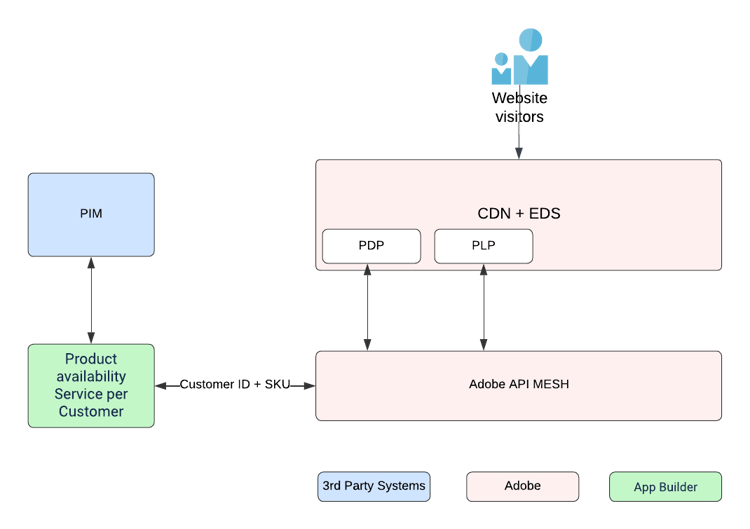
Product Availability per Customer (Storefront → App Builder → PIM)
Product availability is resolved in real time based on customer context and PIM data before requests ever reach Commerce. App Builder allows this logic to scale independently and protects Commerce from a heavy external dependency load.
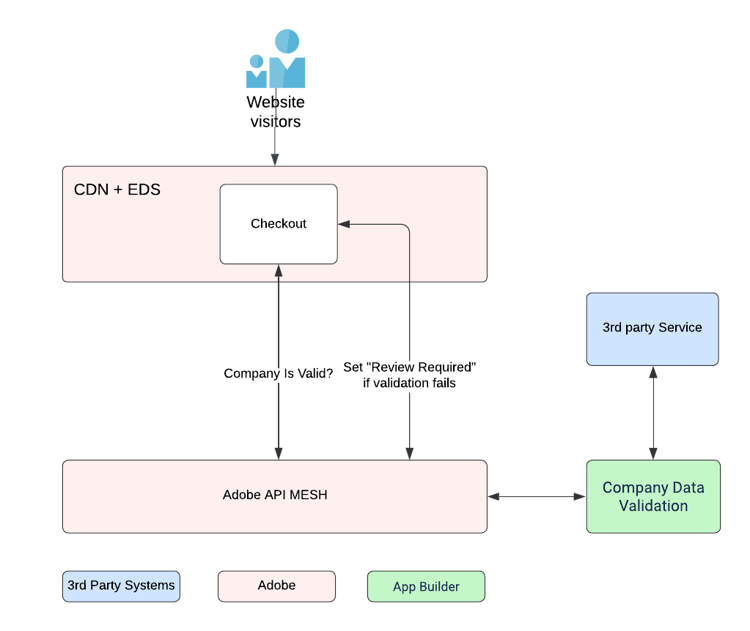
Company Data Validation (Dun & Bradstreet) (Storefront → App Builder → 3rd Party)
Validation is triggered directly from the storefront via App Builder + API Mesh and verified using third-party services, which keeps external service latency and failures completely isolated from Adobe Commerce.
External ID Redirect Engine (Storefront → App Builder)
Inbound traffic from external systems is processed and mapped via App Builder before entering the storefront, which enables safe traffic normalization, flexible redirect rules, and zero risk to the Commerce core.
4. Commerce Storefront Prerendering: SEO without compromising UX
The AEM Commerce storefront is a modern, frontend-driven application that relies heavily on JavaScript to load product data in the browser. While this delivers an excellent user experience, it introduces a classic SPA challenge:
Search engine crawlers and browserless systems often receive almost empty HTML, as they don’t reliably execute JavaScript.
To solve this challenge, we implemented AEM Commerce Prerendering, an official Adobe solution built on App Builder.
How prerendering works in our architecture
The App Builder prerender application:
-
Reads product data directly from Adobe Commerce Catalog Service
-
Generates fully hydrated HTML pages based on predefined templates
-
Stores the prerendered output in its own blob storage
Commerce Storefront is then configured to use this storage as an overlay source. When either:
-
A search engine crawler
-
Any browserless client requests a product URL
It immediately receives a fully rendered HTML response with real product data, without executing any JavaScript.
At the same time:
- Regular users still receive the standard SPA experience, with live PDP rendering in the browser.
Why App Builder is the core enabler here
App Builder is the central control plane for the entire prerendering process. It allows us to define:
-
Data fetching frequency
-
Which products and locales are included
-
HTML and JSON-LD structure
-
SEO metadata generation
All of this can be adjusted through small App Builder configuration changes, without any downtime for the main storefront or Adobe Commerce.
Adobe also provides a starter kit for the prerendering App Builder application, which allowed us to get the solution production-ready in a very short time and achieve an immediate SEO uplift.
Key benefits of this approach
-
Massive SEO improvement
Crawlers receive fully rendered product pages with structured data instead of empty HTML. -
No impact on storefront performance
Regular users keep the fast, dynamic SPA experience. -
Zero-risk deployment model
All prerendering logic runs outside Adobe Commerce and the Storefront runtime. -
Full control via App Builder
Prerendering rules, data models, and schedules can be adjusted without platform redeployments.
5. Orders & ERP sync: Asynchronous by design
Checkout and order placement remain fully handled inside Adobe Commerce, preserving data integrity and transactional consistency. Once an order is created, the export process is taken over by a dedicated Scheduled Order Exporter built on App Builder.
This exporter synchronizes orders to the ERP asynchronously, outside of the storefront and Commerce request lifecycle.
Key benefits of this approach
-
Storefront uptime is fully decoupled from ERP availability
Even if the ERP is slow or temporarily unavailable, customers can continue placing orders without disruption. -
No checkout blocking due to downstream failures
Order creation is no longer dependent on real-time ERP responses, eliminating a major source of conversion risk. -
Safe retries and controlled data flow
App Builder allows scheduled execution, retry mechanisms, and failure handling without impacting Commerce performance. -
Independent scaling and deployment
Order synchronization can scale based on volume without any redeployments or performance side effects on Adobe Commerce.
Why not a complete move to App Builder?
One of the earliest and most important architectural decisions was not to treat App Builder as a total replacement for PHP modules and also not to default everything to PHP “because that’s how it’s always been done.”
Instead, every requirement went through a simple filter:
Will it reduce maintenance costs associated with upgrades?
What stayed in PHP (the 30%)
We kept PHP customizations only where they truly belong:
-
Checkout and order placement adjustments
-
Pricing, cart, and quote logic
-
Deep GraphQL and performance-sensitive hooks
-
Areas where latency must be near-zero and fully synchronous
These are places where direct database access, tight coupling to Commerce internals, and request lifecycle control are still absolutely justified.
What moved to App Builder (the 70%)
Everything else moved out:
-
Identity and SSO orchestration
-
Customer and company validation
-
Product availability resolution
-
External system coordination
-
ERP and third-party integrations
-
Redirect engines and automation
-
Background jobs and schedulers
These are all areas where PHP modules historically suffer from:
-
tight coupling
-
hard deployments
-
poor failure isolation
-
and limited scalability
Key advantages gained
By shifting roughly 70% of the business and integration logic to App Builder, we fundamentally changed how the platform is built, deployed, and operated. The impact was visible not only in architecture quality, but also in delivery speed, system stability, and long-term cost control.
Independent deployments
With App Builder handling the majority of integrations and business workflows, most changes no longer require a full Adobe Commerce redeployment. Integration updates, validations, and background processes can be deployed independently, drastically reducing:
-
release risk
-
deployment windows
-
coordination overhead between teams
This alone became one of the biggest productivity gains in day-to-day operations.
Better scalability where It matters most
Previously, traffic spikes in:
-
availability checks
-
company validation
-
or external API calls
would directly impact Commerce performance.
Now, these workloads scale independently in App Builder. As a result:
-
checkout performance remains stable
-
Commerce resources are reserved for transactional workloads only
-
and unpredictable third-party traffic no longer threatens conversion rates
True failure isolation
One of the most critical improvements is failure containment. When third-party systems experience latency, degradation, or outages:
-
App Builder absorbs the impact
-
retry and fallback logic is applied there
-
and Adobe Commerce remains fully operational
This has effectively eliminated a whole class of incident scenarios that previously led to partial or complete storefront downtime.
Cleaner code ownership and clear responsibilities
The platform now has clear architectural boundaries:
-
Adobe Commerce → transactional logic, checkout, pricing, cart
-
App Builder → integrations, orchestration, validation, background jobs
This separation:
-
simplifies onboarding of new developers
-
reduces cross-team dependencies
-
And prevents the gradual erosion of the Commerce core by integration-heavy custom code.
Future-proof by design
This hybrid architecture is fully aligned with Adobe’s long-term SaaS, API-first, and composable commerce strategy. By externalizing most custom logic:
-
platform upgrades become safer
-
vendor lock-in at the code level is reduced
-
and the solution is already prepared for a move to Adobe Commerce as a Cloud Service
We did not just solve today’s requirements – we built a platform that is structurally ready for what Adobe Commerce is becoming.