Adobe Advertising’s Creative Management — Dynamic Creative Optimization (DCO) combines rule-based targeting with machine learning to render personalize ads from 10,000+ product catalogs in under 25ms, delivering 20–40% performance improvements through a two-tier architecture.
Introduction
Imagine browsing online and seeing an ad for exactly the product you’re interested in — not random, but perfectly tailored to you. Behind this seemingly simple ad lies a sophisticated two-tier system that combines rule-based targeting with machine learning to serve personalized ads in under 25 milliseconds.
Adobe Advertising Creative Management enables advertisers to create, manage, and optimize ads across channels. It supports standard static creatives, dynamic feed/catalog ads with targeting, rotation methods, and performance optimization.
Dynamic Creative Optimization (DCO) is a core capability within Creative Management that powers real-time personalization for dynamic ads. While Creative Management handles creative setup, catalog uploads, and experience configuration, behind the curtains when it comes to rendering ad, DCO executes the real-time decision engine that selects the optimal product tailored as per user preferences. This two-tier system — combining deterministic targeting rules with machine learning optimization — ensures that advertisers can leverage massive product catalogs while maintaining the speed and scale required for programmatic advertising. DCO transforms static creative templates into personalized, context-aware ads that adapt to user’s location, and preferences in real time.
This is Dynamic Creative Optimization (DCO) — a production-ready architecture that handles millions of decisions per day while continuously learning what works best.
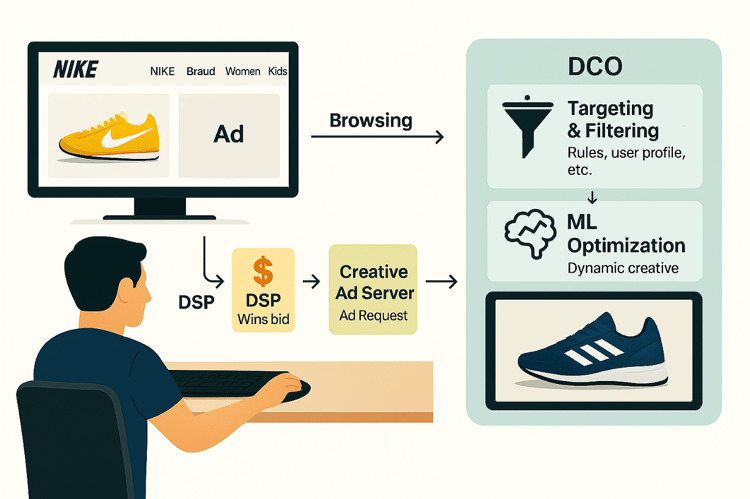
Fig 1 : From bid win to targeting,product selection, ML optimization, and final ad rendering.
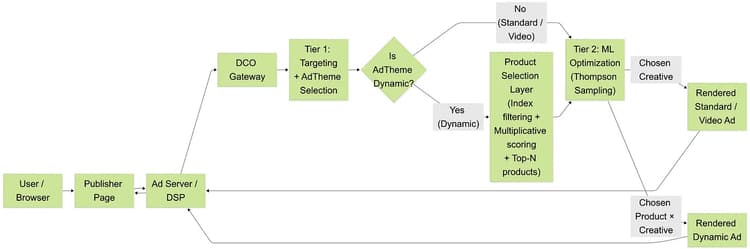
Fig 2 :End-to-end Creative Optimization workflow
The challenge
Serving personalized ads at scale requires solving four constraints simultaneously:
-
Scale: Process catalogs with 10,000+ products per advertiser
-
Speed: Decide in <25 milliseconds for each ad request
-
Relevance: Match ads to user context (location, interests, device)
-
Optimization: Learn and improve continuously from real user behavior
Traditional approaches fall short. Random selection provides poor relevance. Scanning thousands of products sequentially is too slow. Static scoring rules can’t learn what converts. And pure machine learning without business logic can serve irrelevant ads or violate campaign constraints.
Types of creatives: standard and dynamic
Before diving into the targeting system, it’s important to understand the two main types of creatives
Standard creatives
Standard creatives are static ads with predefined, fixed content. The creative assets (images, copy, call-to-action) are uploaded once and remain unchanged regardless of who sees the ad.
-
Use case: Brand awareness and subscription promotions where personalization isn’t required.
-
Example: An Adobe Creative Cloud banner highlighting features like “Turn brief into brillance” or “Clients want more option done”, showcasing pre-designed ad templates and creative tools with a fixed layout and messaging, shown identically to all eligible users.
-
Optimization: ML optimizes which static creative performs best, but the content itself doesn’t change per user.
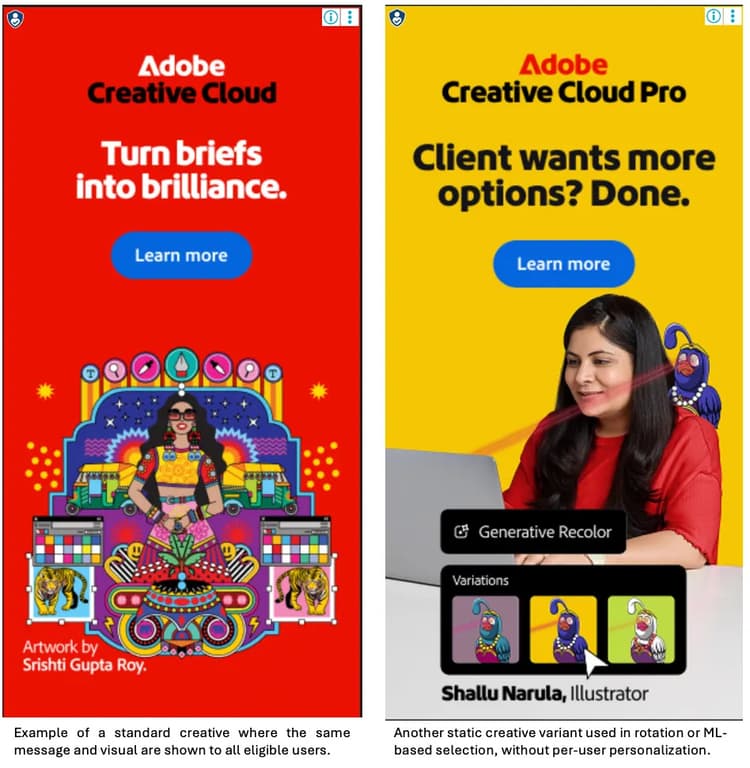
Fig 3: Examples of static creative variants
Dynamic creatives
Dynamic creatives are template-based ads that pull real-time product information from a catalog feed. The template defines the layout, while product data (image, title, price, description) is injected at serve time based on user context.
-
Use case: Retail, travel, automotive — any advertiser with a large product catalog who wants to show relevant products to each user.
-
Example: A user in California browsing electronics sees a dynamic ad featuring a laptop available in their region at $999, while a user in New York sees a different product based on their browsing history.
-
Optimization: ML optimizes the product × creative template combination — selecting both the best product and the best visual treatment for that user.
Creative Group & AdThemes
In Adobe Advertising Creative, campaigns are organized into experiences. A targeted experience can use a decision tree: each branch applies audience rules (geo, device, segment, etc.), and the final leaf node in that tree is what this article calls an AdTheme — a specific audience path with creatives attached.
A Creative Group is the collection of creatives (standard or dynamic) associated with one AdTheme. Once Tier 1 selects an AdTheme for the current request, the system still needs to decide which creative from that Creative Group to show. This choice is controlled by the rotation method configured in the UI:
Algorithm-based (Algo)
Uses machine learning — specifically Thompson Sampling — to automatically select the best-performing creative. The system tracks success metrics (clicks, conversions) for each creative and increasingly favors winners while still exploring alternatives. This is the recommended method for maximizing campaign performance.
Weighted
Distributes impressions across creatives according to advertiser-defined percentages. For example, an advertiser might configure 70% of impressions to Creative A (their primary message) and 30% to Creative B (a test variant). Useful for controlled A/B testing or when specific traffic allocation is required.
Sequential
Rotates through creatives in a defined order, cycling through each creative before repeating. Ensures even distribution over time and is useful for campaigns where all creatives need equal exposure.
Random
Randomly selects from available creatives with equal probability on each request. Simple but doesn’t learn or optimize — useful for baseline testing or when true randomization is desired.Tier 1: Targeting & AdTheme Selection
Purpose: Find the right creative group (AdTheme). This happens for all ad types: standard, dynamic, and video.
Tier 1: targeting & AdTheme selection
Purpose: Find the right Creative Group (AdTheme). This happens for all ad types: standard, dynamic, and video.
Two targeting approaches
1. Decision tree targeting
Advertisers can set up multiple layers of targeting in the form of Decision Tree Experience and assign creatives to each branch of the tree. An experience has a ad tag which advertisers could use in any Demand-Side Platform (DSP)
How it works
Evaluates multiple criteria simultaneously and performs set intersection. The system maintains separate indexes for each targeting dimension:
-
Geographic: Country, region/state, city, ZIP, DMA
-
Device: Device type, browser, OS
-
Data Pass: Custom parameters (t1–t5)
-
Profile: User attributes (ut1–ut5)
-
Segments: Behavioral targeting
-
Ad Scheduling: Date/time ranges
2. Tag-based targeting
User can set up experience which is non decision tree and works on different tags setup on ad sizes.
When request includes tag=’4', system directly retrieves the AdTheme associated with tag 4. Faster but less flexible than decision tree.
Scoring: additive model
After intersection identifies matching AdThemes, scoring uses an additive model:
Example:
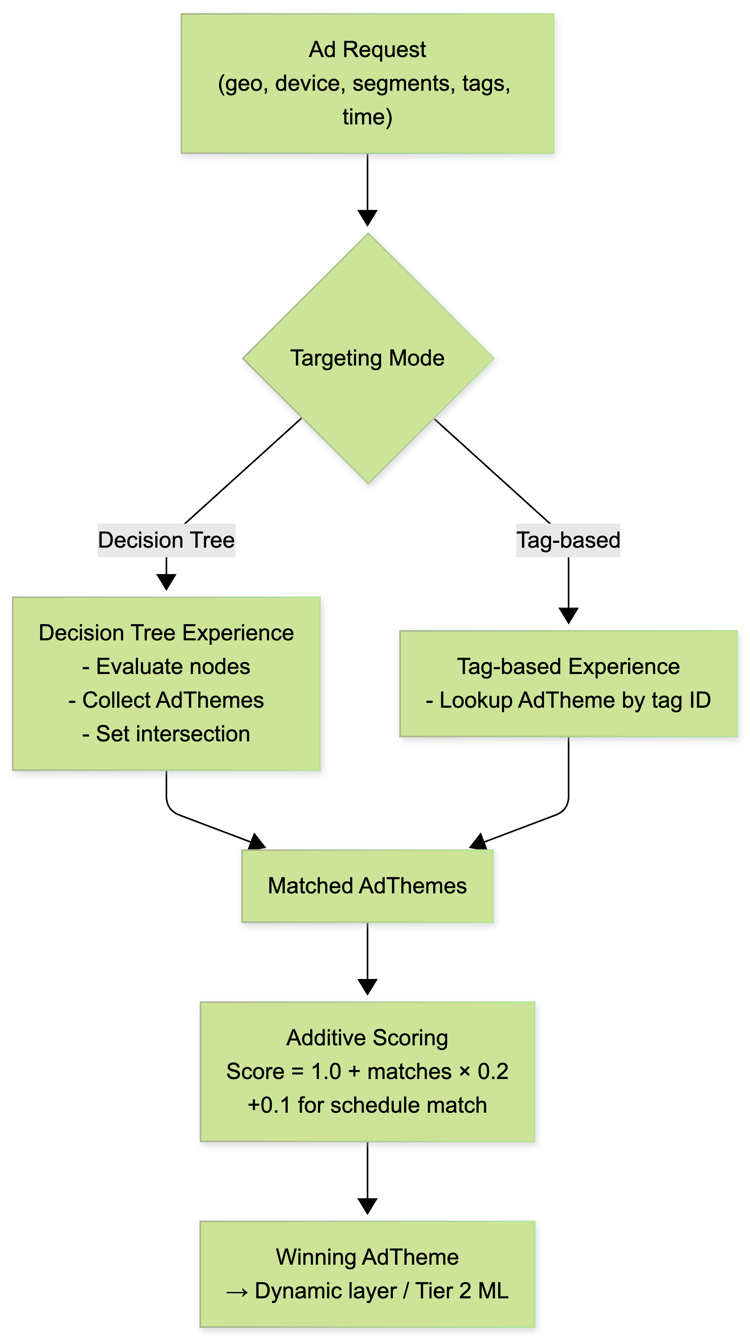
Fig 4: Tier 1 targeting flow — decision-tree or tag-based targeting feeds into additive scoring to select the winning AdTheme for the request
For dynamic ads: product selection layer
Important: Product selection ONLY happens for dynamic ads. Standard ads skip this layer.
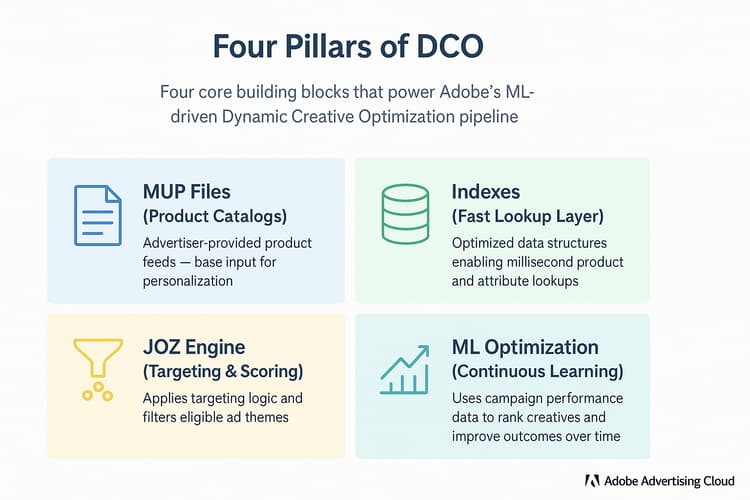
Fig. 5: The four pillars of DCO — targeting, scoring, product selection, and machine-learning optimization working together in real time
Product catalog files (MUP files)
Advertisers upload product feeds (UTF-8, tab-delimited). Each row represents a product and includes: product ID, title, description, price, image URLs, category, brand, provider, geographic availability, and custom targeting fields.
From feed to indexes: offline pipeline
-
Feed parsing: parse rows into lightweight product handles (initial score = 1.0).
-
Index configuration: which columns become indexes is configuration-driven (properties file).
-
Inverted index creation: for each configured column build an inverted index, often using compressed bitmaps.
-
Serialization & hot-loading: serialize binary indexes and hot-swap into serving pods with atomic updates.
Product selection process
Step 1 — Index-based filtering: fetch product sets per criterion (country, category, segment).
Step 2 — Multiplicative scoring (different from Tier 1):
Example table:

Fig 6 : Variant 1 — the highest-ranked product after index-based filtering and multiplicative scoring. This is the selected product.

Fig 7 : Variant 2 — an eligible dynamic ad product that passes targeting but receives a lower final score

Fig 8: Variant 3 — another qualifying product retained for comparison but not selected
Cumulative note: These(fig 6–8) figures represent three variants of the same dynamic ad, derived from different rows of the product feed. All variants satisfy targeting and scoring constraints, but only the highest-scoring variant is selected and mapped to the creative template.
Step 3 — Top-N selection: return top N products (e.g., top 200). Ties at cutoff are included for fairness.
Step 4 — Final product post creative optimization algorigthm, final product is returned which gets mapped to the template.
Performance engineering: achieving <25 milliseconds
Several engineering practices enable the <25ms target:
1. Data locality
-
Preload indexes into pod memory at startup
-
Cache product details for frequently accessed items
-
Hot-loading for updates without downtime
2. Compact data structures
-
Compressed bitmaps for handle sets
-
Dictionary indirection to avoid string duplication
-
Efficient set operations
3. Result caching
-
Memoize results for repeated patterns
-
Invalidate on feed changes
-
TTL-based expiration
4. Bounded candidate sets
-
Limit top-N to keep ML fast (10–50 products per creative)
-
Run ML only on eligible subset
-
Parallelize stat lookups and product detail fetches
5. Atomic index swaps
-
Support atomic updates with zero downtime
-
Optimized for large batches; rollback capability
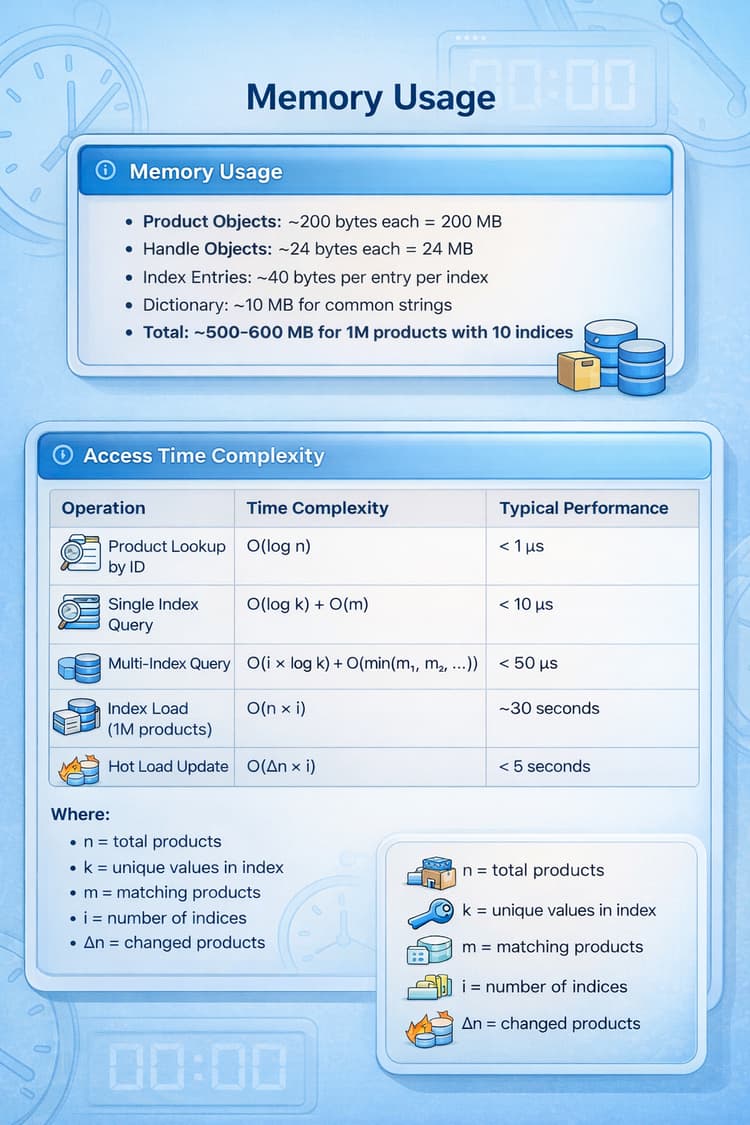
Fig. 9: In-memory indexes, compact data structures, and caching strategies that enable sub-25ms decision latency
Tier 2: ML optimization
Purpose: Intelligent selection from the top candidates. ML runs for all ad types but operates on different “arms”:
-
Standard ads: arms = static creatives
-
Dynamic ads: arms = product × creative pairs
-
Video ads: arms = video creatives
When does ML run?
ML runs when there are multiple competitive options or when exploration is required.
Scenario A — Clear winner (no ML):
Scenario B — Ties / competitive options (ML decides):
Thompson Sampling: the ML engine
-
Retrieve historical success/failure counts for each variant
-
Sample from Beta distributions (one per variant)
-
Select the variant with the highest sampled probability
Why Thompson Sampling? Works with daily batch updates, naturally balances exploration vs exploitation, runs quickly, and shows 20–40% improvement versus naive selection.
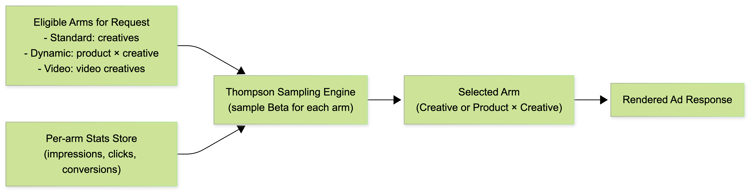
Fig 10: Thompson Sampling in DCO — eligible arms and per-arm performance stats feed the bandit engine, which selects the best creative or product × creative for the current request
Understanding "arms" in a multi-armed bandit
The term “arm” comes from slot machines (one-armed bandits). In DCO:
-
Standard Ads — arms = static creatives (e.g., 5 creatives = 5 arms)
-
Dynamic Ads — arms = product × creative pairs (e.g., 3 creatives × 10 products = 30 arms)
Why contextual arms matter: The set of arms can change based on request context (location, availability). ML samples only from the currently eligible arms, enabling dynamic adaptation without precomputing all combos.
Complete flow: request to response
For standard ads, the flow is direct: Tier 1 picks an AdTheme based on targeting rules, then Tier 2 ML picks the best creative from that group using Thompson Sampling. For dynamic ads, an extra layer filters and scores products before ML decides the final product × creative combination. In both cases, the entire decision pipeline completes in under 25 millisecond
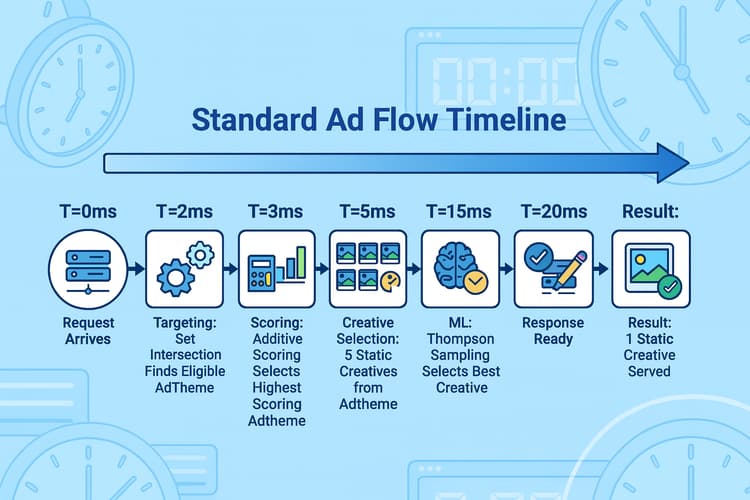
Fig. 11: Standard ad request flow — targeting and ML select the best static creative
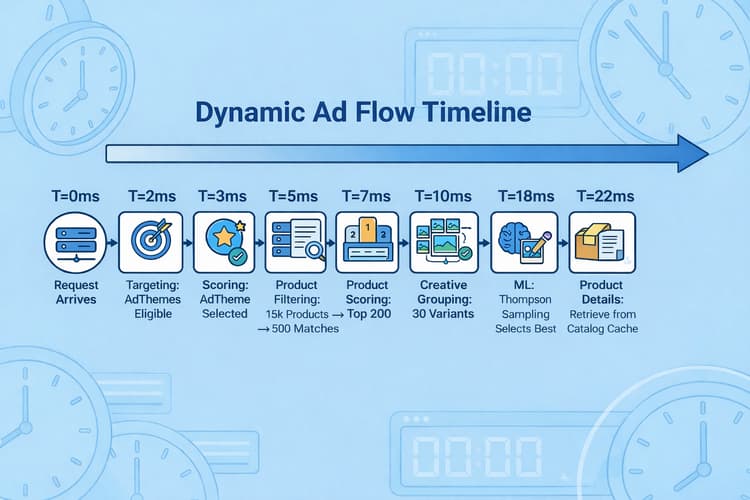
Fig. 12: Dynamic ad request flow — includes product selection before ML optimization and rendering.
Beyond advertising: universal applications
The two-tier pattern (Targeting + ML) applies beyond ads:
-
Content recommendations — filter by rating/availability; ML optimizes engagement.
-
E-commerce search ranking — filter by inventory/price; ML optimizes conversion.
-
Email campaign optimization — enforce preferences; ML selects subject/time.
-
Clinical trial matching — enforce eligibility; ML optimizes enrollment success.
The pattern: Target → Score → Optimize.
Why this architecture works
Targeting + Rules alone: fast & deterministic, but may tie-break randomly.
ML alone: can learn but might violate business logic and converge slowly without pruning.
Targeting + Rules + ML: best of both — business logic enforced, relevance scoring, and ML for continuous improvement. Typical gains: <25ms latency and 20–40% performance improvement versus naive baselines.
Key takeaways
-
Two-Tier System: Targeting/scoring first (fast, deterministic), then ML optimization (adaptive learning).
-
Different Scoring: Additive for AdTheme selection; multiplicative for product selection.
-
Dynamic = Extra Layer: Dynamic ads add product selection between AdTheme selection and ML.
-
ML for All Types: Thompson Sampling works for standard, dynamic, and video — only the arms differ.
-
Real-Time Scale: Millions of decisions per day at <25ms per request.
Conclusion
Dynamic Creative Optimization is a powerful architecture pattern combining:
-
Tier 1: Rule-based targeting and scoring (deterministic, fast)
-
Product Selection: Index-based filtering and multiplicative scoring (dynamic ads)
-
Tier 2: ML optimization with Thompson Sampling (all ad types)
The key insight: it’s not rules or machine learning — it’s both in sequence. Targeting ensures relevance, scoring ensures differentiation, and ML ensures continuous optimization.
Want to learn more about how DCO can boost your ad performance? Explore Adobe Advertising Creative to get started.