While most Adobe Marketo Engage users are familiar with person tokens for personalization, My Tokens are a more advanced capability designed for scale. With the introduction of Global and Workspace My Tokens in the March 2025 release of Adobe Marketo Engage, this feature becomes significantly more powerful. This article explores what changed and walks through three practical use cases for scalable operations.
Most Adobe Marketo Engage users are familiar with tokens from day one. Person tokens are widely used to pull values from person fields and personalize assets with data, such as first name, company, or job title. They are foundational to how personalization works in Marketo Engage.
My Tokens serve a different purpose.
Rather than pulling values from records, My Tokens are custom variables created and managed by the user. They were designed to abstract configuration and logic away from individual assets and centralize it at the program or folder level. This makes them especially powerful for scaling operations, enforcing consistency, and reducing manual work. While sometimes referred to as “custom tokens,” they are most commonly known in Marketo Engage as My Tokens.
My Tokens can be defined at multiple levels and inherited down the structure, allowing teams to balance centralized control with local flexibility. This article assumes familiarity with the basics of token creation and focuses instead on how this capability can be used more effectively at scale.
For a detailed overview of where My Tokens live in the Marketo Engage UI, available token types, and inheritance behaviour, refer to the official Adobe documentation here.
My Tokens have been around for a while. With the introduction of Global and Workspace My Tokens, this enhancement extends My Tokens beyond individual programs and folders, enabling users to manage them at the instance and workspace levels. What was previously a strong local optimization tool can now be used as an instance-wide governance mechanism.
Rather than re-explaining token fundamentals, this article focuses on what this functionality and update unlock in practice. It explores three real-world My Tokens use cases that show how teams can move from basic efficiency gains to advanced, scalable architectures.
Use case 1 – Global copyright year (baseline best practice)
This is the simplest My Token use case, and one that every Marketo Engage instance should implement.
Most email footers include legal text with a copyright year. Because this information is small and visually understated, it is also one of the most commonly forgotten updates. Each year, many teams unintentionally send emails with outdated copyright dates across nurture, triggered, and automated campaigns.
By tokenizing the copyright year using a simple text My Token, for example, {{my.CopyrightYear}}, the footer references a variable instead of a hardcoded value. Updating the year once updates it everywhere.
Before Global My Tokens, this still required maintaining the same token across multiple folders, and assets tested from Design Studio could expose unresolved token values. Global My Tokens removes these limitations by allowing the copyright year to be defined once at the Admin level and applied across the entire instance.
This turns a yearly, error-prone task into a single, low-risk update and should be considered a baseline best practice.
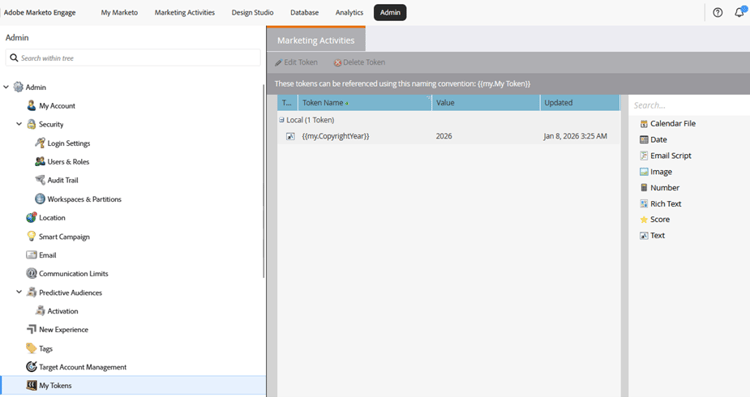
Global Copyright Year My Token is defined in the Admin section. Now simply use {{my.CopyrightYear}} in your email template footers.
Use case 2 – Tokenized program templates for recurring events
Recurring event programs are the classic My Token use case and a core scalability pattern in Marketo Engage.
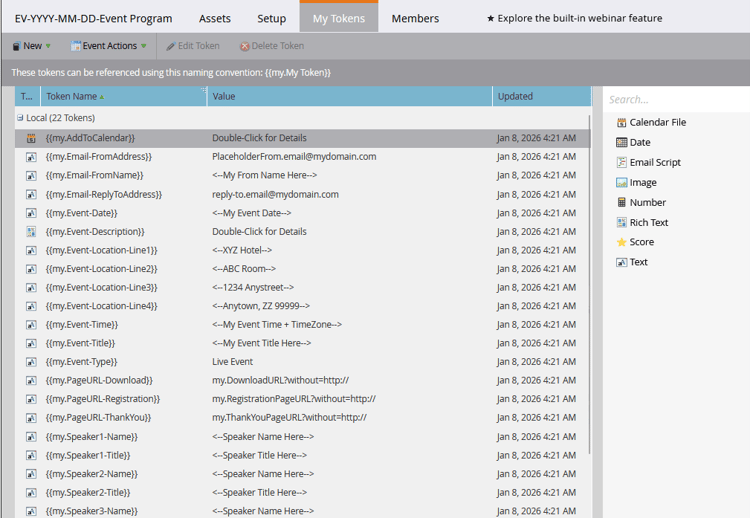
In roadshows, trade shows, or webinar series, the program structure is identical across instances: registration pages, confirmation emails, reminders, and follow-up logic. What changes are the details, such as city, venue, date, time, or speakers.
By building program templates with tokens like {{my.Event City}}, {{my.Event Date}}, or {{my.Event Venue}}, teams avoid hardcoding values across multiple assets. When the program is cloned, only the token values need to be updated, and all nested assets adjust automatically.
This allows teams to scale from a handful of events to dozens with minimal effort, while maintaining consistency and reducing manual edits.
Global My Tokens play a supporting role here, serving as safe defaults. They ensure that assets resolve correctly during testing, previews, or sample sends, even before program-level values are finalized, improving QA and stakeholder confidence.
Use case 3 – Tokenized unsubscribe logic and smart preference centers
As Marketo Engage environments scale and teams introduce more granular subscription models, unsubscribe logic becomes a common source of human error.
Advanced preference centers often rely on different URLs or URL parameters to indicate which subscription type a user wants to manage. These parameters are small, non-obvious, and easy to misconfigure, especially in large teams with mixed experience levels.
By tokenizing the variable portion of the unsubscribe URL, teams can centralize subscription logic and remove the need for marketers to manually edit complex URLs. Tokens can be defined at the folder level and inherited by all programs within that folder, ensuring the correct subscription context is applied automatically.
In more advanced architectures, this pattern can be combined with dynamic content driven by URL parameters. A single preference center landing page can display different content depending on which folder or program triggered the email.
Global and Workspace My Tokens add an important layer of safety. By defining default values at the global or workspace level, teams avoid broken URLs during testing, sample sends, or early-stage builds, and ensure unsubscribe links always resolve correctly.
This use case is covered in full detail, including dynamic content driven by URL parameters, in this Marketo User Group session.
Key takeaways
-
Person tokens handle personalization, while My Tokens handle scale and governance.
-
My Tokens become significantly more powerful in the Global and Workspace scopes.
-
Try simple use cases that deliver immediate operational value.
-
Advanced patterns reduce human error in large, distributed marketing teams.
-
Tokens work best when built into templates and governance from the start.