Learn how to migrate commerce tracking from Adobe Analytics AppMeasurement to AEP Web SDK, including product views, cart actions, checkout, and purchase events. This guide provides side-by-side implementation examples, migration best practices, and practical tips to help ensure accurate data collection and continuity of reporting.
This guide covers migrating Adobe Commerce analytics tracking from AppMeasurement to the Adobe Experience Platform (AEP) Web Software Development Kit (SDK) — written for practitioners who know the s.products string like a phone number they never meant to memorize. Think of it as your translation guide, your migration companion, and your "why does this exist" explainer, all in one.
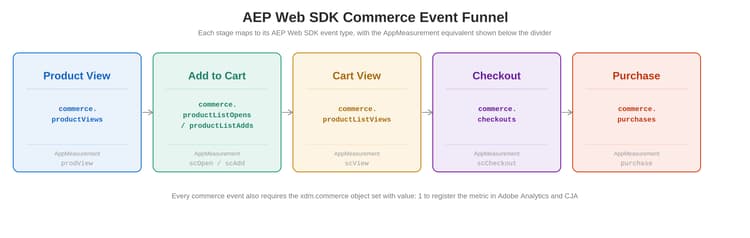
The funnel diagram above maps each commerce stage to its AEP Web SDK event type and AppMeasurement equivalent. Use it as your orientation map before reading the code sections.
Implementing Commerce Events
If you have implemented commerce tracking in Adobe Analytics, the Web SDK rule model will feel familiar. Update Variable replaces Set Variables, and Send Event replaces Send Beacon. The "set across several rules, dispatch once" pattern you already use carries over directly.
What is actually different: The pattern is the same. What changes is what you build: instead of setting s.products and s.events, you populate a variable data element holding an Experience Data Model (XDM) object - with the commerce object and productListItems array. That XDM structure is the real learning curve, not the rule mechanics.
The three-tier setup
A clean commerce implementation uses three tiers of rules feeding one shared variable data element:
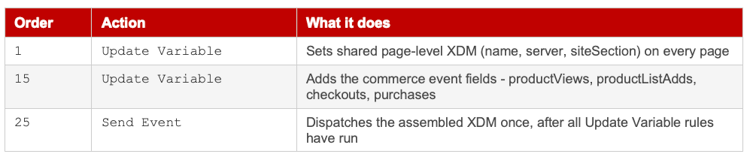
One Send Event for the whole site: You only need one Send Event rule (order 25). Each commerce page or event runs an Update Variable rule at order 15 that adds its own commerce object and productListItems, then the single Send Event dispatches the merged result. Do not add Send Event to individual commerce rules - that causes duplicate hits.
Mapping a commerce event in update variable
For each commerce event, the Update Variable action sets three things on your variable data element. Product view shown as an example:
-
eventType -> commerce.productViews
-
commerce.productViews.value -> 1 (registers the metric in Analytics and Customer Journey Analytics (CJA))
-
productListItems -> SKU via Provide individual items in a product detail page (PDP) or entire array (cart, checkout, purchase)
Swap the event type and commerce field per stage: productListAdds for cart add, checkouts for checkout, purchases for purchase. Everything else stays the same.
XDM clears after each send: Web SDK clears all XDM automatically after every Send Event. For single-page apps or pages firing multiple commerce events, each logical event needs its own Update Variable then Send Event cycle - the variable does not persist across sends the way Analytics vars used to.
eVars, props, and custom events - The data object
Commerce events live in the xdm.commerce object. But eVars, props and custom events that support those commerce events have no XDM equivalent - they go in the data object, sent alongside XDM in the same call.
alloy("sendEvent", {
"xdm": xdmData, // commerce events, productListItems
"data": {
"__adobe": { "analytics": {
"eVar1": "member", // eVar - direct, no processing rule
"prop1": "running shoes", // prop
"events": "event1,event2" // custom events
}}
}
});
Adobe recommended as of May 2024: Setting custom Analytics variables in data.__adobe.analytics is now Adobe's recommended approach - no XDM schema needed for eVars and props, and it keeps that data out of Real-Time Customer Profile. In Tags, set the Data field (alongside XDM) on your Send Event rule to a data.variable data element, or none of it will be sent.
Bottom line: the rule pattern is the one you already know. The commerce events go in xdm.commerce with value: 1, the products go in productListItems, and the supporting eVars and props go in the data object.
Then vs. now: Commerce events side by side
Product view: Then vs. now
You have been on a PDP-product detail page before. Not as a shopper - as an analyst, staring at a tag debugger, hoping the prodView event fired correctly and that someone, somewhere, set s.products with a semicolon in the right place.
Those days had character.
Legacy AppMeasurement
A product view required s.events and the s.products string working together. The products string used a rigid semicolon-delimited format: category;product;quantity;price;eventN=value;eVarN=value. For a product view, quantity and price were left empty and the event was prodView.
// Legacy AppMeasurement - Product Detail Page
s.pageName = "pdp: running shoes";
s.channel = "footwear";
s.prop1 = "footwear";
s.eVar1 = "footwear | mens | running shoes";
// category;SKU;quantity;price
s.products = "footwear;SKU-001;;;";
// prodView is required for product detail page tracking
s.events = "prodView";
s.t(); // Send the page view beacon
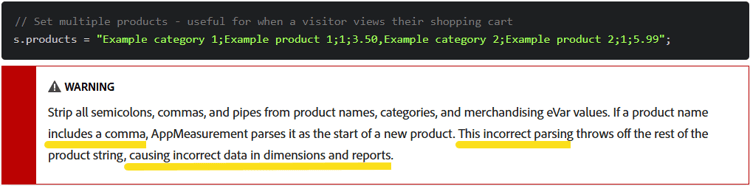
The s.products syntax was unforgiving - a misplaced semicolon would silently break your product data without throwing a single error.
Modern AEP Web SDK (Alloy)
The same event in Alloy reads like structured data rather than a 1990s flat-file export. The type field carries the semantic weight that s.events used to carry and productListItems replaces the semicolon-delimited s.products string with a clean array of objects.
Commerce object is required: The type field on sendEvent sets the XDM eventType. But for Adobe Analytics and CJA to register commerce metrics - Product Views, Cart Adds, Checkouts, Purchases - the xdm.commerce object must also be explicitly set with value: 1. Without it, the metric will not appear in your report suite or CJA data view. This applies to all commerce events.
// AEP Web SDK - Product Detail Page
// Replace _tenantid with your org's AEP tenant namespace
let xdmData = {
"web": {
"webPageDetails": {
"URL": document.URL,
"name": "pdp: running shoes",
"server": document.domain,
"siteSection": "footwear"
},
"webReferrer": { "URL": document.referrer }
},
"_tenantid": {
"pageType": "pdp",
"siteSectionLevel1": "footwear"
},
// REQUIRED: commerce object for Analytics/CJA metric registration
"commerce": {
"productViews": { "value": 1 }
},
"productListItems": [
{ "SKU": "SKU-001" }
]
};
alloy("sendEvent", {
"type": "commerce.productViews",
"xdm": xdmData
});
No semicolons carrying your entire product taxonomy. No silent failures from a misformatted string. Just a structured object the schema validates and the platform routes correctly.
Adobe Launch / Tags - Product view
Adobe Analytics extension (legacy path)
Data elements to create:
-
Page Name - returns the friendly page name from your data layer
-
Product SKU - pulls the SKU from your data layer
-
Products String - custom code: return "footwear;" + _satellite.getVar("Product SKU") + ";;;";
Rule configuration: create a rule on Page Bottom / DOM Ready scoped to PDPs. Add a Set Variables action (set pageName, s.products, s.events = prodView) and a Send Beacon action set to s.t().
Common mistake: Teams sometimes set s.products in one rule and s.events in another. The Analytics beacon needs both variables populated before s.t() fires. Split rules cause one to arrive without the other.
Web SDK extension (modern path)
Updated to match official Adobe Launch rule architecture: This section now reflects the Update Variable + Send Event two-action pattern. The Send Event rule (global - page-top - dispatch edge event - 25) fires for all pages automatically - do not create a separate one here.
Step 1 - Create the product view Update Variable rule:
-
Create a new rule named: commerce - page-top - set product view xdm - 15
-
Under Events: Core Extension, Library Loaded (Page Top), Advanced Order: 15
-
Under Conditions: Path Without Query String, Regex enabled, path matches your PDP URL pattern (e.g. /products/) - or use your ACDL dataLayer push event for prodView
-
Under Actions: Web SDK Extension, Action Type: Update Variable (NOT Send Event)
-
Set Data element to your xdm.variable.content XDM object data element
-
In the Update Variable mapper, configure:
eventType -> static value: commerce.productViewscommerce.productViews.value -> static value: 1productListItems -> select Provide individual items, Add Item, map productListItems.item1.SKU to your Product SKU data element -
Select Keep Changes, then Save.
Individual items vs. entire array: For product detail pages (one product at a time), use Provide individual items in the productListItems configuration. For cart, checkout, and purchase pages (multiple products), use Provide entire array and map to a data element that returns the full array. This toggle is inside the Update Variable mapper under the productListItems field.
EventType goes in Update Variable, not Send Event: A common migration mistake is trying to set eventType inside the Send Event action. In the Web SDK architecture, eventType is set in the Update Variable action for each page-scoped rule. The dispatch rule at order 25 fires whatever the assembled XDM object already contains.
Migration note: The Web SDK Extension replaces the old two-action pattern (Set Variables + Send Beacon) with Update Variable feeding into a single shared Send Event rule. Cleaner and less error-prone.
Add to cart: Then vs. now
Cart add tracking is where the timing debates have always lived. When exactly does scAdd fire? After the click? After the server confirms? After the animation plays? The answer, then and now, is the same: fire on confirmed success, not on click.
Legacy AppMeasurement
// AEP Web SDK - Product Detail Page
// Replace _tenantid with your org's AEP tenant namespace
let xdmData = {
"web": {
"webPageDetails": {
"URL": document.URL,
"name": "pdp: running shoes",
"server": document.domain,
"siteSection": "footwear"
},
"webReferrer": { "URL": document.referrer }
},
"_tenantid": {
"pageType": "pdp",
"siteSectionLevel1": "footwear"
},
// REQUIRED: commerce object for Analytics/CJA metric registration
"commerce": {
"productViews": { "value": 1 }
},
"productListItems": [
{ "SKU": "SKU-001" }
]
};
alloy("sendEvent", {
"type": "commerce.productViews",
"xdm": xdmData
});
Note: s.tl() is a link tracking call, not a page view. The scOpen vs. scAdd distinction existed in AppMeasurement too, but teams often skipped scOpen because the empty-cart case was easy to miss.
Modern AEP Web SDK (Alloy)
// AEP Web SDK - Add to Cart
// Use commerce.productListOpens when adding to an empty cart
// Use commerce.productListAdds when adding to an existing cart
let xdmData = {
"web": {
"webPageDetails": {
"URL": document.URL,
"name": "pdp: running shoes"
},
"webInteraction": {
"type": "other",
"name": "cart add: running shoes"
}
},
// REQUIRED: commerce object for Analytics/CJA metric registration
"commerce": {
"productListAdds": { "value": 1 } // or productListOpens for empty cart
},
"productListItems": [
{ "SKU": "SKU-001" }
]
};
// Conditional type based on cart state
alloy("sendEvent", {
"type": "commerce.productListAdds", // or commerce.productListOpens
"xdm": xdmData
});
The productListOpens vs. productListAdds distinction maps directly to scOpen vs. scAdd in AppMeasurement. The mental model transfers - only the syntax changes.
Adobe Launch / Tags - Add to cart
Adobe Analytics extension (legacy path)
Create a Cart Event Type data element returning "scOpen,scAdd" or "scAdd" based on cart state. Create a Cart Products String data element that assembles s.products with quantity.
Rule: trigger on a custom event fired on confirmed cart add success (e.g. cartAddSuccess). Add Set Variables and Send Beacon (s.tl()) actions.
Common migration mistake: Teams sometimes convert the cart add rule to the Web SDK Extension but forget to remove the Analytics Extension Send Beacon action. Both fire, producing duplicate events. Clean extension boundaries are essential - one rule, one extension, one beacon.
Web SDK extension (modern path)
Updated to match official Adobe Launch rule architecture: Cart add uses an Update Variable rule triggered by a custom event - not by Library Loaded. The dispatch rule at order 25 still handles all firing.
Steps to create the cart add Update Variable rule:
-
Create a new rule named: commerce - custom - set cart add xdm - 15
-
Under Events: Core Extension, Custom Event, Event Name: cartAddSuccess (or your ACDL scAdd event). No order number needed for custom event triggers.
-
Under Actions: Web SDK Extension, Action Type: Update Variable
-
Set Data element to your xdm.variable.content XDM object data element
-
In the Update Variable mapper, configure:
eventType -> your Cart Event Type data element (returns commerce.productListOpens or commerce.productListAdds)commerce.productListAdds.value -> static value 1 (handle productListOpens via data element conditional logic)productListItems -> Provide individual items, map productListItems.item1.SKU to your Product SKU data elementweb.webInteraction.name -> "cart add: " + product name data elementweb.webInteraction.type -> static value other -
Select Keep Changes, then Save.
Migration note: The Cart Event Type data element doing conditional logic is a direct parallel to the scOpen vs. scAdd conditional in AppMeasurement. The logic is identical - only the output values change.
Cart view: Then vs. now
The cart page is the moment of truth in any funnel. It is where intent gets serious and where abandonment gets measured. Tracking it well means knowing exactly what was sitting in the cart when the shopper paused to reconsider. In AppMeasurement this was scView. In AEP Web SDK it is commerce.productListViews.
Legacy AppMeasurement
The cart view fired scView on the shopping cart page, with every item currently in the cart listed in the s.products string. No quantity or price was strictly required for the view itself, though many implementations included quantity to track cart depth.
// Legacy AppMeasurement - Shopping Cart Page
s.pageName = "shopping cart";
s.channel = "cart";
// All items currently in the cart
// category;SKU;quantity;price
s.products = "footwear;SKU-001;1;,accessories;SKU-002;2;";
// scView fires on the cart page view
s.events = "scView";
s.t(); // Send the page view beacon
Because scView rode along on the page view beacon (s.t()), it shared all the timing and persistence quirks of the page load. If the cart contents were rendered asynchronously after the beacon fired, the s.products string could end up empty or stale.
Modern AEP Web SDK (Alloy)
In Web SDK, the cart view becomes commerce.productListViews, with every cart item expressed as its own object in the productListItems array. As with all commerce events, the commerce object must carry value: 1 for the metric to register in Analytics and CJA.
Commerce object is required: The type field sets the eventType for routing, but commerce.productListViews.value: 1 is what increments the Cart Views metric in Analytics and CJA. Without it, the event routes correctly but the metric never appears in your reports.
// AEP Web SDK - Shopping Cart Page
// Replace _tenantid with your org's AEP tenant namespace
let xdmData = {
"web": {
"webPageDetails": {
"URL": document.URL,
"name": "shopping cart",
"server": document.domain,
"siteSection": "cart"
},
"webReferrer": { "URL": document.referrer }
},
"_tenantid": {
"pageType": "cart",
"siteSectionLevel1": "cart"
},
// REQUIRED: commerce object for Analytics/CJA metric registration
"commerce": {
"productListViews": { "value": 1 }
},
"productListItems": [
{ "SKU": "SKU-001", "quantity": 1 },
{ "SKU": "SKU-002", "quantity": 2 }
]
};
alloy("sendEvent", {
"type": "commerce.productListViews",
"xdm": xdmData
});
Every item in the cart is a clean object. Quantity is a number, not a fragment of a delimited string. And because the cart can hold many products, productListItems is built as an entire array - the same pattern used for checkout and purchase.
Adobe Launch / Tags - Cart view
Adobe Analytics extension (legacy path)
Create a Cart Products String data element that loops through the cart data layer and assembles the s.products string with each item's SKU and quantity. Then create the rule:
-
Trigger on Page Bottom / DOM Ready scoped to the shopping cart page
-
Add a Set Variables action: set pageName, s.products, s.events = scView, s.channel
-
Add a Send Beacon action set to s.t()
Fire after cart contents render: Scope the rule to fire only once the cart items are present in the data layer. If scView fires before an async cart render completes, s.products will be empty and your cart view will record zero products.
Web SDK extension (modern path)
Follows the official Adobe Launch rule architecture: Cart View uses a Library Loaded rule scoped to the cart page URL. productListItems is provided as an entire array - the cart holds multiple products. The shared dispatch rule (order 25) handles firing.
Steps to create the cart view Update Variable rule:
-
Create a new rule named: commerce - page-top - set cart view xdm - 15
-
Under Events: Core Extension, Library Loaded (Page Top), Advanced Order: 15
-
Under Conditions: Path Without Query String, path equals your cart page path (e.g. /cart)
-
Under Actions: Web SDK Extension, Action Type: Update Variable
-
In the Update Variable mapper, configure:
eventType -> static value: commerce.productListViewscommerce.productListViews.value -> static value: 1productListItems -> select Provide entire array, map to your cart.productInfo data element returning [ { SKU, quantity } ] objects -
Select Keep Changes, then Save.
Migration note: Cart View, Checkout and Purchase all share the same Provide entire array approach because each involves multiple products. Only the single-product Product Detail Page uses Provide individual items. If you have already built your checkout rule, the cart view rule is nearly identical - just swap the event type and the commerce field.
Purchase: Then vs. now
The purchase event is the most consequential event in any commerce implementation. In AppMeasurement, s.purchaseID handled deduplication. In AEP Web SDK, commerce.order.purchaseID serves the same function. The mechanism changed. The need for it absolutely did not.
Legacy AppMeasurement
// Legacy AppMeasurement - Order Confirmation Page
s.pageName = "order confirmation";
s.channel = "order confirmation";
s.purchaseID = "ORDER-98765"; // critical for deduplication
s.currencyCode = "USD";
// Revenue = per-product total (quantity x unit price)
s.products = "footwear;SKU-001;1;89.99,accessories;SKU-002;2;24.99,footwear;SKU-003;1;119.99";
s.events = "purchase";
s.t();
Modern AEP Web SDK (Alloy)
// AEP Web SDK - Order Confirmation Page
// Replace _tenantid with your org's AEP tenant namespace
let xdmData = {
"web": {
"webPageDetails": {
"URL": document.URL,
"name": "order confirmation",
"server": document.domain,
"siteSection": "order confirmation"
},
"webReferrer": { "URL": document.referrer }
},
"_tenantid": {
"pageType": "order confirmation",
"siteSectionLevel1": "order confirmation"
},
"commerce": {
// REQUIRED: purchases object for Analytics/CJA revenue metric
"purchases": { "value": 1 },
"order": {
"purchaseID": "ORDER-98765", // required for deduplication
"currencyCode": "USD"
}
},
"productListItems": [
{ "SKU": "SKU-001", "quantity": 1, "priceTotal": 89.99 },
{ "SKU": "SKU-002", "quantity": 2, "priceTotal": 49.98 },
{ "SKU": "SKU-003", "quantity": 1, "priceTotal": 119.99 }
]
};
alloy("sendEvent", {
"type": "commerce.purchases",
"xdm": xdmData
});
purchaseID lives inside commerce.order alongside currencyCode. The priceTotal and quantity fields are typed as numbers - the schema will reject strings, a validation layer AppMeasurement never had.
Adobe Launch / Tags - Purchase
Adobe Analytics Extension (Legacy path)
var products = [];
digitalData.transaction.item.forEach(function(item) {
products.push(
item.category + ";" + item.sku + ";" +
item.quantity + ";" + (item.quantity * item.unitPrice)
);
});
return products.join(",");
Rule: trigger on Page Bottom / DOM Ready scoped strictly to the order confirmation page. Use multiple conditions - URL path match AND a data layer flag confirming a completed transaction. Set pageName, s.purchaseID, s.currencyCode, s.products, s.events = purchase. Send Beacon s.t().
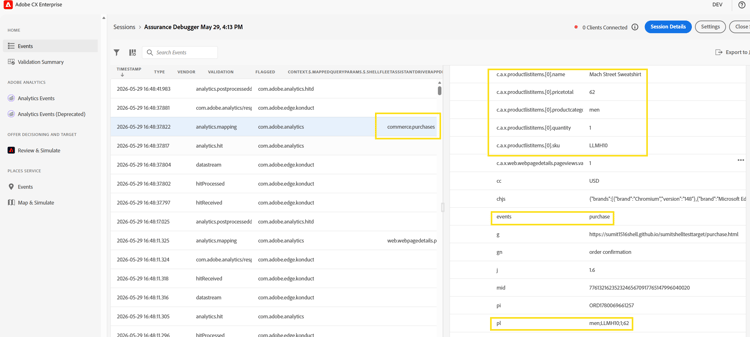
Non-negotiable QA requirement: Test purchaseID deduplication explicitly. Load the confirmation page. Reload it. Navigate away and return. All three scenarios must produce exactly one purchase event in your report suite.
Web SDK extension (modern path)
Updated to match official Adobe Launch rule architecture: Purchase uses a Library Loaded rule scoped to the order confirmation page. purchaseID and currencyCode are mapped directly in Update Variable. productListItems is provided as an entire array.
Steps to create the purchase Update Variable rule:
-
Create a new rule named: commerce - page-top - set purchase xdm - 15
-
Under Events: Core Extension, Library Loaded (Page Top), Advanced Order: 15
-
Under Conditions: path equals your order confirmation page (e.g. /checkout/order/thank-you)
-
Under Actions: Web SDK Extension, Action Type: Update Variable
-
In the Update Variable mapper, configure:
eventType -> static value: commerce.purchasescommerce.purchases.value -> static value: 1commerce.order.purchaseID -> your Order ID data elementcommerce.order.currencyCode -> your Currency Code data element or static "USD"productListItems -> select Provide entire array, map to your cart.productInfo.purchase data element -
Select Keep Changes, then Save.
Numeric parsing is not optional: Quantity and priceTotal must be numbers, not strings. Build parseInt / parseFloat into the data element itself so it cannot be skipped.
// productListItems data element - custom code
return digitalData.transaction.item.map(function(item) {
return {
"SKU": item.sku,
"quantity": parseInt(item.quantity, 10),
"priceTotal": parseInt(item.quantity, 10) * parseFloat(item.unitPrice)
};
});
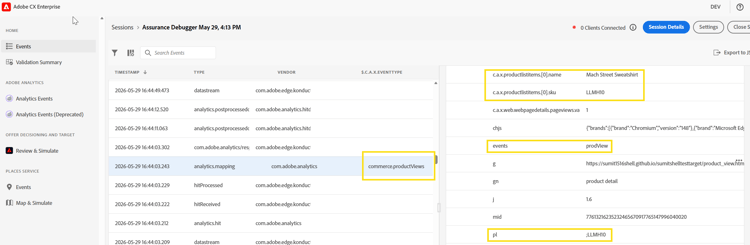
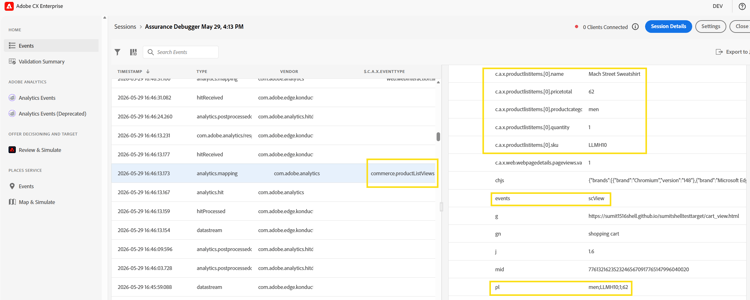
Validation - network logs: interact call or Assurance
Migrating from AppMeasurement to Web SDK
This is the question teams ask in every migration engagement - is this a find-and-replace project or a full reimplementation? The honest answer is somewhere in between. The concepts map. The syntax does not.
s.products to productListItems
s.products compressed an entire product transaction into a single delimited value: category;SKU;quantity;price;events;eVars. It worked because it had to. But it was fragile, hard to read and nearly impossible to validate.
productListItems is a proper JSON array. Each product gets its own object. Each field has a name. The schema validates the types. Nothing is inferred from position in a delimited string.
// AppMeasurement - s.products for three cart items
s.products = "footwear;SKU-001;1;89.99,accessories;SKU-002;2;24.99,footwear;SKU-003;1;119.99";
// AEP Web SDK - equivalent productListItems
"productListItems": [
{ "SKU": "SKU-001", "quantity": 1, "priceTotal": 89.99 },
{ "SKU": "SKU-002", "quantity": 2, "priceTotal": 49.98 },
{ "SKU": "SKU-003", "quantity": 1, "priceTotal": 119.99 }
]
If your data layer already returns product data as an array of objects - which most modern data layers do - this migration is almost mechanical. If it returns a pre-assembled s.products string, ask the dev team to expose the underlying array first.
Mapping s.events to xdm.commerce
s.events was your event bus in AppMeasurement. In AEP Web SDK, the event type is declared via the type parameter in sendEvent. But critically, the commerce object must also be set to register the metric in Analytics and CJA.
// AppMeasurement - s.events declares the commerce action
s.events = "scAdd";
// AEP Web SDK - type sets eventType; commerce object registers the metric
alloy("sendEvent", {
"type": "commerce.productListAdds",
"xdm": {
...xdmData,
"commerce": {
"productListAdds": { "value": 1 } // Required for metric registration
}
}
});
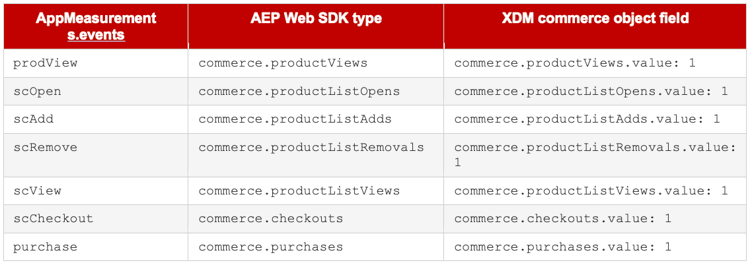
Commerce event mapping table
The table below maps every AppMeasurement commerce event to its AEP Web SDK equivalent, including the correct eventType value and commerce object field for each stage of the funnel.
(Complete Funnel from product view to purchase in both implementations.)
Combining events: In AppMeasurement you could combine events in a single s.events string (e.g. "scOpen,scAdd"). In AEP Web SDK each sendEvent call carries a single type. If you need to express both a cart open and a cart add, send commerce.productListOpens and discuss combined signal handling with your Adobe team during schema planning.
Analytics Beacon vs. XDM Event Mindset
In the AppMeasurement world, every s.t() and s.tl() call was a beacon - a direct HTTP request to Adobe Analytics. The mental model was: "I am sending data to Analytics."
In the AEP Web SDK world, alloy("sendEvent") sends data to the Experience Platform Edge Network. The Edge Network routes it to every downstream service in your datastream - Analytics, Target, Real-Time CDP, CJA and others. You are not sending to Analytics. You are sending to a platform that includes Analytics as one of its outputs.
This changes what you include in each event. During schema design, think about what CJA needs for journey analysis, what Real-Time CDP needs for audience qualification and what Target needs for personalization. Your XDM schema is not an Analytics schema - it is a platform schema that Analytics happens to consume.
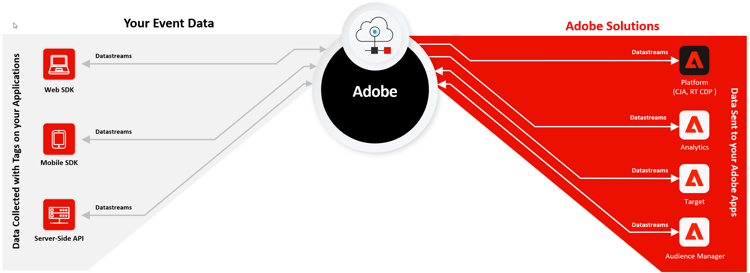
CJA-specific note: If you are using or planning Customer Journey Analytics, the Web SDK migration is foundational - not optional. CJA consumes XDM-structured data from AEP datasets, not raw AppMeasurement hits. Clean Web SDK data collection enables cross-channel stitching, derived fields and multi-dataset connections. Plan your XDM schema with CJA use cases in mind from the start.
Serialization and schema planning
AppMeasurement implementations accumulated serialization patterns over years. Migrating them requires mapping to XDM equivalents - not simply copying syntax.
s.purchaseID maps directly to commerce.order.purchaseID. Clean 1:1 mapping. Verify during QA: page load, page reload, navigate-back-and-forward. All three must produce exactly one purchase event.
Event serialization (e.g. event1:12345) does not have a universal XDM equivalent. Work with your Adobe Consulting team to understand how custom event deduplication should be handled in your schema.
Custom merchandising eVars map to custom fields within the productListItems array in XDM, housed inside your _tenantid schema extension. This is often the most nuanced part of the migration - not the standard commerce events, but the custom merchandising data built up over years.
Migration path options
The sections above cover the full XDM path - the recommended approach for net-new implementations. Adobe also supports a transitional path that many real-world migrations use to reduce risk.
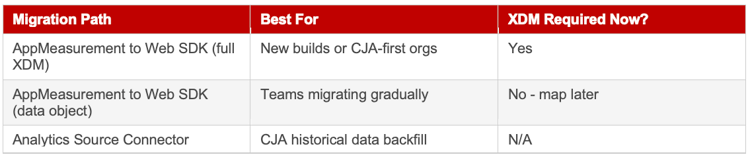
The data object path lets teams send AppMeasurement-style variables through Web SDK without immediately restructuring to XDM. When ready for CJA or Real-Time CDP, you add the datastream mapping to convert those fields to XDM. It is an extra step later, but removes the XDM learning curve from the initial migration.
Reporting continuity considerations
If you switch from AppMeasurement to AEP Web SDK mid-stream, historical and new data will have been collected via different mechanisms. Both appear in the same Analytics report suite - but variables and events need to be mapped correctly for continuity.
The Analytics Source Connector can bring historical Analytics data into Experience Platform for use in CJA, giving you a unified view across pre- and post-migration periods. Plan for this early - the schema mapping is configured at the source connector level.
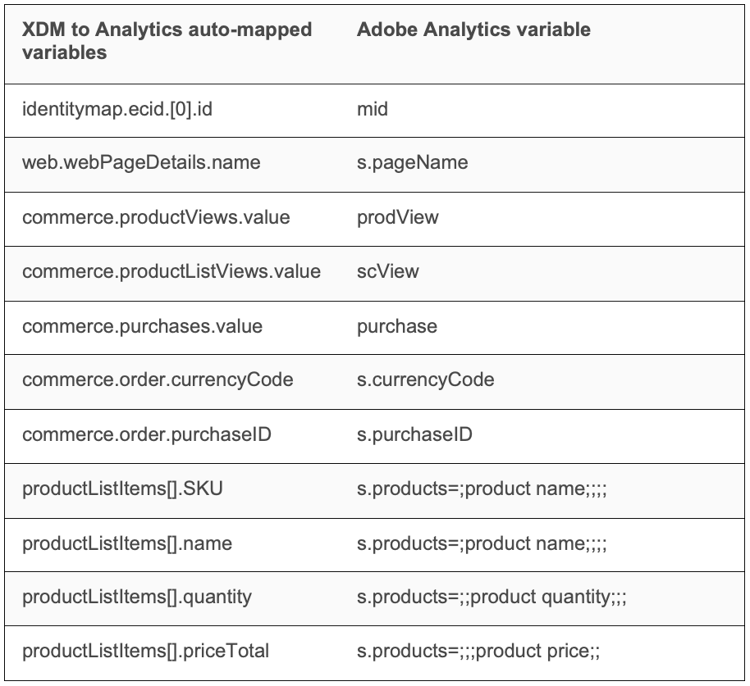
In your Analytics report suite, the XDM field-to-Analytics variable mapping is configured in your datastream's Analytics service settings. Fields like web.webPageDetails.name map to pageName and productListItems[*].SKU maps to the products variable. Verify these mappings before go-live.
Run both implementations in parallel during a QA window if your architecture allows. Fire AppMeasurement and Alloy events side by side on staging and compare the Analytics reports. Discrepancies in that comparison are your pre-launch punch list.
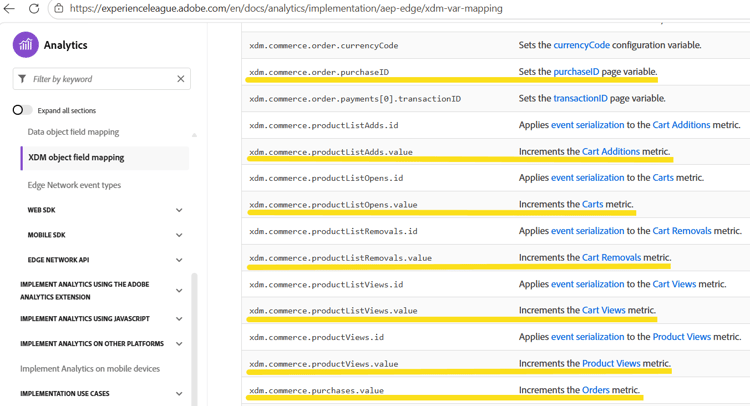
Reference: Adobe's official XDM variable mapping table at XDM object field mapping to Adobe Analytics shows every XDM field and its Analytics variable equivalent. Bookmark it and review it before go-live.
As AEP Web SDK capabilities expand and migration tooling matures, implementation patterns will continue to evolve. The fundamentals - clean data, precise event timing, schema-first thinking - will not.