Most storefronts don’t become slow because one team made one bad decision. They become slow gradually, reasonably, and with good intentions — until the constraint is no longer the code you’re optimising, but the delivery model you’re working within. This is the story of how one team recognised that distinction on a live modular furniture site and what happened after they changed the approach itself.
I’ve spent over eight years working in Adobe Commerce, mostly on large-scale implementations. Across those projects, I pushed platforms, APIs, and services in ways they were not originally designed to handle — all while trying to keep things fast and scalable for real-world pressure.
The story I want to tell is not that performance is important or EDS is fast. The story I want to tell is about how do you know the thing holding your storefront back is not anymore the code you’re optimising, but the delivery model you’re working within.
Why traditional storefronts become slow
When performance comes up, the first part of the conversation is pretty familiar. Speed scores, SEO, Core Web Vitals, customer experience, conversion rates, infrastructure scalability. All of these points are valid. I don’t think anyone would argue that storefront performance can affect the business.
The more interesting question is what teams do after they realize that. Because I think this is the part where things usually start breaking down.
Most storefronts don’t become slow because one team made one bad decision. They usually become slow the way enterprise businesses usually work — gradually, reasonably, and with good intentions.
-
A personalization tool gets added because marketing needs better segmentation.
-
Analytics scripts get added because business needs better attribution.
-
Marketing integrations get added for third-party tracking on a new promotion.
-
Dynamic components get added because the product team needs a better user experience.
None of these decisions sound reckless on their own. And this is why this problem is so common.
There’s also a study from the HTTP Archive Web Almanac. In 2025, they measured page weight and found that homepage weight is now sitting between 2.5 and 2.9MB depending on device. So when teams feel like every release adds a little more weight, a few more dependencies, a little more work before the page is actually useful — this is not paranoia. This is exactly what we’re seeing on the broader web.
How the architecture is actually holding you back
In a traditional Luma or origin-centric storefront architecture, the frontend is very connected to the backend. Every time a user requests a page, that request goes all the way back to the origin server, through business logic, pulls data from the database, and then that page is sent back to the browser and rendered.
What this means is that page speed is directly tied to how quickly the backend can process all of those requests. If anything in this chain is slow — the business logic, the database calls, customer data — that is reflected in the user experience on the browser.
Over time, as complexity gets added, this dependency becomes one of the main reasons impacting performance. And the limitations compound:
-
Rendering speed: The page takes longer to load because of all those server-side dependencies.
-
Scalability: Infrastructure starts struggling under high-traffic spikes and high-load scenarios.
-
Release management: Because frontend is very tied to backend, those releases need to go together to production.
-
Optimization: It becomes more and more difficult to independently tune and optimixe the frontend because it’s not really separated from the backend.
I’ve seen over and over again with teams that they will try to keep solving that performance issue at the optimization level even when the real problem is really sitting in the lower stack. And that distinction really matters. Sometimes you are dealing with a storefront that just needs a little bit of cleanup — better asset handling, better image strategy, better caching, better script discipline. But sometimes you get to a point where your performance is really limited by your architecture itself. And if that is true, then there is no amount of frontend tuning that will give you the breakthrough you’re looking for.
What actually changes with Edge Delivery Services
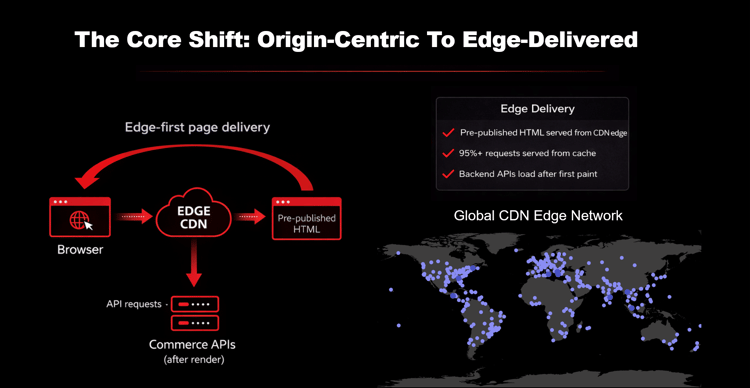
In the Edge Delivery Services architecture, a user’s request goes to the CDN edge node. That edge node serves a pre-published HTML page which is cached in 95% of cases. That page goes back to the browser, the user starts seeing something on the frontend right away, and then any API requests or commerce APIs trigger after all that happens.
This is not just a frontend improvement. This is more about changing how the page is delivered.
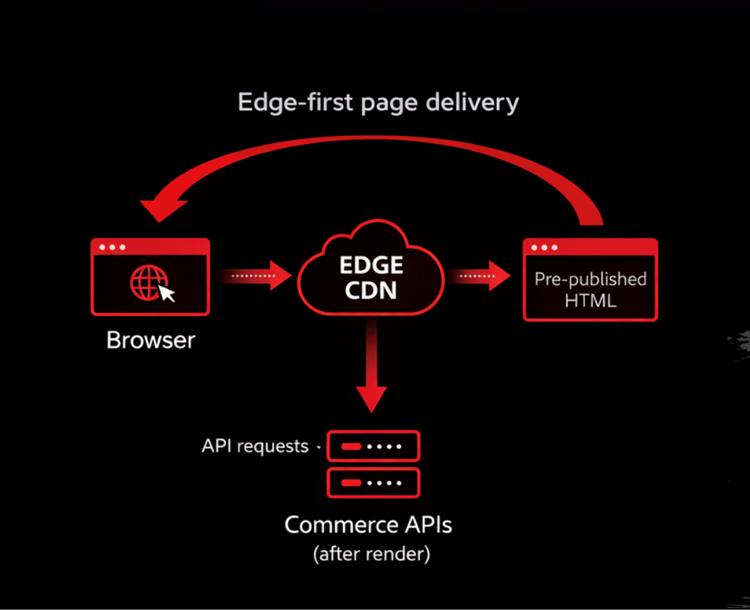
Adobe has edge nodes distributed all over the world — North America, Europe, Asia — wherever users might be. Users are hitting the closest edge node geographically and no longer going to that origin-centric server. That reduces latency significantly.
Here’s a real-world example: we’re in Vegas. In a traditional architecture, a product page request goes back to the origin server, let’s say on the East Coast. That’s around 60 to 80ms travel time one way, before any APIs are triggered, before any database calls, before any user information is fetched. With EDS, that same request hits a server that is maybe even in Vegas or close to Vegas — 10 to 20ms travel time. The only thing that changed is the distance.
This is why the shift is so powerful. Performance is no longer limited by where the backend lives. It is distributed globally as close as possible to the user.
And what happens with Adobe Commerce in this model? It doesn’t go away. Commerce remains the system of record. All pricing still lives there, all promotions, cart and checkout, orders, customer data, business rules, integrations — all of that still stays in Adobe Commerce. This is not about moving away from Adobe Commerce. It’s about stopping the initial storefront from having to wait for the entire commerce stack for anything to show up on the frontend. Commerce gets called when it’s actually needed — when pricing is fetched, when a user adds a product to cart, when checkout happens.
The real migration: Constraints, scope, and what the client actually needed
This was a modular furniture brand where customers could go on the product page and customize modular pieces of their furniture — how many seats, fabric color, cushion level, even a sound system in the couch. A highly customized experience. They really needed that rich content to story-tell and sell their product.
They also had very heavy third-party integrations driving page weight up, an active marketing team shipping promotions daily, high traffic, and active development happening while we were making these changes. This was not the case where you could say “let’s just strip everything down.” These enterprise businesses have complex frontend and backend implementations and a rich third-party ecosystem. Changing all of that takes real time, real strategy, and real planning.
The storefront was not doing too much. The storefront was just doing a lot through a delivery model that had become increasingly expensive for the business. The initial Lighthouse score was around 20 out of 100. Some pages were taking up to 15 seconds to load. Customers were frustrated enough that they started leaving bad reviews.
The three actual goals
Performance was not even the only reason we did this migration. During discovery, three pain points emerged:
-
Authoring experience: Page Builder felt slower compared to more modern authoring experiences like Universal Editor. There was no real-time preview — the workflow involved making the change, saving the page, clearing the cache, then going to the frontend to preview. It works, but it becomes an iterative and slow process for the authoring team.
-
Publishing dependency: Marketing team was ready to publish content, but they still depended on the engineering team to get that content live. Getting changes from staging to production typically involved a database dump. Content was ready, the promotion was ready to go — but the business was stuck waiting on engineering.
-
Performance: The storefront relied on a heavy frontend implementation combined with server-side rendering dependencies. Even before adding new features, there was already a baseline level of complexity that was hard to manage. The goal was to consistently reach Lighthouse scores in the mid-to-high 90s and establish a more scalable performance foundation.
Scope and constraints
We had a 3.5-month implementation window. This was a high-traffic production storefront, so everything had to be stable and work within the existing experience. We had complex product configurator components that had to continue functioning as expected. And there was no backend re-platforming — we were fully integrating with Adobe Commerce throughout.
In total, we migrated around 138 pages across the site. That included about 93 product listing and product detail pages, as well as a number of configurator experiences. To support all of that, we built over 40 custom components for commerce data needs. And all of this happened while the existing workstreams were happening. The machine was still running while we were changing a huge part of how their storefront was delivered.
What changed after the migration
Authoring and publishing
The workflow became much faster and more responsive for the marketing team. Instead of that slower loop, authors could now see changes as they were making them. They no longer had to publish and clear caches to see the content. The content became much more structured and easier to reuse across the website. The whole authoring model shifted from “publish and check” to real-time editing.
When content was ready, the marketing team could now publish that content themselves independently on production. What that meant for the client was a lot less dependency when they needed to move on the frontend.
Performance
This was one of the fastest and most visible changes. We went from a Lighthouse score of around 20 to consistently landing in the mid-to-high 90s range. More importantly, we were no longer just chasing a good Lighthouse score. We now had a much stronger performance foundation to build on.
This really validated that architectural shift. The realization we had was that even if we improved the score through optimization, we were not going to fundamentally improve the experience unless we addressed those architectural constraints.
Outcome
-
Lighthouse score: 20 → mid-to-high 90s (consistently)
-
Page load time: up to 15 seconds → sub-2 seconds for cached pages
-
Authoring: publish-and-check loop → real-time editing with Universal Editor
-
Publishing: engineering dependency → marketing team self-publishes to production
-
Browsing and discovery improved across the site
-
Rich content and media-heavy pages significantly easier to support
-
Site better positioned to handle high-traffic periods
Four lessons we learned during this migration
1. Structure your blocks before you need them
When you move to a faster, more flexible authoring experience, you also need to be very intentional about how your content is structured. With clear structure and clear guidelines in place, it’s much easier for teams to work, and you’re in a much better position when it comes to reusing those components.
What we found is that having a well-defined design system and clear guidelines around how those blocks are used becomes really important. This is not to restrict authors — this is to give them the framework that keeps things consistent and scalable for everyone.
2. Development has to change too
Moving to EDS also meant moving to a block-based model, and that takes quite a bit of a mindset shift for the team. A lot of teams still think in pages. You build this page, you build that page, another variation of that page. But with EDS, a better way to think about pages is in blocks. Now you’re not solving pages from scratch anymore — you’re building reusable pieces that can be used across the site. This really changes how developers build, how authors think, and honestly how your site grows over time. It also forces a lot more discipline because now you’re not treating every page like a one-off project.
3. Performance discipline is ongoing, not one-time
Even with stronger architecture in place, it’s really easy for performance to start degrading over time. A big part of that comes from third-party scripts. In most cases, each integration or each vendor will want you to load their script right away because they’re trying to optimize for their own use cases. But if you load everything upfront, that’s when performance really starts taking the hit.
One of the biggest improvements we made was just being much more intentional about how we’re loading those scripts and how we’re maintaining script load moving forward. Delaying any non-essential, non-critical scripts and just prioritizing what needs to be loaded first had a significant impact on maintaining those high Lighthouse scores. And this really becomes an ongoing practice, not just a one-time optimization.
4. GTM sprawl is a real performance problem
As we started looking deeper into performance, we also looked at how their GTM tags were set up. What we found is that their GTM setup had grown quite a bit over time to the point where they needed two GTM containers just to contain everything they needed. We did a full audit of both containers. We introduced a very simple approach: anything that was business-critical was loaded right away, and anything that we didn’t really have a business justification for was loaded after. The key takeaway was that if you can’t justify the tag loading right away, then it really doesn’t need to be loaded right away.
Key takeaways
-
Performance at this level requires an architectural shift. This is not something you can fully solve through incremental changes. If performance is limited by the architecture itself, no amount of frontend tuning will give you the breakthrough you’re looking for.
-
Edge Delivery fundamentally changes how pages are delivered. Pre-published HTML cached at edge nodes, served from the closest geographic location, before any commerce APIs are triggered. That is what enables the performance improvements.
-
Adobe Commerce doesn’t go away — it gets called when it’s actually needed. Pricing, promotions, cart, checkout, orders, customer data, business rules. All of that still lives in Commerce. EDS stops the storefront from waiting for the entire commerce stack before anything shows up.
-
This migration doesn’t have to happen all at once. It can be done incrementally alongside an active storefront. Start with your high-impact pages — the ones with the most traffic or highest business impact — and you will see value right away.
-
Block structure, development mindset, and third-party script discipline are not afterthoughts. They are what determines whether performance stays high after the migration is complete.
What I’d do differently today
Start with high-impact pages. You don’t need to migrate everything at once. Focus on the pages that get the most traffic or have the highest business impact — this is where you will see your value right away.
Invest in your block system early. Taking the time upfront to define reusable block patterns will make everything easier that comes after.
Prepare your team for a workflow change. This isn’t just a technical shift. It also changes how developers think and how authors work day-to-day. Setting expectations early and guiding the team through this will have a big impact.
Be much more intentional about third-party scripts. Audit what’s actually needed and control how those scripts are loaded — and keep maintaining that as you go. These four things are the biggest factors in maintaining performance over time and keeping those Lighthouse scores high.
Actionable next steps
-
Audit your current Lighthouse score and identify whether the constraint is optimization (asset handling, caching, script discipline) or architecture (delivery model, origin-centric rendering). The answer determines whether you need to optimize or re-platform.
-
Run a page weight audit. If your homepage is between 2.5 and 2.9MB, map which dependencies are driving that weight and which are actually business-justified.
-
Identify your highest-traffic pages and assess whether they are candidates for EDS migration. You do not need to migrate everything at once — start where the traffic and business impact are highest.
-
Audit your GTM containers. If you cannot justify why a tag needs to load immediately, it should load after. This single change can have a significant impact on Lighthouse scores.
-
Define your block system and design guidelines before developers start building. Well-defined blocks prevent authors from creating inconsistent content and prevent developers from treating every page as a one-off project.
-
Plan for script load management as an ongoing practice, not a one-time task. Every new integration will want its script loaded immediately — build the review process into your release workflow from the start.