Integrating Adobe Commerce with SAP ERP means solving for data ownership, sync patterns, real-time pricing, and catalog segmentation — before writing a single line of code. This article covers material data synchronization, ATP availability checks, order simulation pricing, and how Commerce's native B2B features map onto the workflows SAP-driven enterprises already run.
B2B commerce sits at the intersection of two competing pressures: buyers want a self-service experience that matches B2C convenience, while enterprises need the operational control, pricing governance, and ERP integration that comes with decades of business process investment. Nowhere is this tension more visible than in SAP-driven organizations.
SAP is the backbone for many mid-market and enterprise manufacturers, distributors, and wholesalers. It holds the authoritative data for products (called materials in SAP terminology), pricing conditions, customer master records, and inventory. When a company decides to open a digital storefront using Adobe Commerce, the integration challenge is not just technical — it’s about deciding which system owns what, how data flows in each direction, and where business logic lives.
In a recent implementation for a mid-market industrial supplier, the project team spent the first two weeks not writing a single line of integration code, but mapping out exactly those questions. That investment paid off significantly later.
Designing the system landscape
Before writing an API call or configuring a data feed, you need a clear picture of your system landscape and its responsibilities.
In SAP, product data is called material master data. It contains far more than a product name and price — it includes units of measure, plant assignments, material groups, and procurement types. Adobe Commerce has its own product catalog with its own attribute model. The integration is not a one-to-one copy; it is a deliberate translation that maps SAP material fields to Commerce product attributes.
A typical landscape for this kind of project has three tiers. SAP ERP holds Material Master (MM), Customer Master and Pricing Conditions (SD), ATP checks, and Sales Orders. An integration middleware layer — built on App Builder, MuleSoft, or a custom API layer — orchestrates batch sync for catalog and customer data, event-driven updates for inventory and pricing, and real-time API calls for ATP checks and order simulation. Adobe Commerce sits at the front end, serving Company Accounts, Shared Catalogs, Purchase Orders with approval rules, and Negotiable Quotes to buyers.
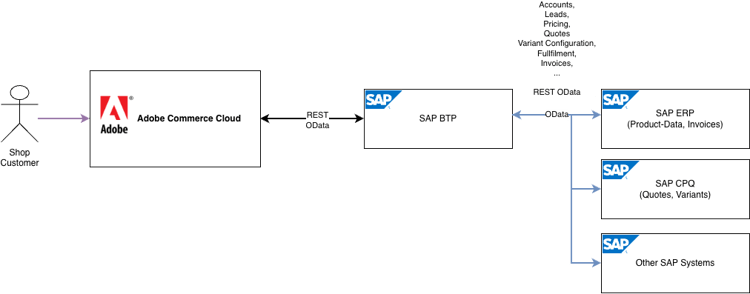
The middleware layer is critical. Direct point-to-point connections between SAP and Adobe Commerce tend to become brittle over time, especially when SAP release cycles and Commerce upgrade cycles are not aligned. A decoupled, event-driven approach — where SAP publishes changes and Commerce subscribes — is significantly more resilient.
Data flow and synchronization
With the system landscape defined, the next question is: what moves between systems, in which direction, and how often? There are two broad patterns, and the right choice depends on your data volume and how time-sensitive accuracy needs to be.
Batch synchronization is the simpler pattern. SAP exports material data — descriptions, attributes, units, classification — on a scheduled basis (typically nightly or hourly), and the middleware transforms and imports it into Adobe Commerce. This works well for product catalog data that doesn’t change minute-to-minute. The risk is stale data: if a material is discontinued in SAP at noon but the next sync runs at midnight, customers can place orders for unavailable products.
Event-driven synchronization is more complex but more accurate. When a material record changes in SAP — a new product is created, a price condition updated, a customer account modified — SAP fires an event that middleware picks up and relays to Commerce in near-real time. This requires either SAP’s IDoc/BAPI/RFC infrastructure or, in newer S/4HANA environments, the SAP Business Technology Platform event mesh.
In practice, most implementations use a hybrid: batch for catalog data (which tolerates some lag), and event-driven or real-time API calls for inventory and pricing (which must be accurate).
Customer data flows similarly. SAP customer master records contain the SAP customer number, payment terms, credit limits, and purchasing organization. These map to Company Accounts in Adobe Commerce B2B, which serve as the central organizing entity for all B2B features. Synchronizing the SAP customer number into a custom attribute on the Commerce company account is the key that ties orders placed in Commerce back to the correct SAP customer record downstream.
Real-time availability with SAP ATP checks
One of the most impactful — and most misunderstood — integration points is inventory availability.
Adobe Commerce has its own stock management (Multi-Source Inventory), and you can import static stock figures from SAP in batch. But for B2B customers ordering large quantities of industrial goods, “we have 500 units” is not enough. They need to know: can you promise me 500 units by next Thursday?
That question is answered by SAP’s Available to Promise (ATP) check, part of the Materials Management (MM) and Sales & Distribution (SD) modules. An ATP check does not just look at on-hand stock — it considers open sales orders, planned production runs, incoming purchase orders, and warehouse lead times to calculate a realistic availability date.
Integrating real-time ATP into Adobe Commerce requires a custom call from the storefront to the middleware, which then calls SAP’s BAPI BAPI_MATERIAL_AVAILABILITY (or the equivalent RFC in S/4HANA). The response is not a simple yes/no — it includes a confirmed quantity and a confirmed delivery date, which can be surfaced directly in the product detail page or cart.
In a deployment for a European chemical distributor, surfacing confirmed delivery dates in the cart reduced inbound phone calls from buyers asking “when will it arrive?” by over 40%. The buyers trusted the date because it was calculated by SAP in real time, not estimated by a marketing team.
The tradeoff is performance. Each ATP call adds latency. The solutions are caching (short-lived, for items where stock doesn’t fluctuate wildly) and batching (a single ATP call for all items in the cart rather than one per line item). Design this carefully — a checkout that takes 8 seconds because it fires 12 sequential ATP calls is worse than no ATP check at all.
Approval workflows and dynamic pricing via order simulation
B2B pricing is almost never a flat price list. SAP’s pricing conditions model supports layered discounts: base price, customer-specific conditions, volume scales, contract pricing, regional surcharges, and more. Recreating this logic inside Adobe Commerce — either in Shared Catalogs or custom price rules — is technically possible but creates two sources of truth that inevitably diverge.
The cleaner pattern for price-sensitive B2B is SAP order simulation. Rather than importing prices into Commerce, the Commerce cart sends a simulated order to SAP (via BAPI_SALESORDER_SIMULATE or the S/4HANA equivalent). SAP runs its full pricing engine — applying all conditions, discounts, and rules — and returns the final calculated price for each line item. Commerce displays that price to the buyer.
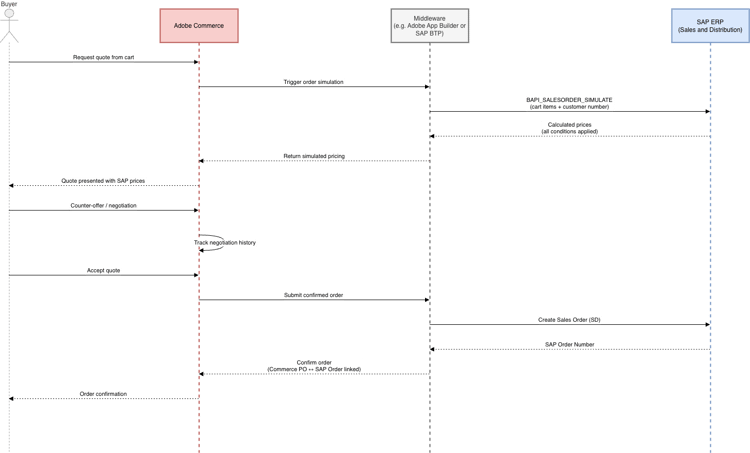
The downside is latency and dependency: if SAP is unavailable, the storefront cannot show prices. A fallback strategy — cached last-known prices, or a degraded mode — is mandatory in production.
In a large-scale implementation for a German industrial distributor with over 80,000 active customer accounts, order simulation replaced a complex price import process that had required nightly reconciliation jobs and still produced mismatches on approximately 2% of orders. After switching to real-time simulation, pricing discrepancies dropped to near zero, and the reconciliation jobs were decommissioned entirely.
Adobe Commerce’s native Negotiable Quotes feature maps naturally onto this pattern. A buyer can request a quote from the cart; the seller initiates a simulation in SAP to get an accurate price before responding; and the negotiated quote is confirmed back through Commerce. The full negotiation history — including line item discounts and counter-offers — is tracked within Commerce, while the final pricing logic lives in SAP.
For purchase order workflows, Adobe Commerce’s native approval rules handle the internal governance: who can approve what, at what order value, and what the escalation path is. Once a PO is approved in Commerce, the order is transmitted to SAP SD where it becomes a confirmed sales order. The Commerce PO number is stored as the SAP purchase order reference, providing a traceable link between the two systems.
Custom catalogs and company hierarchies
SAP’s customer master supports sales areas, distribution channels, and pricing groups — it already models the fact that different customers get different products at different prices. Adobe Commerce’s Shared Catalogs are the native mechanism for expressing this on the storefront.
A Shared Catalog is assigned to one or more Company Accounts. Each catalog can contain a custom subset of products and fixed pricing per SKU. A large industrial manufacturer might have 15,000 SKUs in SAP but only 400 of them relevant to a specific distribution partner. That partner’s Shared Catalog contains exactly those 400, at pricing derived from SAP conditions via the integration layer.
When combined with Company Hierarchies, organizational grouping becomes manageable at scale. A parent company can have subsidiaries, each mapped to their own SAP sales organization — yet all visible from a single Commerce admin. The parent company administrator can view and manage company accounts for all assigned subsidiaries, mirroring the high-level organizational model that SAP’s enterprise structures already represent.
In a deployment for a multinational packaging group with subsidiaries in six European markets, each country entity had its own SAP sales organization with distinct pricing agreements. Mapping these to individual Commerce Company Accounts under a single parent hierarchy allowed the central procurement team to monitor spend across all entities while each subsidiary’s buyers saw only their own contracted assortment and prices — with pricing resolved via SAP and written to each catalog individually.
The mapping work is non-trivial. SAP sales areas (Sales Organization + Distribution Channel + Division) do not map one-to-one to Commerce company accounts or Shared Catalogs. You will need a deliberate mapping document before any configuration begins.
Key takeaways
-
SAP is the system of record; Commerce is the interface. Material data, customer data, pricing, and availability all have their authoritative source in SAP. Design the integration to reflect this, not to replicate SAP logic inside Commerce.
-
Two synchronization patterns serve different needs. Batch sync for catalog data, real-time/event-driven for inventory and pricing. Use both, calibrated to your tolerance for data lag.
-
ATP checks transform availability from a number into a promise. Surface confirmed delivery dates, not just stock counts. Buyers make faster decisions when they can trust what they see. ATP batching and caching are custom — build them deliberately.
-
Order simulation keeps pricing in SAP — but requires custom front-end and middleware work at every display touchpoint. A single simulation call returns pricing that is always accurate; getting it onto the screen is not native.
-
Shared Catalogs approximate SAP segmentation — they do not mirror it. Fixed prices per SKU are what Commerce natively supports. SAP condition logic must be resolved outside Commerce and written in as flat values.
-
Company Hierarchies provide organizational visibility and parent-level account management. They do not propagate Shared Catalogs, pricing, or credit limits to child accounts automatically. Each account requires individual assignment.
-
The middleware layer will be the most-changed component in the integration over time. Design it to be independently deployable and testable — not bolted on as an afterthought.
Actionable next steps
-
Document your SAP system landscape first: which modules are active (MM, SD, FI), what RFC/BAPI versions are available, and whether you are on ECC or S/4HANA. This determines which integration patterns are available to you.
-
Confirm your Adobe Commerce deployment model — PaaS, SaaS, or ACO — before designing the integration. Catalog architecture and the requirement for local SKU ingestion differ across deployment types.
-
Build the customer and material master mapping matrix before any Commerce configuration. For every B2B buyer: SAP Customer Number → Commerce Company Account → Shared Catalog → Pricing Source. One unambiguous row per buyer.
-
Decide your synchronization pattern for each data domain — catalog, inventory, pricing, customers, orders — and document your tolerance for lag per domain before any middleware development begins.
-
Prototype the ATP call pattern early in a sandbox to validate latency. Design your batching strategy (one cart-level call, not per-product calls) and caching TTL before storefront development begins. Plan for 300–900ms or more per simulation call in your performance budget.
-
Define your fallback strategy for SAP unavailability before go-live: what does the Commerce storefront show for pricing and availability when SAP is not reachable? Cached last-known prices or a degraded mode are both valid approaches — the absence of a strategy is not.
-
Enable the Adobe Commerce B2B feature set and configure Company Accounts, Shared Catalogs, and Purchase Orders in sequence. Verify your Commerce version includes Company Hierarchies (B2B 1.5+) before building organizational structure that depends on it.
-
Run end-to-end order simulation tests covering the full quote-to-order-to-SAP-sales-order flow before User Acceptance Testing begins.