Adobe Target quietly “ghosts” bot traffic. It detects automated visitors and lets them see content but ensures that their activity does not influence experiments, metrics, or personalization models. This keeps SEO intact and data trustworthy, ensuring optimization decisions are based only on real human behavior.
Bots are those pesky ghosts that keep marketers up at night - haunting reports and distorting data insights. They quietly slip into A/B tests, inflate visitor numbers, and confuse personalization models with behavior that is hard to explain.
Unseen bot activity can undermine your reporting data, which is why Adobe Target includes built-in features to identify, manage, and quietly “ghost” automated traffic before it can spook your metrics. (“Ghosting” here refers to filtering out bot traffic so it never interferes with your data - not the social “ignoring someone” meaning.)
Ghost city: What counts as bot traffic?
Bot traffic is any non-human automated interaction with your website. Common examples include:
-
Monitoring tools (e.g., Catchpoint, RuxitSynthetic)
-
Website crawlers and scrapers (e.g., search engine crawlers)
-
Automated programmatic requests from headless browsers or APIs that simulate user behavior
-
AI tools - these are considered bots only when they generate automated visits or actions without a human actively browsing
While there are some helpful residents in Ghost City like Googlebot, which assists users to discover your site, others can cause chaos in your analytics if left unchecked.
Find the ghost: Why detecting bots matters
When bots interact with test experiences, they can:
- Inflate impressions and conversions that never actually occurred
- Skew traffic allocation between experiences
- Mislead AI-driven personalization models
This makes it difficult to trust test results and can lead to decisions based on phantom data, exactly why bot detection is essential. Without it, marketers are essentially chasing ghosts.
Enable bot detection in Adobe Target
Adobe Target offers several methods to detect and filter bot traffic, depending on your implementation:
Traditional Client-Side (at.js Library)
Target automatically uses user-agent recognition via DeviceAtlas’ isRobot metric to identify bot traffic.
Server-Side Implementation with Delivery API
Both both client and server-side implementations DeviceAtlas’ isRobot metric for user-agent recognition. However the server-side implementation prioritizes the request context node when flagging automated activity.
AEP Web SDK Implementation
Bot detection can be configured at the data stream level, using:
- The IAB/ABC International Spiders and Bots List
- Custom rules based on IP addresses, IP ranges, or request headers
Ghost the ghost: How Adobe Target handles bot traffic
Adobe Target ghosts bots in the most classic way - quietly.
Blocking bots outright can interfere with SEO, accessibility, or the expected behavior of crawlers. Instead of shutting them out, Target lets bots pass through while handling them differently behind the scenes. Bots see the same content as human visitors, but they never influence your metrics, experiments, or personalization models.
Specifically:
- A visitor profile is created in memory only - nothing is written to the profile store
- Audience and segment rules still evaluate, ensuring consistent experience delivery
- Experiment data and personalization models exclude the visit - Target doesn’t learn from bot behavior
In short, Target may allocate experiences to bots, but their visits are never persisted, never reported, and never allowed to skew results. They’re simply… ghosted.
When bots are helpful
Not all automated traffic is harmful. Some bots or clients especially those used by internal testing, API integrations, or trusted monitoring tools are allowlisted by Adobe Engineering.
Think of them as being present, but harmless, quietly doing their job without disturbing your data.
Examples of allowlisted user-agents include:
Apache HttpClient · OkHttp · PhantomJS · Catchpoint · GomezAgent · RestSharp · curl · Python-urllib · Google-HTTP-Java-Client · PostmanRuntime · NewRelicPinger · and others.
Using profile scripts to block helpful bots
Adobe Target also gives marketers the option to block helpful bots if needed, for example, to exclude internal testing tools from experiment data.
You can create a Profile Script that detects specific user-agents and prevents them from influencing activity data.
// Sample Profile Script
// Exclude helpful bots (e.g., Catchpoint and RuxitSynthetic)
// If the user-agent string matches Catchpoint or RuxitSynthetic
// The script will return true

if (user.browser != null &&
(user.browser.indexOf('Catchpoint') != -1 ||
user.browser.indexOf('RuxitSynthetic') != -1)){
return true;
}

You can then create an Audience based on this profile script to exclude any hits from Catchpoint or RuxitSythentic.
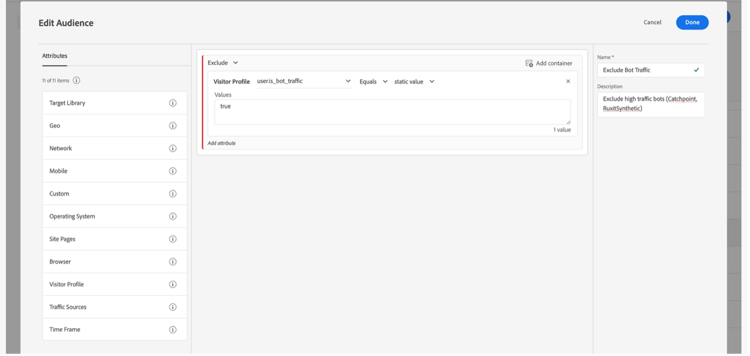
Depending on your use case, you can apply this Audience globally across all Activities or only to specific experiments where bot exclusion is required.
Adobe Target gives you the flexibility to keep your data free of ghostly interference- whether it is a helpful bot or another mischievous phantom bot.
Best practices for managing bot traffic
- Align bot filtering across solutions: Leverage Adobe Experience Platform (AEP) bot detection. Enable and maintain bot rules in your AEP data stream configuration for consistent cross-solution filtering.
- Monitor traffic patterns regularly: Review analytics for anomalies or spikes that may indicate automated activity.
- Maintain and update bot lists: Keep your organization’s bot lists current to block known bot traffic. Document changes for traceability and governance.
Conclusion
Your party, your rules… mostly. You decide which experiences to show, but when it comes to identifying who’s a “ghost,” Adobe Target relies on DeviceAtlas. Target doesn’t expose full bot-detection controls to customers.
If genuine visitors ever get mistaken for bots - or if bots slip through as humans - that’s when engineering steps in. We can work with DeviceAtlas to tune detection or configure back-end exclusions to make sure the right guests show up to the party.
While bot detection may not be the most glamorous part of digital optimization, it’s essential for keeping your data trustworthy, personalization relevant, and SEO intact.
Key benefits of excluding bot traffic from reporting data
- SEO preservation: Bots see the same content as users
- Improved data accuracy: Data reflects genuine user behavior
- Relevant personalization: AI/ML models learn from real interactions
By layering Adobe Target’s built-in bot handling with custom data stream settings, you can ensure data integrity across your marketing ecosystem.
In short: Adobe Target keeps your metrics ghost-free so you can focus on optimizing for real people, not phantoms!