This is the story of how a simple support queue inside Workfront became the main engine for adoption, visibility, and measurable value. By treating it as the front door for every request, the team turned everyday support into a structured feedback loop that exposed real demand, justified investment, and unlocked significant savings through automation.
People are the part that always changes
When we think about Workfront or any new implementation, we usually break it into people, process, and data. And every time, people are the part that is going to change. They are also the part that is most valuable to the tool, because if you do not have people in it and engaging with it, nothing else really matters.
Workfront is not a set it and forgets it system. It is going to keep changing, and people drive most of that change: new leaders, new priorities, new teams, new ways of working. This system is why you have to lean into the people side. Engage with them, understand what they value, and identify the champions in your organization who help carry the platform forward.
User adoption and support are where many teams dabble but do not apply enough focus. It sits there as this constant nag, something you know you have to tend and care for. It is not a do it once and forget about it activity. The people aspect of building a system is not a side note; it is the whole game.
The support queue lives at the intersection of these three dimensions:
-
People: Daily users, Champions, admins, requesters, leaders
-
Process: Intake, prioritization, workflows, release management
-
Platform: Workfront, Fusion automations, reporting
Jumping into the work with both feet
As a system admin, I jumped into Workfront with both feet. I very quickly adopted a support queue; I did not have any qualms about it. There was nothing else previously built that I had to manage around or compete with, and I had real user adoption issues. I needed a way to talk to my user base in a structured, consistent way, so I went straight to the queue.
Now, as a consultant, the most successful customers are the ones who also build this in Workfront itself. You want users to go into the system when they have a question and stay there to see the problem get solved. You can have the entire feed inside Workfront: the request, the conversation, the decision, and the solution all living together. That lets you really tell the value story and the user story in one place, and then share that back out to the broader community using the tool for a full feedback loop.
Help me, help you
Nobody likes to send you an email and get a response of “please put this into Workfront.” That is especially true for executives, because they just want the problem to be fixed. They do not want to think about the process; they just want an outcome. Pushing back with “that is the rule” does not work. The way I found to solve that was by telling a story. Everybody loves a good story.
I frame it as: I am asking you to help me, help you. When you submit that ticket in Workfront, you are not just checking a box. You are giving us the ability to build real metrics around what I am supporting you with and what the value of those enhancements actually is. That is what allows a system admin to say, “I saved $500,000 building this expense flow into Workfront – reducing duplicative work and increasing our efficiency.”
At that point, when the question comes up of why you need an extra headcount, the conversation changes. The answer becomes, “If I can double this and save us $1,000,000, then adding a headcount is well worth the effort.” The ticket is not bureaucracy; it is the data you need to prove the value of the work and unlock more of it for everyone (including the executive!).
Building the queue so it actually works
A support queue in Workfront is essentially set up like any other queue or project. The mechanics are not complicated. What matters is what you capture. At the very minimum, there are a few fields that drive much value: what is the request, who is the team, and what is the impact. You already know who it is coming from because they are submitting it to Workfront.
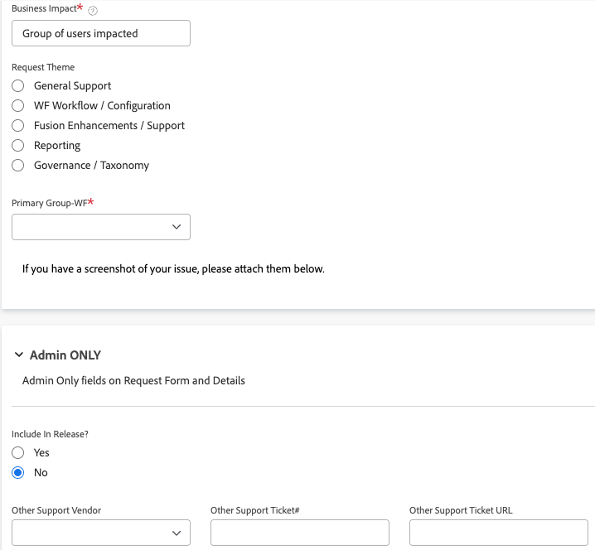
From there, you can make it as detailed as you want. You can capture which teams are affected, how many people are affected, whether it is a bug, an enhancement, a maintenance request, a report, or a user access problem. You can run the work off boards in a more agile space, or you can keep it simple and just manage it as an intake queue.
The critical part is not the form; it is the ownership. Do not let it become an empty support queue with nobody really managing it. You and your fellow admins have to dedicate time to it. When you do, it becomes a fantastic way to drive adoption, solve people’s problems, and show them that if they speak up, they are going to be heard.
Do not aim for perfection at the start. Get it in there, get people using it, and keep enhancing it as you learn.
What the queue exposed
The support queue gives structure to what people are doing. They are no longer just throwing a request out into the ether and hoping someone eventually answers it. Much like everything else in Workfront, it becomes about visibility. You can actually point to the bottlenecks and say where there are issues and what is happening with the work.
From the end-user perspective, they can look at the admin queue and say, “I submitted this five days ago, why do I not have an answer yet?” I do not always love hearing that, but it forces a different level of accountability to the team and to leadership. It makes you ask, at what point do I need someone else to come in and help me.
On the leadership side, the queue made something very clear: this person is spending 30, 40, sometimes 50 hours a week doing support tickets and enhancements. From a resourcing and value perspective, that is absolutely validated through the support queue. It is no longer a vague “I am busy”; it is visible and valuable work.
It also exposed how much effort things really take. I started on support tickets thinking certain items were going to be an hour or two. By the time you go through the build, the testing, the approvals, and actually getting it into production, you are 2-3x that. What came in as a two-hour ask often ended up taking ten hours once you accounted for all the pieces that have to happen! It can be just as eye-opening for you as an admin as it will be to your leaders and team.
The Fusion unlock
Adobe Workfront Fusion was a late addition to my support queue, mostly because for most people Fusion is a black box. They just know that magically things happen behind the scenes. Being able to pull more of that Fusion practice out into the open for end-users turned out to be a real bonus.
Once you connect Fusion to the work coming through the queue, the numbers change quickly. You can go from talking about a $20,000 or $30,000 savings on a single improvement to talking about $2,000,000 in savings across a group of them. When you can say, “That used to be a five-minute task for you to do, and now it costs nothing because Fusion is doing it,” it clicks. All of those little five-minute tasks add up really fast.
That level of value realization did not happen on day one. It was an unlock that came years into our Workfront journey, once the queue was mature enough to show the patterns and Fusion was in place to automate against them.
Looking back
When I did my first implementation, I was very focused on the immediate needs right in front of me. We built everything that way, without really stepping back to look at the bigger picture. If I could go back, I would say: take the blinders off. Do not just think about where you are at today. Think about the whole landscape that you are going to grow into; as you build Workfront groups, teams, and access levels, design with that broader view in mind.
The biggest wrench shows up when you start to get into release management. Are you doing two-week sprints, one-week sprints, or something else your IT team aligns to. Who is the agile team? How are changes getting bundled and moved? Sometimes you can still keep it all within one queue and manage both small fixes and bigger efforts together. Other times you really do need to use “epic projects” to break out your sprints and tasks in a more structured way.
The good news is that project management skills carry you a long way in Workfront. A support queue is just another project at its core. You still have to ask the same questions: how do we action this work, how do we groom the backlog, what does sprint planning look like. If you bring that discipline into the queue, it becomes a real engine instead of just a place where requests land.
If you’re starting now
If you are thinking about a support queue, do it now. Do not wait for the perfect design. Get it out the door with the minimum: who is the team, what is the impact, what is the request. That, plus the change management of getting people to leverage the tool, is where you start.
Nothing in Workfront happens in a vacuum. If people are not using the queue, it is worthless no matter how well built it is. You need alignment from your leadership to back it, to push people into that path, and to reinforce that this is how work gets requested and prioritized. Once that is in place, you can keep refining the queue over time.