Shaw Industries used Adobe Workfront to standardize project management for its marketing teams with consistent templates, workflows, and user setups—all without complex integrations. This reduced confusion, improved visibility, and enabled both project managers and non-PMs to manage work more effectively, helping establish a modern Project Management Office and a culture of continuous improvement.
Introduction
I work at Shaw Industries, a leader in flooring and other surface solutions designed for residential housing, commercial spaces, and outdoor environments. I focus on the residential marketing side of the business. There are 500 active Workfront users in the system, and around 50 have some sort of focus on project management. Most of them aren't even officially "project managers" by title. Rather, they're marketing managers or users who just need visibility and access to manage assets and tasks for their teams.
With relatively few project managers, we rely heavily on standardized templates, workflows, and reporting to keeping the management process simple for “non-PMs” that need to manage their team’s work. We do all of this management without really relying on Fusion, so we depend on standardization to keep things simple, consistent, and usable across the organization.
Where we started: Limited adoption, significant potential
Because adoption of new tools is always a challenge for some folks, thoughtful plans for change management are vital for long-term success and adoption. While each organization faces change management difficulties, the reasons behind the difficulties are as unique as the teams and individuals within them.
Yes, Workfront is an incredibly powerful tool, but ultimately its value comes down to how users and administrators leverage it. If configurations aren't set up properly, teams aren't connected properly, and project templates differ and behave wildly, the complexity of Workfront can make stakeholders avoid it. And much like an all-inclusive power tool in a carpenter’s workshop, if no one knows how to set it up and use it, suddenly Workfront feels like a large, fancy paperweight.
But, if teams are determined to work through those difficulties because they see the potential on the other side, there is a tremendous amount of opportunity to grow.
When Workfront isn't maintained, chaos grows like weeds
Years ago, our system was configured with very little standardization—especially when it came to user setup for team association and job roles. Initially, the system had different pieces that were haphazardly tailored to each team’s desired workflow without considering a bigger, enterprise effect. Portfolios, taxonomies, user setup: all were created without a global, systemic approach. And because there wasn’t a true global approach for the initial Workfront setup, governance from the top for all of these things was impossible. The system—this amazing garden of workflows that was created—couldn’t be maintained, and things grew out of hand.
For example, a large piece of our system that lacked standardization was our user layout templates. For most users, they are an unknown part of their setup. But layout templates are designed to allow clear visibility to pre-determined Workfront features in the main menu, navigation panels, or system terminology. These features can be set up individually or based on user roles or team association. Lacking any consistency, many of our users’ experience in Workfront would look completely different than their teammates, and they had no explanation as to why. To make matters more complicated, our administrator’s SOP was to copy someone else's setup (what I call their "user DNA") to create new users without really knowing the bigger consequences that would cause. A new user would get created based on a colleague's “DNA”—but if that was already set up improperly, we were just making bad copies, and the problems simply flourished.
Someone would ask, "Why don't I see a dashboards button on my main menu?" or "Why does my landing page button take me somewhere different?" Much of our troubleshooting is traced back to inconsistent user setup. Without that level of standardization, the system produces confusion, distrust, and frustration.
Back to basics: Templates as functional DNA
Getting projects to behave the same way every time, setting up standardized dashboards, and making Workfront simple enough for people who don't consider themselves "Workfront people” have been the biggest shift for us.
Project templates have played a key role for Shaw as well. Templates can determine things like which portfolio/program a project falls into, who has visibility or access to manage the project, and how the project’s due dates behave. So, if a template isn’t set up well and isn’t aligned with how the rest of the templates function, basic users are likely to be confused without a consistent experience. Picture yourself driving through a busy downtown city, but each street has its own rules. For example, which side of the road you’re supposed to drive on? Who is permitted to drive or park there? All the same-looking street signs mean something different depending on the street that you’re on. Navigating these roads would be difficult enough for an expert driver, let alone a student who’s just learning or a tourist who isn’t familiar with the area.
Workfront should be set up with enough thoughtfulness and consistency that it shouldn’t take being a project management expert for someone to feel confident in their driving skills.
Complexity to visibility
Our most complicated workflow is one in which our product development team manages thoroughly vetted ideas coming in from our innovation team. Eventually, the workflow sends a product to the masses with our marketing teams. We have a systematic review process that takes brand new ideas from, "We don't know anything about this concept," all the way through feasibility and marketability testing.
Shaw built long, detailed templates for this process, depending on the product type and complexity. Some project templates even show the overall duration as lasting more than two years to make it through the full cycle. But using that template lets us see the connection between product development and commercialization. It shows how every piece affects the timeline and how a hiccup early in the process can have compounding effects on the future.
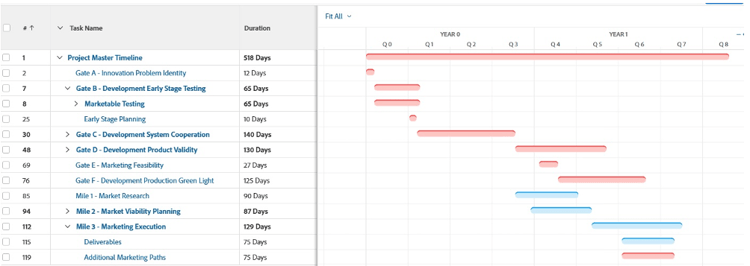
Shaw has been around for decades, so this complexity isn’t entirely new for our manufacturing and marketing teams. The overall system of creating products and sending them to market has been around for longer than most of us have been alive. However, recently we’ve been able to put it all together in Workfront and allow each team to gaze out from their silos. Workfront allows them to see how their work is relevant to the enterprise.
Today our project documents and approval processes are all getting tracked and timestamped. We now see the whole history of an idea over whatever length of time that it takes for it to be developed, tested, and sent to market. We compare planned completion dates to actuals. We highlight delays and understand our opportunities. We adjust templates where needed to maximize efficiency. And now we can spot problems in advance and make better business decisions on how to move forward.
My favorite project manager trick: Cross-project visibility
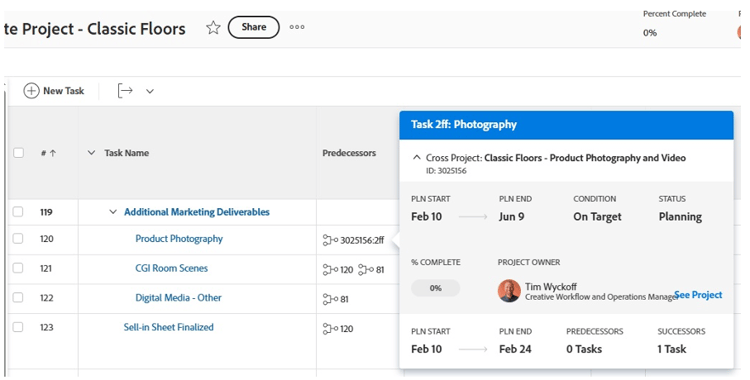
My favorite hidden gem of a trick right now (one that I think could also benefit other organizations) is Workfront’s cross-project predecessors. Cross-project predecessors allow you to connect task timelines across different projects. We often use them to connect campaign deliverables to large and complex “outside projects” that necessarily required management from other established work teams. They allow us to have a main project “trunk” managed by one team. This trunk is connected to all the different “branches” —deliverables projects with complex workflows that are each managed by their own team’s PM.
The simple act of being able to hover over that cross-project predecessor and instantly see the status of another project is huge for visibility. Whenever we show this feature to teams, it's an instant “aha” moment. They realize we can finally see all the connected parts of this complicated tree.
That visibility and inherited communication also help our project managers avoid the constant bombardment of routine questions like, “Where are we at on this task?” If PMs and task assignees are routinely updating their parts of the process with real-time information, executive stakeholders can simply go directly into a project or a report. The stakeholders can then find the connections they need, and see some of those basic updates themselves without interrupting the flow of work that’s being done.
A game changing future: From old school to PMO
Shaw is a well-established company, but we never had this level of organizational visibility until we really began properly leveraging Workfront. We've historically had team leaders who were somewhat hesitant, fearful of new tools, and unintentionally holding their teams back from reaching their full potential. But as roles have changed and newer leaders started leaning into the benefits of this technology, we’ve seen growth. Associates who have craved structure and organization are now finally getting it. Team members are empowered to ask questions and be curious about what this system can do to help them be more effective—enabling them to get back to their most meaningful and important work.
A few years ago, we started creating a simple information-gathering request form for new product ideas, and unknowingly at the time began constructing what would become the largest visible end-to-end process in our organization.
When leaders started to see what Workfront could do for our marketing campaigns and in the full innovation-to-commercialization process, other areas of the business started to grow with the same energy. Our events and digital marketing teams are also now being more fully integrated into the Workfront ecosystem.
We’re seeing development and maturity across the board, but in some ways, we still feel like we’re refreshing every day. A few months ago, we decided on creating a PMO. We decided on a Project Management Office that would govern standard project management operations, best practices, and training all in Workfront. For a manufacturing company that's traditionally “old school,” this transition is a huge step toward modernization. This modernization means that we don't need to throw more people at problems, and we can capitalize on the right tools to be more efficient.
We're in the middle of this evolution. Whether it’s marketing, manufacturing, product development, everyone has their own process. But now we're asking: how do we do this process quicker, faster, more intentionally? How do we leverage data? How do we highlight our people's good work?
Shaw is coming together in the biggest sense of the word “team,” and when we discover game-changing solutions together, everyone’s thrilled. Adoption grows. Curiosity surges. And the ecosystem starts to blossom and thrive the way it always should have.
Moving forward checklist for stuck organizations
Use the below checklist to turn your “big cool paperweight” into a working system again.
-
Standardize your DNA: Pick 3–5 core templates, clean out the rest, and bake portfolios/approvals/visibility into those templates.
-
Fix day-one setup: Use role-based layout templates and a single, clear landing view so everyone knows what to act on today.
-
Modernize your worst workflow first: Map your most painful process. Build it in significant, simple milestone steps first, then add task details as needed.
-
Connect work across projects: Use cross-project predecessors so dependencies and delays show up in the tool, not just in meetings.
-
Make leaders self-serve: Give execs simple views (dates, status, risks, last notes) and train them to check Workfront before asking, “Where are we at?”
-
Let curiosity drive adoption: Regularly ask what you need, want, and are curious to know TODAY, and if it matters, start tracking it in Workfront for tomorrow.