Discover the key differences between Requestable and Executable Campaigns in Marketo Engage and explore two real-world peer use cases that help marketers choose the right campaign type strategically for consistent, scalable results.
Since the release of Executable Campaigns, one of the most common questions customers ask is: 'Should I use a Requestable Campaign or an Executable Campaign?' The answer isn’t always straightforward. In this article, Minna Pacanowski shares the use cases she has implemented using either campaign type and how you can apply these lessons to your own programs.
Prefer watching videos?
Watch Minna's full Skill Exchange presentation below to understand the similarities and differences between these two campaign types and see the use cases in action.
Similarities and differences between Requestable and Executable Campaigns
To understand the differences, let’s start by understanding the reasons behind the birth of Executable Campaigns. Executable Campaigns were developed to address the gap of Requestable Campaigns. Previously, Marketo Engage users relied on arbitrary "wait" steps (for example, wait 5 or 15 minutes) in Requestable Campaigns, hoping that data updates would complete before subsequent actions were taken. However, this approach can be unreliable and yield inconsistent results.
Executable Campaign introduces a "stop sign" in the workflow. It ensures that all required steps are completed before proceeding, eliminating the need for guesswork and improving process control. Both Requestable and Executable Campaigns are triggered by a parent campaign in Marketo Engage. The parent program orchestrates logic and timing by calling the child campaigns when specific conditions are met, while the child campaigns execute their respective tasks. Now, with Executable Campaigns being an option, it’s advised that you use Requestable Campaigns sparingly due to their potential to slow down system performance.
- Requestable Campaigns run independently and asynchronously—the parent campaign proceeds after making the request, continuing with its own flow; meanwhile, the child campaign runs in parallel, independent of the parent. For example, if the lead data hasn’t been fully updated yet, but the parent campaign continues and passes the lead along. This effect can result in incomplete or insufficient data being used in downstream campaigns, leading to errors or inconsistent behavior.
- Executable Campaigns run in series—the parent waits for the child to finish, ensuring that all data updates and processes within that Executable Campaign are guaranteed to complete before proceeding. This difference is crucial for workflows where timing and data readiness matter.
In comparison, Executable Campaigns would be described as handling all necessary preparations (such as putting the letter in an envelope, addressing it, and stamping it) before mailing, ensuring each prerequisite is completed before moving forward.
Understanding this difference can help you design more reliable and predictable workflows by choosing the right type of campaign for each task.
What are the pros and cons of each
Many customers are already using Executable Campaigns — primarily for operational tasks. Tasks such as person scoring, data standardization, and managing internal processes. And those use cases are great as Executable Campaigns bring structure, reusability, and scalability to the operational side of marketing automation.
For example, in a data standardization campaign, Executable Campaigns is a neat way to achieve reliable results without using multiple Smart Campaigns to fix.
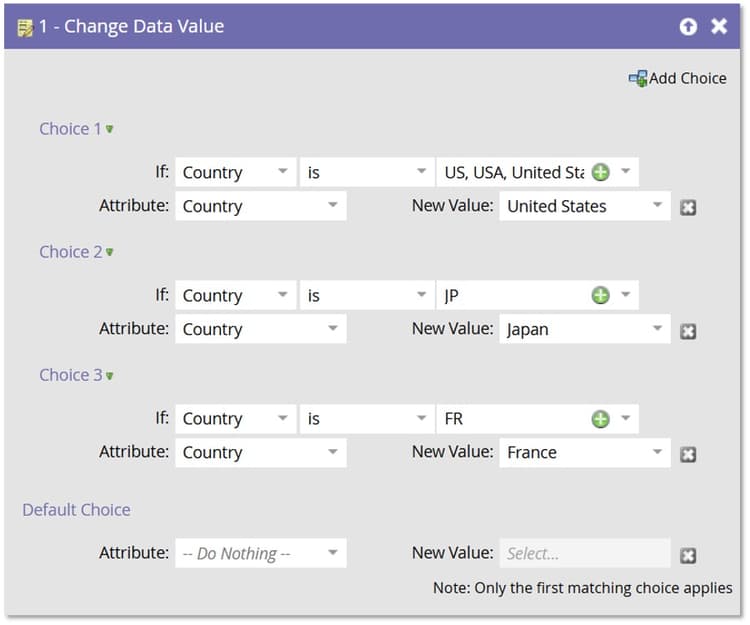
However, a significant opportunity is often overlooked: leveraging Executable Campaigns to drive external communications. Specifically in retrying failed processes, these campaigns can help save time and get customers back on track in a timely and effective manner.
How to decide which type to use
If the process requires each step to be completed before the next one begins, Minna uses Executable. If I’m okay with things happening in parallel (and can handle a little mess), Requestable Campaigns work well. Minna always recommends mapping out dependencies to ensure that critical data updates are completed before proceeding to the next step.
In the following section, Minna discusses how she implemented Executable Campaigns for a non-profit to follow up donors whose credit cards had declined. This project achieved a 65% higher success rate in the ongoing donation process.
Use case 1: Using Executable Campaigns to streamline nonprofit fundraising follow-up
This was a memorable project with a nonprofit organization struggling with declined credit card donations. They were losing revenue and spending weeks chasing donors for updated payment details. Here’s how Executable Campaigns changed the game:
- An Executable Campaign was set up to automatically check for failed payments.
- Donors were prompted via email and SMS to update their credit card details using a personalized link.
- The result? A 66% increase in successful updates, and the follow-up time dropped from 2-3 weeks to just 1–2 days.
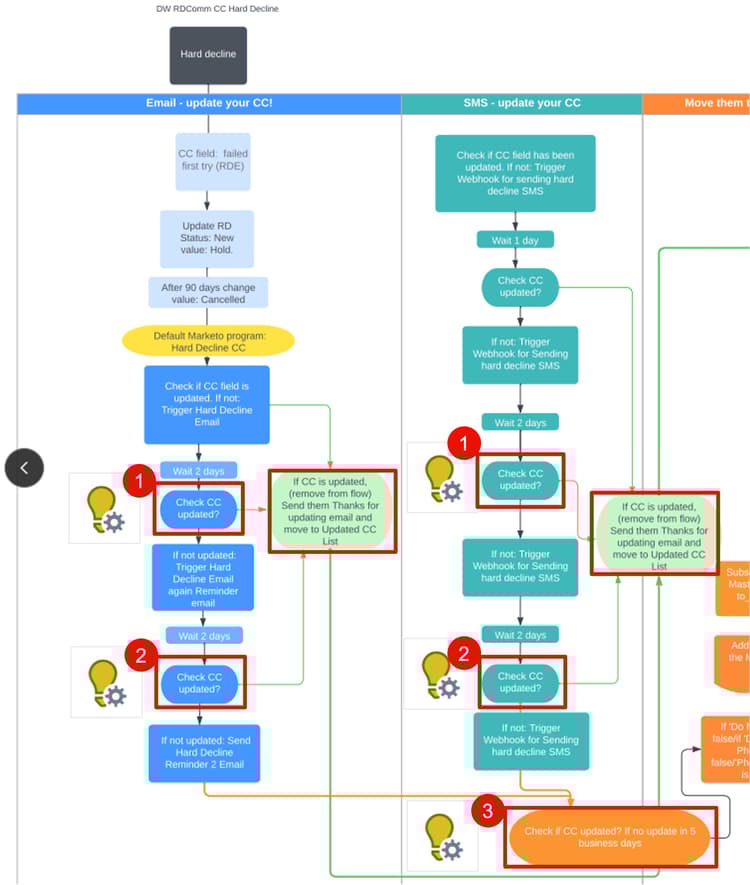
How-to in Marketo Engage
-
Set up an Executable Campaign to check for declined payments.
-
The Smart List of the Executable Campaign determines if the credit card has been successfully updated for #1.
-
If the person qualifies, it enters the flow that executes #2 and #3.
-
-
Trigger personalized follow-up emails and SMS messages using flow steps.
-
Monitor updates and remove donors from the flow once a successful payment is made.
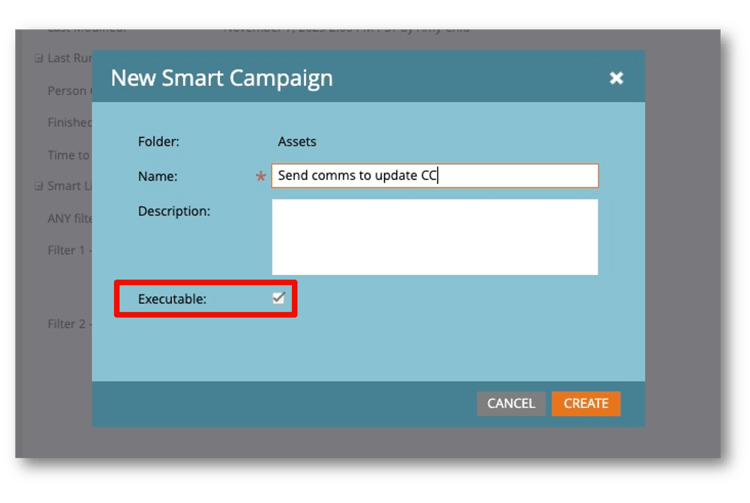
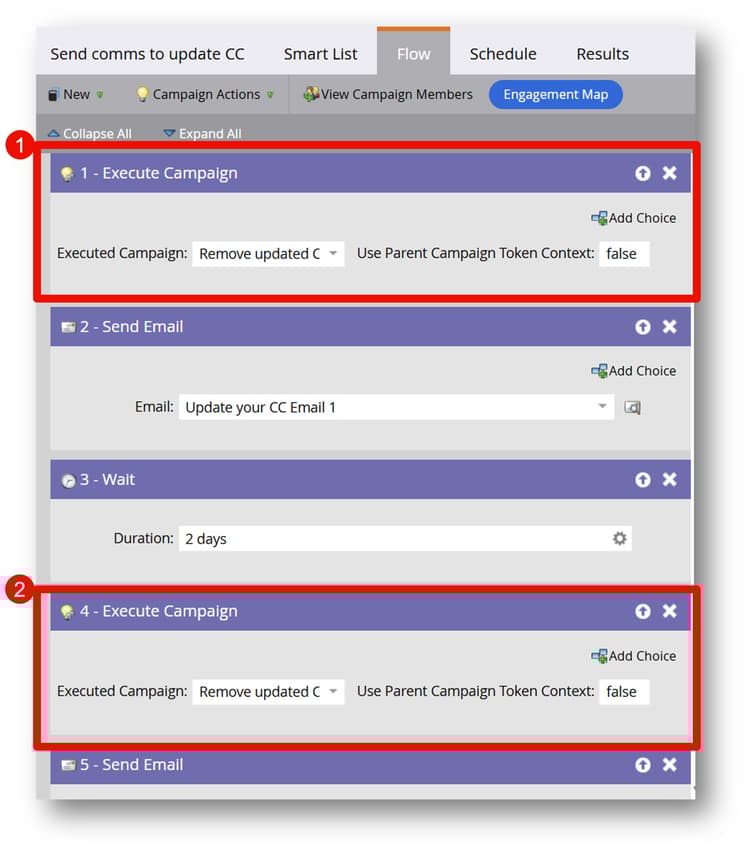
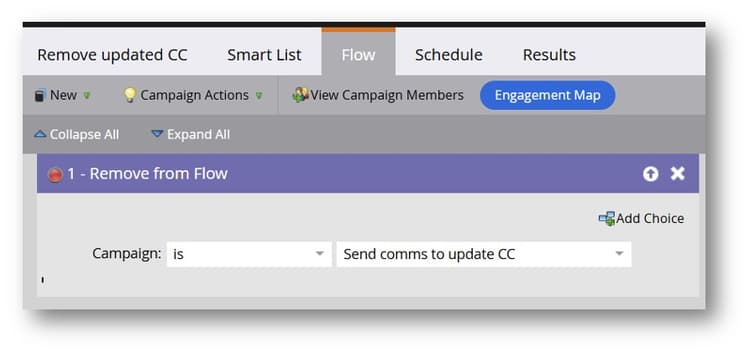
This automation not only saved time but also helped the nonprofit retain more donors and maximize their impact.
Use case 2: Daisy-chain approach using Requestable Campaigns for credit card product push prompts
Requestable Campaigns still matter. Minna once worked with a global online credit card company. The project aimed to upsell customers on additional financial products. Here’s how the team did it with Requestable Campaigns:
- After a credit card sign-up, Marketo Engage checked for related products.
- If customers already owned the product being checked, the workflow skips to the next product. If not, the workflow triggers the next campaign to promote the next product.
- Using Requestable Campaigns with Choice steps in one workflow makes the process flexible and scalable.
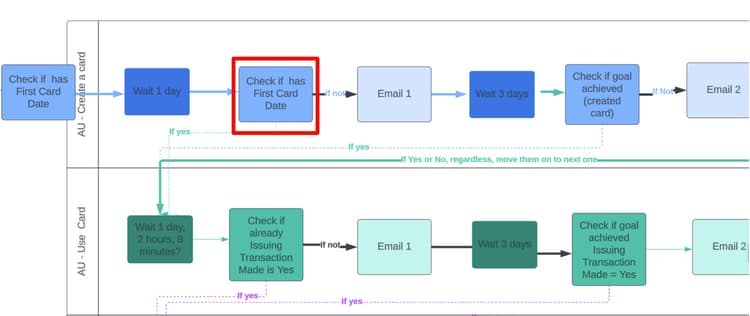
How-to in Marketo Engage
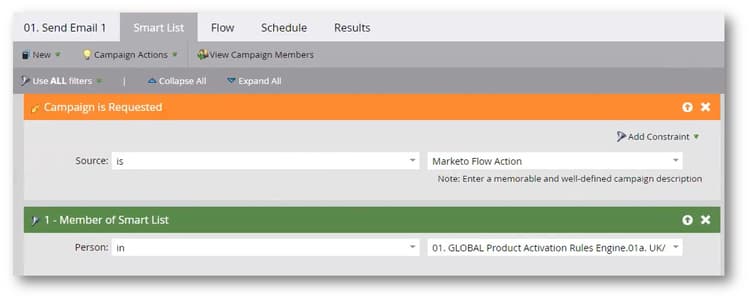
- Create a Smart List to segment customers based on their product ownership using “First Card Date” as the identifier.
- Use "Request Campaign" flow steps to trigger additional product prompt campaigns.
- Add "Choice" steps to skip campaigns for products the customer already owns.
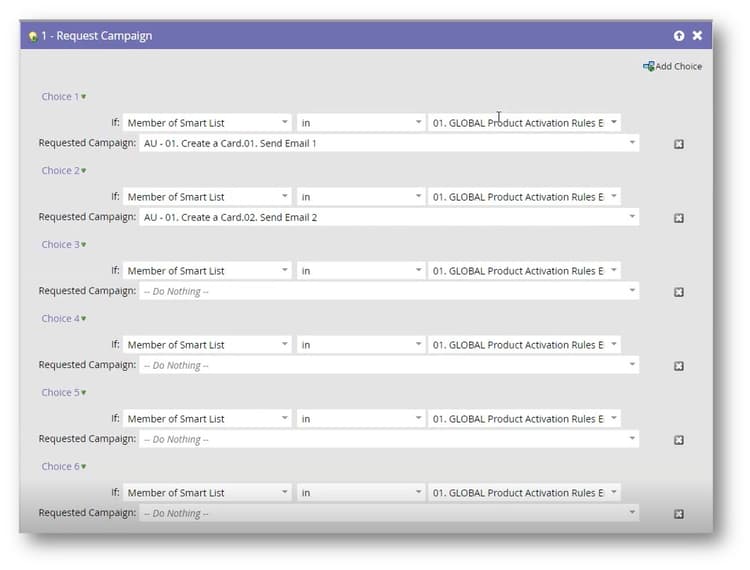
The choices use a waterfall logic, and only the first match runs the first time and every time afterward. This approach enables us to personalize the journey for each customer, without overwhelming them or missing product promotion opportunities.
Key takeaways & recommendations
Here’s what Minna would advise on how to decide between Executable and Requestable Campaigns for your follow-up journeys:
- Identify crucial campaign flows in your instance: Map out essential processes, such as lead routing or data standardization, where automation can prevent errors and bottlenecks. Sample questions you can ask: Is your lead routing running into any errors? Do you need data standardization ahead of lead queues to ensure smooth processing?
- Match the campaign type to the scenario: Executable Campaigns excel for real-time and sequential actions such as declined card follow-ups or confirmation triggers. Requestable Campaigns are ideal for simple and one-off tasks, such as alerts or batch updates.
- Balance effort and impact for implementation: Consider complexity, potential failure points, and timing requirements. Executable Campaigns can also power external communications when data and timing precision matter.
- Centralize for scalability: Use Executable Campaigns to consolidate reusable logic, reduce duplication, and simplify maintenance across programs.
- Choose based on timing and data sensitivity: It’s not one or the other; use each campaign type where it fits best. Executable Campaigns shine for synchronous, step-by-step completion. Requestable Campaigns excel when speed and flexibility are the priority.
Additional resources
- Everything you need to know about Executable Campaign in Marketo Engage
- Learn how Executable Campaigns can drive efficiency & impact