Structured intake forms, shared reporting, audited templates, and capacity dashboards can turn a growing regulated marketing team's scattered records into one auditable system, giving leadership real proof of where time goes and setting standards before growth turns the process into chaos.
Overview
Our marketing team is responsible for the development of a large number of campaigns, and we provide centralized management of omnichannel execution. As a team in a regulated industry, it's of the utmost importance that we're able to track and maintain records of the collateral our team has produced. As the size of our team and our responsibilities has vastly grown over the last few years, it became clear that we didn't have a cohesive way to maintain these records. We work with internal and external partners to create assets, but unfortunately there was no centralized system that held all of the information we needed to maintain. So our marketing team turned to Workfront to initially help us gather and save this information, and in turn we've gained extensive insights on what types of projects we do most often, as well as where our team's time is being spent.
Starting with intake and turning requests into projects
To start, I created a custom form in Workfront to capture basic project information, and created a new request queue specific to our team. The team members provide details such as the name of the request, if there is a hard deadline, what the budget is, what channels and types of customers we are targeting, as well as which business unit the campaign is supporting. We also identified three levels of project tiers, to tell us which is highest priority and which can be pushed to a later date, if necessary.
Using reporting to show what the work really looks like
The best part of requiring each campaign or tactic to be submitted via a request form is that it ensures that the custom form gets attached to each project, every single time. I've experienced when marketers will build a project without going through a request queue, and when that happens they will usually skip filling out the form to try to save time. However, this form is key in capturing a ton of data that our directors are using to ensure we are one, focused on the right efforts, and two, spending time on the correct initiatives.
In my experience, sharing the results of this data we are capturing with the marketers is key in getting them to understand that the work of filling out the form is not for naught. We can show them the amount of time that is estimated to be spent per business unit, and managers and directors can then make decisions about where time is being spent, and whether we're aligning to goals properly. It gives fantastic insight into what is actually being done, but it also shows whether we are spending our time on worthwhile projects.
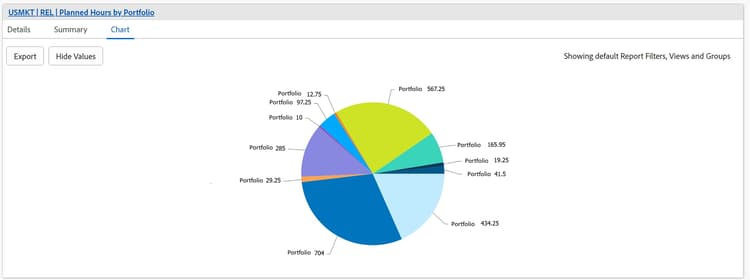
This report shows us the amount of planned hours grouped by portfolio, which gives a clear picture of how much time is aligned to which of our lines of business. In the same dashboard, I also offer charts that show, within each of these pie slices, how many are tier 1, 2, or 3, as well as a combination bar and line graph that showcases the amount of planned hours versus logged hours, and all of these combined start to tell a story to a manager or director.
One thing I like to point out to team members is that we are not reporting on a personnel level when it comes to hours logged. The point of recording this information is not to be Big Brother, but rather to confirm if the time is being spent in the correct places, in consideration of business goals, team goals, and strategic initiatives. The only time we report on a personnel level is the dashboard that shows what tasks are assigned to individual people, to ensure one person is not more overloaded than another. That view is specifically meant to be used in a one-on-one meeting, or for a manager who needs to show that their team could use more resources, or that work should possibly be distributed differently amongst the team.
Treating comments, updates, and documents as part of the project record
I am working hard to get everyone used to using the Workfront updates function to post comments on a project. One of my teaching points is that I want users to think of Workfront as a diary of a project. Instead of having chat messages or emails buried in an inbox, if they do all project-related communication within Workfront, it will tell the story of the project without any extra effort on their part. This also allows managers and others to clearly see what is happening with any given project, without having to bother the person throughout the day.
In addition to using the updates function, we are trying to capture screenshots of approvals that come via email, as some of our partners do not have access to Workfront, or they are working in a fully separate Workfront timeline that is related to, but not connected to, our timeline. In a perfect world, anyone involved with a specific project would be using Workfront, and the same project timeline, but we're not there yet.
Building templates that reflect real work
We use templates based on the type of asset that is required for a campaign. I spent a lot of time sitting with the team to understand their processes and how a tactic gets completed from start to finish. You can create any type of template, but if you do not know what is actually happening when people are working on a project, the template does not really mean anything, and it won't be useful to the marketer. It is worth spending this time up front to capture things as accurately as possible.
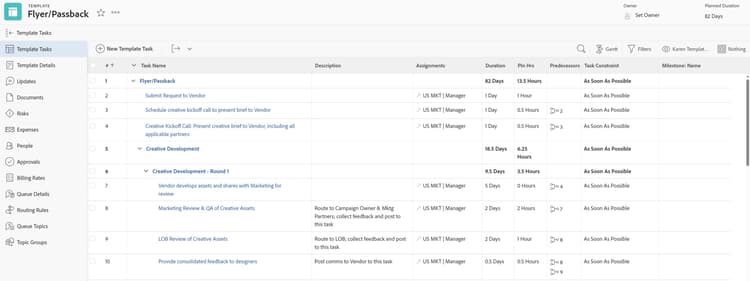
Example of the first steps of a tactical template for a flyer or passback.
While templates are incredibly important, I believe it's equally important to understand that a template will only get you about 80% of the way there. You will most likely have to make some edits once it is added to a project. We have tried to capture every single thing you could possibly need for each type of tactic, to make it easier to simply delete what is not required.
One of our current challenges is that we do not currently have SLAs for each type of tactic, depending on which team is working on the actual item. We have taken a best guess, but I've tried to teach our marketing team that sometimes this is an estimate at best, and that they will need to change the durations to match what their creative, web, or social partner tells them once they have accepted the project.
Another thing to be aware of is the importance of auditing your templates on a regular schedule. Review each template compared to an actual project that gets completed, to ensure you are allowing the right amount of planned hours and duration of tasks. I recommend doing an audit like this at least twice a year. The less that needs to be changed in the template once it's attached to a project, the better, and the more accurate the information in the template, the better your reporting will ultimately be.
Making task status and capacity visible
I've created dashboards for each team manager, where they can see a vast amount of information pertaining to their specific team members. Some of the reporting available on these dashboards includes:
-
A view of the incoming request queue, filtered to the specific manager's team
-
A list of all of the projects their team is currently working on, showing a color-coded condition of each, how many hours are planned versus how many hours have been logged, and a visual of what the last typed update was on each project
-
A chart showing planned versus logged hours by program, to see if our reporting is accurate
-
A resource management view, to show who has capacity, or doesn't
Like any team, we definitely have issues with users reflecting what they are actually doing in Workfront in a timely manner, but I think a lot of that comes down to familiarity with the tool, as well as encouragement from their direct managers. I tell people constantly that if they are not sure what they are supposed to do, or if they see they have a lot of things that are late, they need to come to me so we can sit down and work through it together. I also offer Workfront office hours where anyone can come with any question, and they can also just join to hear what others are struggling with.
One of the biggest challenges I've found is that if users do not stay on top of moving their tasks along in Workfront in a timely manner, they will get behind on their home page, which means they are seeing old tasks instead of current ones. When this happens, the manager isn't able to see accurate reporting, and there's a possibility of that snowballing into bigger issues down the line.
Every time I meet with a team, I try to get them to understand that inputting this information into Workfront, having the detail of each project on their plates recorded, and seeing the amount of time going into their work, just makes everything so much easier. Instead of going to your manager and saying, "I am buried, I cannot take anything else," and then trying to explain why you are as busy as you say you are, this data gives you proof on paper. There is no arguing against the reporting, if it is accurate and kept up to date.
Putting standards in place before the system becomes chaos
I think if you are starting as a project manager, you really need to get some basic guardrails around things right away. That means things like having a clear naming convention, making decisions on how you want to organize projects into portfolios and programs, and thinking about what information you ultimately want to know. If you have a good handle on what kind of details and information you want to report on, you can build Workfront to suit those needs right from the start.
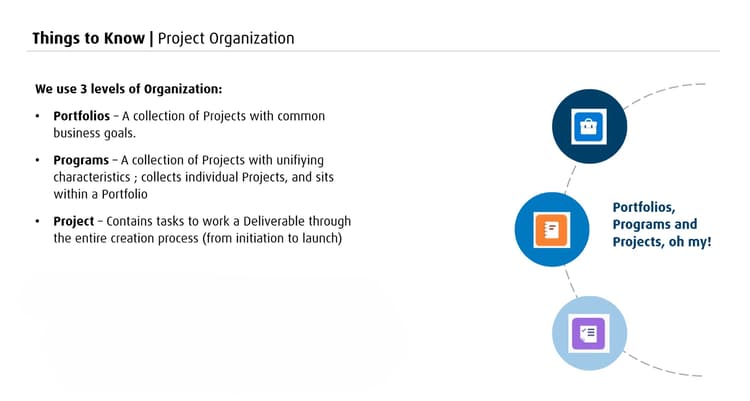
We have slides like this one in our onboarding presentation for new hires, which clearly outline how we structure our projects.
A lot of companies seem to approach this a little backwards, starting with "all of our projects need to be in Workfront, now," without putting time into the infrastructure first. To me, the infrastructure of the system is maybe the most important part of the entire thing. If you do not have that infrastructure set up correctly from the start, you are going to spend so much time going back, cleaning things up, and trying to get the reports you want, possibly without the data being there at all.
It really all comes down to having standards. We are truly in the middle of trying to set some guardrails and standards, and convincing everyone to get on board. To me, this is the number one thing. Teams have to take a step back before they jump in and just start using Workfront, to ensure the way it is structured today will fit the needs five years from now. It's not an easy exercise to do, but it is worth every minute of your time figuring that out.
FAQ
Why require every project to start as a request instead of letting marketers build projects directly?
Going through a request queue guarantees the custom intake form gets attached every time, which is what captures the data leadership needs. Projects built without going through the queue tend to skip the form entirely.
Why avoid reporting at the individual personnel level?
The goal is to confirm time is being spent in the right places against business and team goals, not to monitor individuals. The one dashboard that does show individual tasks is meant for one-on-one conversations, not broad reporting.
How often should templates be audited?
At least twice a year, comparing each template against actual completed projects to check whether planned hours and task durations still reflect reality.
What should a new Workfront project manager prioritize first?
Basic guardrails: a clear naming convention, a decision on how projects roll up into portfolios and programs, and clarity on what information needs to come out of the system, before projects start pouring in.