This is a practical guide to integrating Workfront, Adobe Experience Manager (AEM), and Creative Cloud to streamline compliant content operations in the FinServ space, with lessons learned across planning, creation, management, and delivery.
Managing siloed creative, workflow, and asset systems does not just slow content delivery in a regulated environment: it creates compliance exposure.
This is a practitioner guide to:
-
integrating Workfront, Adobe Experience Manager, and Creative Cloud into a unified content supply chain
-
understanding the architecture, the implementation decisions, and what the first year of operations actually teaches you
This guide focuses on planning, creation, management, and delivery, the foundation most financial services teams need to build first. Personalization and measurement come next.
In most financial services organizations, the gap between content capability and actual content operations is significant.
The tools are in place. The budgets have been spent. And yet designers are still duplicating files across systems, project managers are still creating folders manually, and compliance teams are still spending weeks tracking down approved versions of assets for audit requests.
The problem is rarely the technology. Workfront, AEM, and Creative Cloud each do what they are designed to do. The problem is that they have been deployed as separate solutions rather than as a connected system. When those three tools are siloed, you get duplication, version drift, inconsistent metadata, and a compliance review process that takes far longer than it should.
This guide walks through how to connect them: the architecture, the specific setup steps, the connector decision you will have to make, and the change management work that determines whether the integration actually delivers value or sits underused twelve months after go-live.
Why the content supply chain problem is different in financial services
Marketing content in a financial services organization is not just a creative output. It is a regulated artifact.
Every piece of customer-facing material is subject to legal and compliance review before it can be published. Asset versioning is not an operational convenience; it is a requirement, because the wrong version of a disclaimer or product disclosure reaching a channel without approval carries real compliance risk. Audit trails for marketing materials are not optional. And in a multi-brand environment managing multiple lines of business, the same underlying content governance problem is multiplied across every product and every digital property.
These constraints do not change the case for a unified content supply chain. They make it more urgent, because the cost of a siloed or manual workflow is not just slow time-to-market. It is regulatory exposure.
When your legal and compliance team cannot quickly pull all marketing projects and associated assets tied to a specific product, campaign, or time period, audit requests that should take hours take weeks. That is not just an operational problem. In a regulated environment, it is a risk management problem.
A connected content supply chain addresses this directly: standardized proofing workflows shorten review cycles, version control becomes systematic rather than manual, and audit retrieval becomes a search query rather than a multi-week manual process.
What an integrated content supply chain looks like
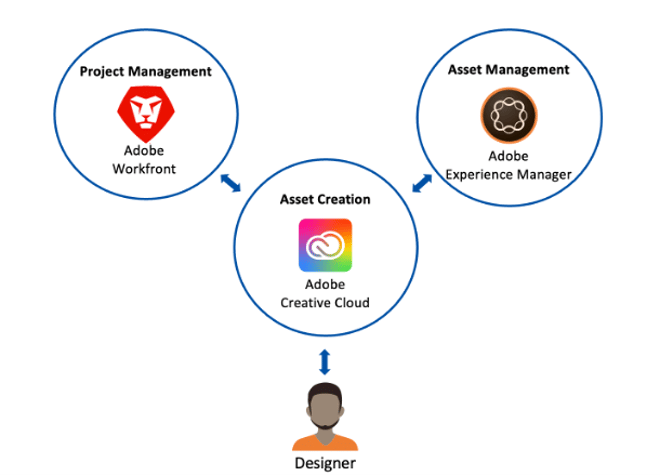
Before getting into setup steps and connector choices, it helps to understand the architecture you are building toward. In a fully integrated environment, Workfront, AEM and Creative Cloud all work together with Workfront Fusion connecting them.
-
Workfront - serves as the system of record for all marketing work. Every project, every request, every approval lives there.
-
Adobe Experience Manager (AEM) - acts as the single source of truth for digital assets, the DAM where every final asset lands with consistent metadata, usage rights, and expiration dates applied.
-
Creative Cloud - where designers work, with direct access to check out assets from AEM, make changes, and submit for approval without leaving their tools.
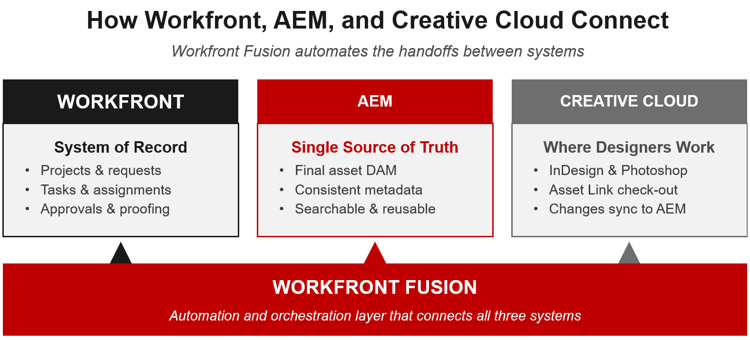
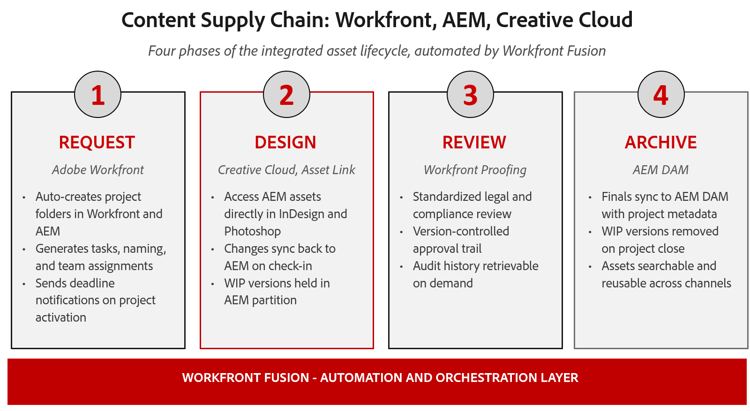
Workfront Fusion is the connective layer that automates the handoffs between these three systems. When a project starts in Workfront, Fusion creates the corresponding folder structures in both Workfront and AEM, generates tasks, assigns team members, and notifies everyone with deadlines. When designer finishes work and a project closes, Fusion syncs final assets from Workfront to AEM with all project metadata automatically applied. No manual export, no duplicate upload, no metadata inconsistency.
The result is a content supply chain where the same piece of content flows from request to creation to review to approval to publication - live on your site through AEM, and available for reuse anywhere else that pulls from the same DAM record, without leaving a trail of duplicates across three disconnected systems. That same lifecycle runs in reverse when usage rights expire: the asset comes down and gets archived, not left live because nobody noticed.
Why your three tools are not talking to each other
If your organization already runs Workfront, AEM, and Creative Cloud, the problem is probably not missing technology. You have what you need. The gap is connection and standardization.
In a siloed environment, the same file typically exists in multiple places simultaneously: in Workfront as an attached document, on a separate creative server where designers work, and eventually in the DAM, often without consistent metadata or naming conventions. Finding an asset that actually exists somewhere in the system can take longer than recreating it.
Folder creation when a new project starts is manual and prone to inconsistency. Asset naming is left to whoever is on the project that week. Generating a report of all assets tied to a specific campaign or product requires someone to go searching across multiple systems.
And the proofing workflow, particularly the legal and compliance review that every piece of customer-facing content requires, has no standardization. In financial services, review cycles of four to six weeks per project are common when the process is not systematized. Without a centralized proofing trail, retrieving a previous approval on demand means reconstructing the email thread or tracking down whoever signed off.
When you connect these three tools into a single workflow, the immediate impact is not just efficiency. It is governance. Version control becomes systematic. Approval history becomes retrievable. The compliance team stops spending weeks on audit requests that should take hours.
Consider a scenario: a credit card campaign uses an image co-branded with a partner institution. When the licensing window on that image closes, it needs to come down immediately, not whenever someone happens to notice it’s still live. Without rights and expiration data tracked at the DAM level, unpublishing it means first finding every place it was used, across the site and every other channel it was pushed to, which in a siloed environment can take longer than the exposure window itself.
Building the integration: Workfront Fusion as the connective layer
The integration centers on Workfront Fusion automating and standardizing the asset lifecycle across all three systems. Here is how the connected workflow operates.
When a request comes in and a project manager activates a project using a custom template in Workfront, Fusion automatically creates the tasks and folders for that project, both in Workfront and in AEM, and notifies the entire team with specific deadlines and the asset folders required.
Designers then work on their tasks inside Creative Cloud applications like InDesign or Photoshop. If assets already exist in the AEM DAM, they can check them out, make changes, and send them for approval directly from the Creative Cloud application using Creative Cloud Asset Link. This is the target state: designers stay in their tools without navigating separate systems to manage their workflow.
Once proofing is complete, final assets are uploaded to a Workfront final assets folder, which then syncs to AEM with all metadata automatically applied. From there, a DAM coordinator reviews and finalizes the metadata in AEM. That step is fast only if the naming and metadata discipline already started upstream, in the Workfront task template and in how files were named inside Creative Cloud. Metadata isn’t something you fix at the end in AEM. It’s a discipline that has to run through all three tools.
What previously required days or weeks of manual handoffs across disconnected systems can be completed in a fraction of that time.
How to set up automated project and folder creation
Step 1: Build a custom project template in Workfront
The project manager sets the number of assets in the request form. Fusion reads that input and generates all tasks, applies asset naming within those tasks, handles assignments, and, once the project goes active, creates the corresponding folder structure in both Workfront and AEM.
Step 2: Standardize asset naming through the task
Use the task itself as the template for the asset name, which carries through the rest of the systems. Some pieces of the asset name will require a human judgment call, but the format can be locked in and maintained at scale. This removes one of the most persistent sources of inconsistency in manual workflows: each project generating its own ad-hoc naming conventions.
Step 3: Partition work in progress from final assets in the DAM
When a project starts in Workfront, it creates three sections in the DAM, each with one job:
-
• WIP: where designers create and version drafts. Nothing here is approved.
-
• Final assets: the approved record copy, synced from Workfront once the project closes, with metadata applied.
-
• Site-ready: the subset of final assets an author has actually placed on a live page or campaign.
This partition matters for more than organization. If a content author in AEM can browse the WIP folder while building a page, an unapproved draft eventually gets published by accident. The partition is what prevents that specific failure, not just tidiness.
This partition is an important governance decision. Without it, your DAM accumulates work-in-progress versions alongside final assets, and version clarity, which matters significantly for compliance, breaks down.
Native connector or enhanced connector: How to decide
Adobe recommends starting with the native Workfront-AEM connector before evaluating the enhanced connector. On AEM as a Cloud Service, native is the only supported option for a new integration, Adobe no longer allows new enhanced-connector deployments there. The native connector handles the core use case: sending assets from Workfront to AEM with metadata mapping, and for many organizations, that is sufficient.
Native Connector
Enhanced Connector
-
One-directional asset sync, Workfront to AEM
-
Standard metadata mapping, no custom development
-
Single AEM environment
-
Building your first Workfront-AEM integration
-
No custom folder automation required
-
Bidirectional data flow- AEM to/ from Workfront
-
Auto-folder creation driven by Workfront project templates
-
Brand Portal event subscriptions for self-service access
-
Custom cross-system workflow logic via Fusion
-
Multiple AEM environments
The enhanced connector still exists for environments where it was already deployed, typically AEM Managed Services. Moving to it means layering in custom Workfront Fusion automations to address remaining gaps: folder creation, version control, and workflows that pull information from AEM back into Workfront. It is not a plug-and-play upgrade, it is a foundation for building a more sophisticated integration. Adobe does not support running native and enhanced together.
How the integration changes work for each role
The integration changes day-to-day work differently depending on the role. Understanding what improves for each team, and what requires behavioral change, is essential for planning your rollout.
-
For project managers, the biggest change is the elimination of manual, repetitive setup work. Templating projects in Workfront and automating folder creation, task generation, asset naming, and team notification from that template removes a significant source of error and inconsistency. Project setup that used to require manual steps across two or three systems happens automatically when the project goes active.
-
For your legal and compliance team, standardizing the proofing workflow inside Workfront substantially shortens review cycles: in regulated environments without a standardized process, four-to-six-week review timelines are common, and that drops to one-to-two weeks once the workflow is systematized, and continues to shrink as the DAM matures and fewer approvals require manual follow-up. The more durable improvement is in audit retrieval: any previous approval on any asset can be retrieved on demand rather than reconstructed from email threads.
-
For designers, the goal is to enable them to work entirely within Creative Cloud: to stay in InDesign or Photoshop without navigating separate systems to manage their workflow. Creative Cloud Asset Link makes this possible in principle. In practice, this is the most significant behavioral change in the entire integration, and the piece that requires the most sustained investment in training and change management.
Across all three roles, the technology's value is conditional: it has to make people's jobs easier. If any step in the new workflow is harder than what it replaced, adoption will stall there regardless of how well the integration is built.
What to measure, starting from day one
Time saved per colleague is the primary efficiency metric. Measure it by estimating time savings by role against actual workload: manual steps eliminated, approval cycles shortened, search time reduced. Build a baseline before the integration goes live so you have something to compare against.
Key metrics to track from day one:
-
Hours saved across teams through automation: Combine time saved in project setup, asset search, and approval retrieval. Organizations that fully automate the Workfront-to-DAM handoff consistently measure significant annual savings across creative and operations teams.
-
Audit response time: Track how long it takes to retrieve all marketing projects and assets tied to a specific product, campaign, or time period. In financial services, this is a direct risk metric. The move from weeks to hours on an audit request is measurable and material.
-
Legal and compliance review cycle time: Track from submission to approval. A standardized proofing workflow with clear version control and approval trails reduces cycle time and eliminates the back-and-forth that happens when approvers cannot locate the right version.
-
Time to market: From initial request to published asset. This is a longer-horizon metric: you need several months of post-integration data to establish a reliable baseline, but it is the one that matters most to marketing leadership.
-
Asset reuse versus net new creation: This requires a stable DAM foundation with consistent metadata before it is meaningful. Build toward it from day one, but do not expect reliable data in the first two quarters. The DAM consistency you are building now is the prerequisite.
None of these metrics matter in isolation from the business outcome they enable. Faster review cycles and shorter time-to-market aren’t just cost savings, they’re capacity. An organization that cuts its review cycle in half can field more campaigns in the same quarter with the same team, and more campaigns in market is a growth lever, not just an efficiency one.
What steady-state operations actually look like
After the first year, the integration stops being a project and becomes how the team works. That shift from implementation mode to operational mode surfaces a different set of lessons.
-
Designer adoption is a continuous management challenge, not a go-live milestone. The tools will work. The friction will be behavioral. Peer demonstration in the actual workflow, not classroom onboarding, is what consistently accelerates adoption. Pair early adopters directly with slower-to-shift colleagues inside real work, not training sessions.
-
The Workfront-to-DAM connection is the most durable piece, and the one with the most room to grow. Build a quarterly Fusion enhancement cadence: your operations team identifies manual steps that can still be eliminated and builds them into the next release. This keeps the integration from going stale and produces compounding efficiency gains beyond what the initial implementation delivered.
-
Your measurement infrastructure takes longer to build than the integration itself. The DAM foundation needs to be stable and consistently tagged before asset reuse tracking becomes meaningful. Budget at least two to three quarters after go-live before your time-to-market and reuse metrics tell you anything reliable.
-
Team continuity is the underestimated risk. If you do not have internal champions who are invested in the outcome and have time allocated to it, not just available for questions, the rollout slows in ways that are hard to recover from. People move roles. When they do, institutional knowledge about why things are configured the way they are goes with them unless you have documented it and distributed it.
One outcome that is often not anticipated: with centralized storage and consistent metadata, you can run a search across all imagery by tag and project to review asset diversity. Without that foundation, this means going through assets individually. With it, it takes minutes.
Preparing for AI in a regulated content supply chain
Generative AI is a natural next layer on a connected content supply chain. Adobe Firefly is the logical integration point: the ability to accelerate asset creation inside the tools designers already use, without taking them out of the systems or workflow you have built.
Firefly is worth watching closely. Direct integration with AEM Assets can generate production-ready assets for live use on the site, and Firefly Creative Production extends that into governed, scaled production: defined triggers, approvals, and brand rules applied to high-volume asset variants instead of one at a time. GenStudio for Performance Marketing is worth watching too: it can generate content variations from already-approved assets, giving performance marketing teams a way to scale ad and email variants without waiting on a creative team for every version.
In a regulated environment, the question is not whether generative AI belongs in this content supply chain. It is how to get it there responsibly.
The governance requirements are real. Content generated with AI, particularly in a highly regulated industry, needs to clear the same approval process as content created by your design team. That means the proofing workflow you are building now is also the governance foundation your AI layer will run on. Organizations that have done the hard work of standardizing review, metadata, and approval trails are better positioned to adopt AI tools than those that have not.
Before any production deployment of generative AI in your content supply chain, work through three questions:
1. What is your organization's approval process for AI-generated content, and who owns it?
2. How will AI-generated assets be tagged and tracked in your DAM so they are identifiable at audit time?
3. Does your legal and compliance review process require additional steps for AI-generated material, and have those steps been defined?
The integration architecture you are building is the right foundation. The governance questions are the prerequisite.
Before you build: What the implementation actually requires
The technology is well-documented. The things that are less obvious going in are on the people and process side. Here is what to do from day one, including what most teams wish they had done differently.
-
Audit your DAM metadata strategy before connecting anything. If your DAM does not have consistent tagging and metadata applied, asset reuse and findability will not improve regardless of how well the integration is built. Metadata consistency is the foundation. Without it, every other integration is built on unstable ground.
-
Start with the Workfront-to-DAM connection. Automate folder creation, task generation, and metadata sync at the project level first. This is the highest-value connection and the most manageable change for your teams. Build the habit before adding the complexity of the Creative Cloud layer.
-
Define your WIP versus final asset structure before go-live. This decision shapes how every role works and how storage is managed across systems. It requires input from creative, operations, legal, and DAM administration. Budget time for this conversation. It will take longer than expected, and getting it right at the start avoids costly restructuring later.
-
Standardize asset naming through your Workfront task template. Build the naming convention into the task itself so it carries automatically into AEM and Creative Cloud. This removes a persistent source of manual error and inconsistency that compounds over time.
-
Resource change management as a separate workstream, not a side activity. This is the most common place where implementations underdeliver. The technology can be well-implemented and underused simultaneously. Identify internal champions early, allocate dedicated time to the role, not just availability for questions, and build a structured onboarding path, especially for designers, whose day-to-day workflow changes the most. In financial services, account for legal and compliance team adoption as well: if reviewers are not bought into the new proofing workflow, the efficiency gains on the creative side do not materialize.
-
Build a baby-step process from the start. Not everyone adopts new workflows at the same pace, and going in with a 'here it is, step into it' mindset works for some people but not all. A structured path from the old way of working to the new one, with dedicated resources who are genuinely committed to driving the change, is what separates 60 percent adoption from 95 percent adoption twelve months after go-live.
-
Plan for quarterly Fusion enhancements. Fusion is not a one-time implementation. Build in a regular cadence to identify and automate new manual steps as your team discovers them. The compounding gains from this cadence will exceed what the initial implementation delivered.
Key takeaways
| For marketing and digital leaders |
-
Centralized asset management with consistent metadata, rights, and expiration tracking is the prerequisite. Do not skip or rush this step; every other integration depends on it.
-
The Workfront-to-DAM sync with metadata automatically applied at the project level is the single connection with the most consistent value.
-
The Creative Cloud connector changes how designers work day-to-day. Plan for it to be the hardest behavioral change in the project.
-
Build quarterly Fusion enhancement cycles into your operating model from the start: this is where compounding value comes from.
-
In financial services, a connected content supply chain is a compliance infrastructure investment and a growth lever, not just an efficiency one. Faster review cycles mean more campaigns fielded per quarter with the same team.
-
Legal and compliance review cycle times drop significantly when the proofing workflow is standardized. Plan for this to be one of the first measurable outcomes.
-
Change management is where implementations underdeliver. Resource it as a first-class workstream with dedicated time and internal champions.
-
The governance foundation you build for this integration is the same foundation your AI tooling will run on. Organizations that do this work now are better positioned for what comes next.
What’s next
This integration is the foundation, not the ceiling. Two layers sit on top of it: personalization and optimization through Target and Journey Optimizer, and measurement through Analytics and Customer Journey Analytics. Both are natural next steps once this backbone is operating.