Customer journeys often span multiple data sources, channels, and phases, making them highly complex. These best practices provide a clear framework to simplify journey design and execution, ensuring marketing teams can operate efficiently without being overwhelmed.
Introduction
Every customer journey is personal, evolving with everyone’s needs and behavior. When done right, our marketing meets our customers where they are while driving them through the milestones that lead to deeper engagement. By listening to customer signals, each person moves through their journey at their own pace where every touchpoint feels personalized and relevant to their unique context.
Given this complexity, multi-step journeys may challenge marketing and marketing operations teams in ways they haven’t had to with more traditional marketing campaigns.
This framework helps manage that complexity. It covers key components of an effective journey strategy, including:
- Best practices for data management
- Breaking down journeys into bite-sized sub-journeys
- Tips to streamline tagging and naming conventions
Simplify data management by reducing moving parts
Clean data is the fuel to well-running customer experiences. The more you can simplify your data management practice, the more you can focus on optimizing the journeys that make up your overall customer experience. Journeys as analogous to machines and, like machines, the complexity of maintenance goes up with the number of moving parts. To simplify, reduce the number of moving parts as much as possible.
Think about two key parts to reduce complexity. First, the datasets used to bring data into the Experience Cloud Data Lake and store it there. Second, the datasets that need to be enabled so they can contribute to the Real-Time Customer Profile. While there are many benefits to leveraging these features, your success in leveraging them depends on careful planning around the following considerations:
- Data sourced from external databases must be synchronized with proper alerts in place to identify ingestion failures when they occur.
- Profile guardrails need to be considered in addition to the data ingestion guardrails that apply to all data coming into Experience Platform.
- Identity data and its integrity in your source systems must be carefully planned for healthy identity graphs.
- Data Lake utilization, which includes overall storage consumption, table relationships, and addressable profiles, must be part of any pre-ingestion assessment.
At a high level, the best way to reduce moving parts within your data management is to carefully consider the use case for each data source you leverage. From there, you can determine the simplest method for ingesting and managing that data in Experience Platform while still enabling all the functionality required by your use cases.
Let’s compare options for ingesting and leveraging data within customer journeys.
Option 1 - Access external data source via Custom Actions in Journey Optimizer
This method allows you to connect directly to external data sources without persisting in the Experience Platform Data Lake.
To leverage this approach, consider the following questions about your use case:
- Is the data that you need to access useful outside of your customer journey? If not, you may not need to create a dataset in the Data Lake.
- Is your data source accessible through an API endpoint that can be accessed by external systems? If so, does the response contain the attributes needed to personalize and enable your journey?
Option 2 - Data ingested into dataset not enabled for profile in Data Lake
This method allows you to trigger and personalize your journeys based on contextual event data without having the data source contribute directly to the Real-Time Customer Profile.
To leverage this approach, consider the following questions about your use case:
- Do records contain an identity field that can be used to access profiles stored within Experience Platform’s profile store? This is required for your journey to access profiles and deliver marketing to them via Journey Optimize.
- Is the data useful for creating audiences that can be leveraged in channels outside of Journey Optimizer? If not, you may not have a need for enabling the dataset for profile.
- Does the data contain multiple identities that may be useful in stitching together other disparate profile fragments, creating richer datasets? If not, it may not contribute to richer customer identity graphs.
Option 3 – Data ingested into profile-enabled dataset in Data Lake
This method allows you to create audiences, identity graphs and profiles, then leverage those components across multiple journeys in Journey Optimizer along with any other RT-CDP Destinations.
- Is the data useful for creating audiences that can be leveraged in channels outside of Journey Optimizer? If so, using a profile-enabled dataset allows you to use this data within your audience definitions.
- Does the data contain multiple identities that may be useful in stitching together other disparate profile fragments, creating richer datasets? If so, using a profile-enabled dataset will lead to richer, more powerful datasets by stitching together otherwise disparate profile fragments from other data sources.
Bite-size your customer journeys
Within journeys, marketing channels guide customers through milestones that are important to the overall customer experience. Customers may move through these milestones at their own pace, and the marketing touchpoints they receive may vary depending on whether they have already completed certain milestones on their own. In Journey Optimizer, the time between marketing touchpoints can be controlled with Wait activities, and the overall orchestration of personalization can be managed through Split activities.
Even simple customer journeys can quickly become overwhelming for the marketing and marketing operations teams responsible for building and managing them.
In this example, customers are guided through three milestones using two marketing channels. The journey strategy is straightforward: an initial communication is sent, followed by a reminder after a few days if the customer has not completed the intended milestone within that period.
In this journey, customers enter by joining a loyalty program. From there, they are encouraged to download a mobile app, followed by marketing efforts designed to lead them through their first and second loyalty transactions.
A diagram of the journey described looks like this:
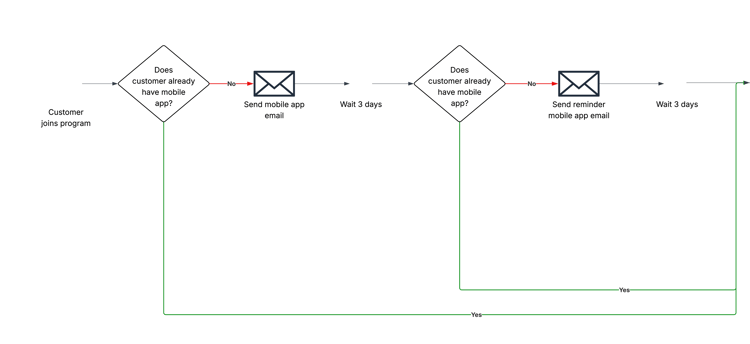
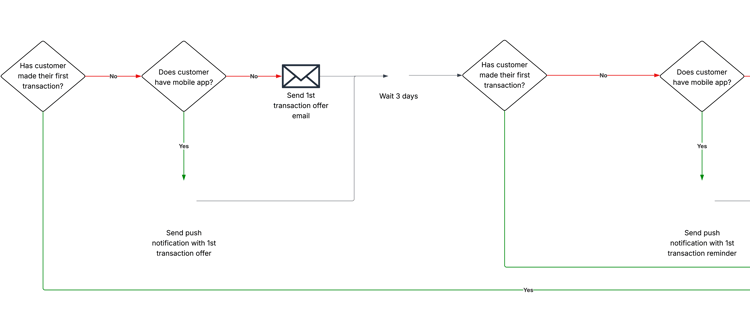
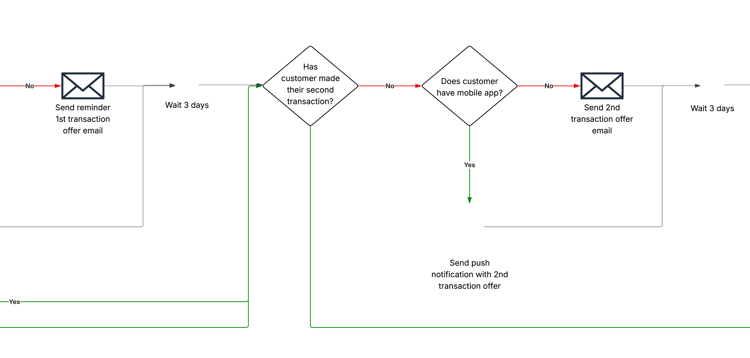
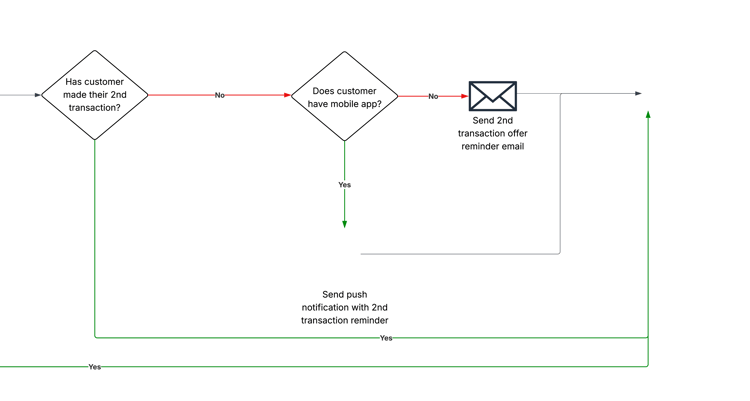
While this journey may seem simple, the example includes more than 20 unique paths a customer can take (20 is simply the point at which counting became too difficult). One customer may receive only the first two mobile app communications, while another may receive every communication in the journey. A third customer may progress through the journey but receive only the communications related to loyalty transactions.
This wide range of possible experiences within a single journey creates a level of complexity that can slow down teams responsible for building and managing journeys. This complexity increases exponentially as additional marketing channels or touchpoints are introduced.
To help manage this complexity, the following technique can be used to break journeys into smaller, more manageable sub-journeys.
Step 1– Visualize the end-to-end journey
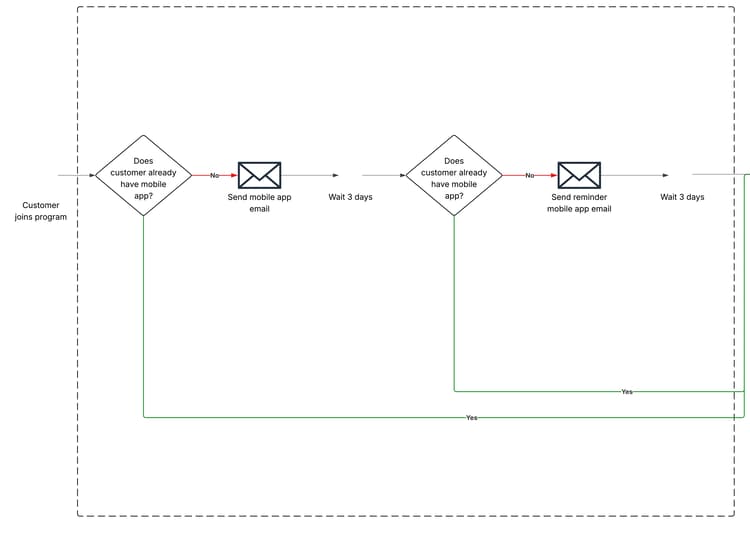
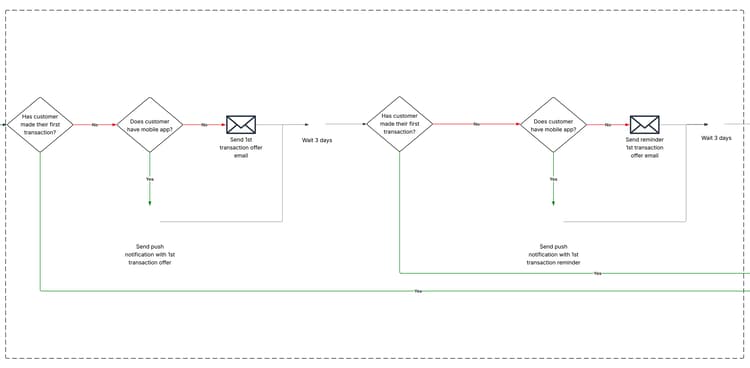
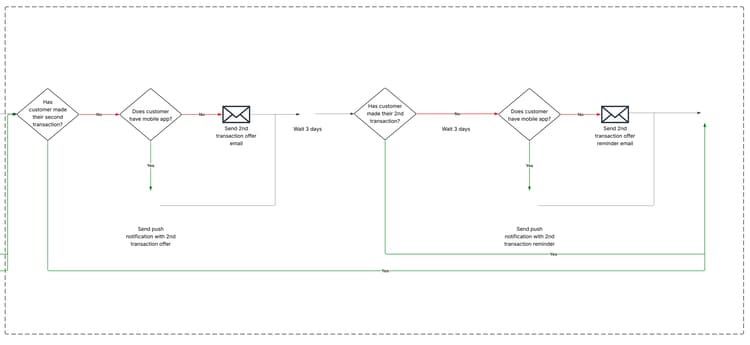
Once the full end-to-end customer journey is represented visually, the high-level phases and milestones within the journey can be clearly identified.
Phase 1: Download mobile App
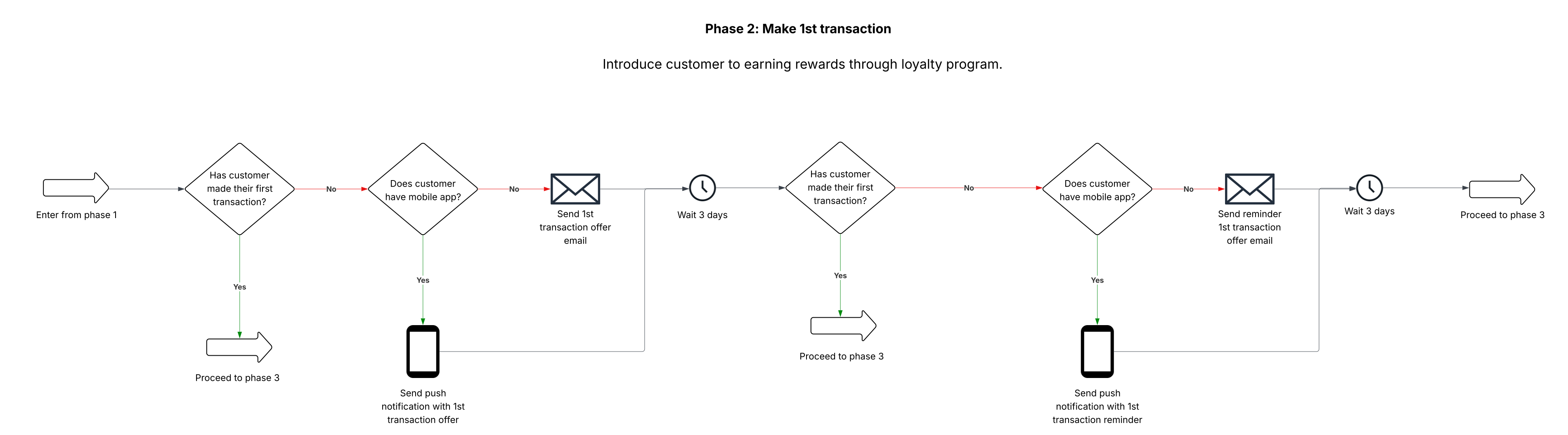
Phase 2: Make 1st transaction
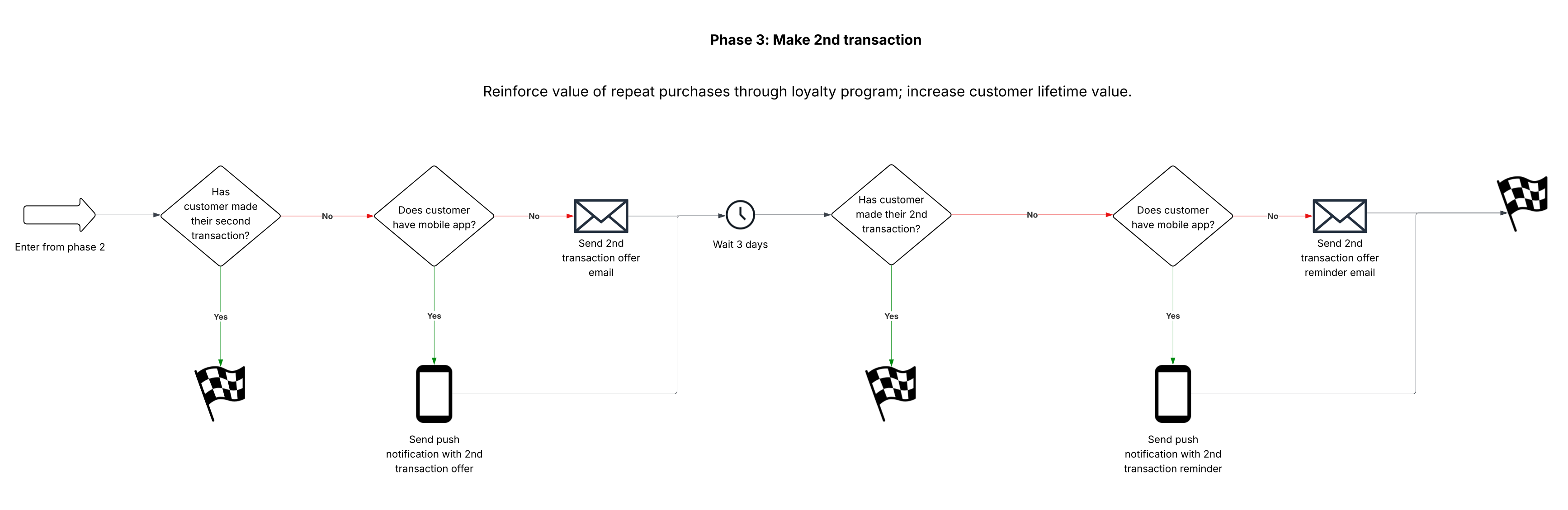
Phase 3: Make 2nd transaction
Step 2 – Annotate journey map with phases
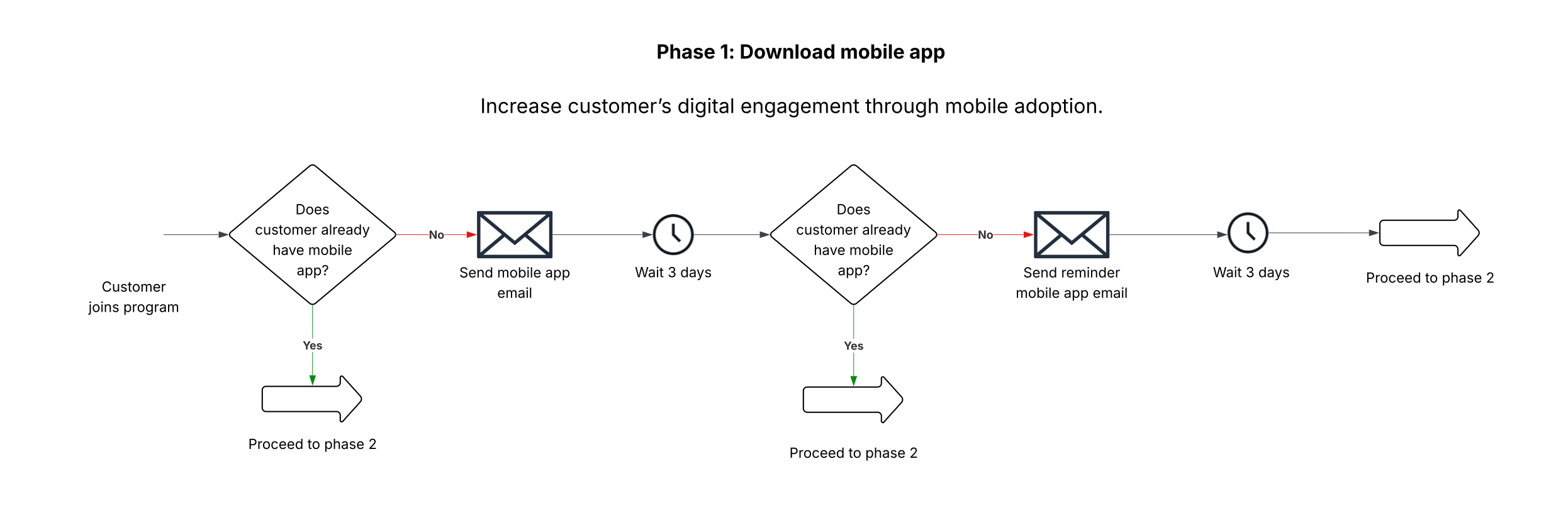
With phases clearly marked, separate each phase into its own separate “sub-journey.” It may also be useful to clearly mark the business objective to drive with each of these sub-journeys. This will further help with alignment in the final step when teams begin the work required to bring these to life.
Step 3 – Build a larger end-to-end journey via separate “sub-journeys”
With larger customer journey broken down into smaller sub-journeys, focus on translating these high-level diagrams into more technical requirements and designs that can then be built within Journey Optimizer.
With this approach, three relatively simple customer journeys are developed. These smaller journeys then combine to create the larger, more complex journey originally illustrated.
With this approach, sophisticated customer journeys can be created with less risk of introducing unnecessary complexity.
Tag your way to simplified journey maintenance
Once the journeys are live, the work does not stop. Their delivery and performance must be monitored, and new, refined versions should be created as part of ongoing optimization. This often needs to be done across multiple journeys running at the same time, and across different business units or marketing teams.
In this context, it is important to be able to quickly review and locate journeys within the full set of live journeys in an organization’s Journey Optimizer instance.
A common approach to achieving this is the use of naming conventions. Although often created with careful thought and good intentions, these naming conventions can sometimes add complexity to customer journey management rather than reduce it.
The following example illustrates how this can occur.
A typical naming convention uses a defined structure when labeling journeys. Many elements within that structure contain metadata that goes beyond the customer experiences being created. A sample naming convention structurd, designed to make it easy to identify journeys based on selected metadata, may look like this:
<Marketing stakeholder team> - <Marketing objective> - <Campaign/Journey name> - <Phase/milestone name> - <In-market dates>
When applied correctly, a journey leveraging this convention may have the following name:
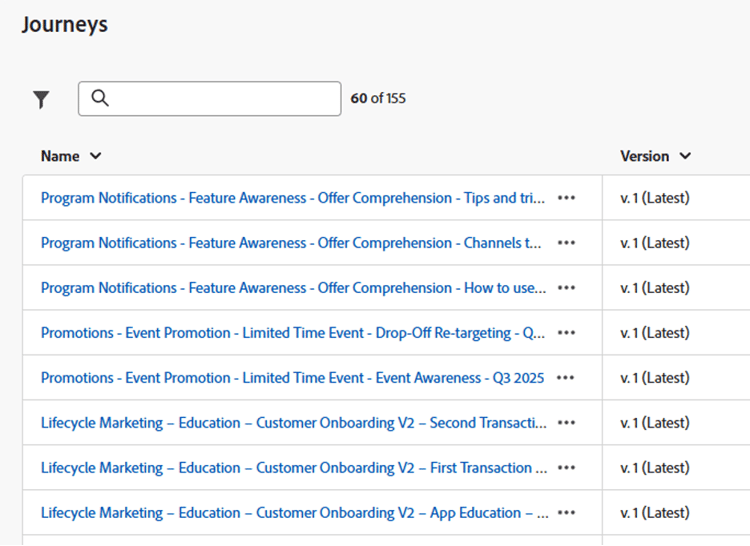
Lifecycle Marketing – Education – Customer Onboarding V2 – App Education – Q3 2025
If a single team member is managing and labeling all journeys, the convention can likely be applied successfully. However, as work scales across multiple team members or multiple teams, the likelihood of the convention being applied without errors decreases significantly.
Here’s what an instance of Journey Optimizer looks like with many journeys running simultaneously, leveraging this naming convention:
Despite this being a common approach, there is a better way.
Tags and Tag Categories in Journey Optimizer allow you to accomplish many of the stated goals associated with naming conventions—without the complexity seen in the examples above. Teams can filter on these tags and categories while journey names can be focused more clearly on the customer milestone being driven.
Follow the steps below to translate your naming convention approach into a simpler one, leveraging these features.
Step 1
Have a platform administrator create tag categories for any of the attributes you use to organize your journeys. Good candidates for tag categories are additional metadata your team might otherwise implement with a more complex naming convention.
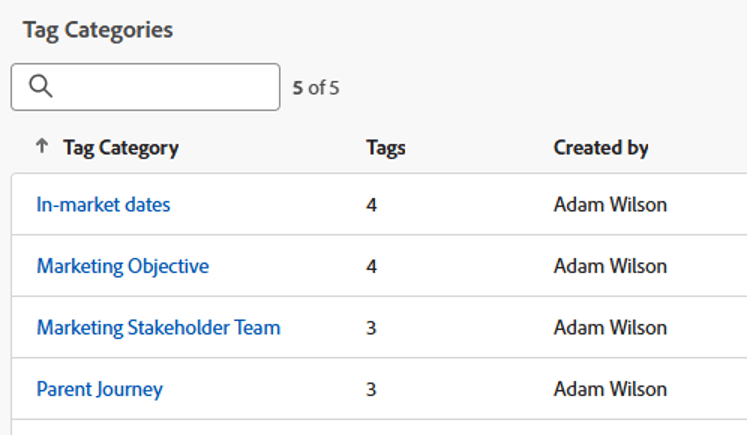
Step 2 - Within each category, create the tags that will be available for application as journeys are created. These tag values should represent the metadata that will describe possible journeys within that category.
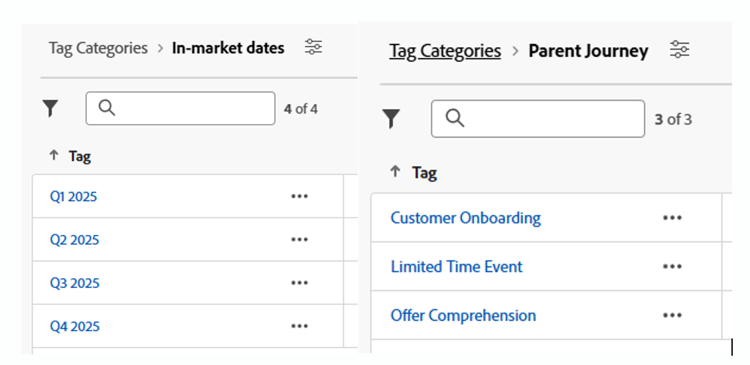
Step 3 - When launching new journeys, ensure each of the established tags and tag categories is correctly applied. Each journey will likely have multiple categorized tags.
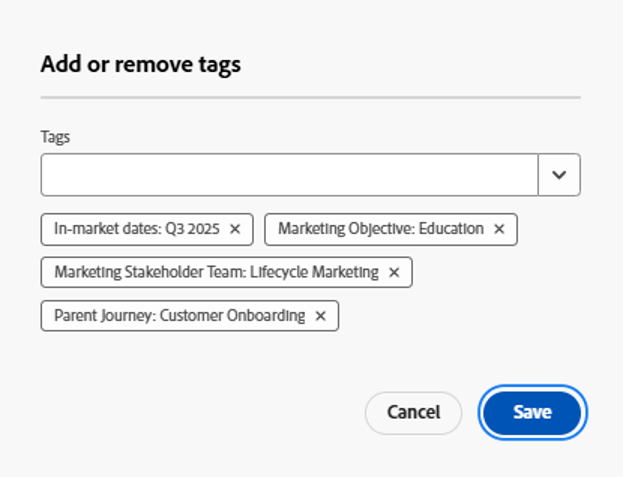
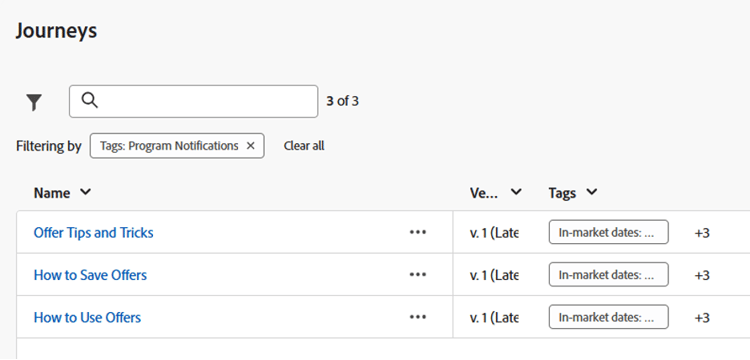
Step 4 - Use the journey name to indicate the milestone being driven by the journey. Looking across the live journeys is now a significantly easier task. Further, we haven’t lost our ability to locate journeys based on the metadata we’d previously stored in the journey name via a naming convention. We can filter on these tags and tag categories to do this.
Conclusion
While customer journeys represent an exciting opportunity for marketing teams to create rich, personalized customer experiences, leveraging technology, there’s a risk the teams building them become overwhelmed by complexity as they do so. To avoid this outcome, be mindful of the following areas for simplification:
- Within your data management practice, review the use cases for each data source to remove as many “moving parts” as possible.
- Break down your larger customer journeys into smaller, “bite-sized” sub-journeys that can be combined to create your overall journey.
- To assist in day-to-day maintenance and optimization, explore the usage of tags and tag categories as an improvement over complex naming conventions.