As a Target Consultant working on a multitude of projects, one project that has been interesting to work on has been a Target and Workfront Fusion integration. Separately Target and Fusion have had their own momentum, however seeing how they can work together has really brought forward some powerful ideas in terms of what can be done with automation.
Introduction
As a refresher Target is the testing and personalization offering from Adobe while Workfront Fusion excels at automation. The key capabilities of Fusion include linking actions in Workfront, Target, and other systems without extensive coding.
Although there are many ideas on what this automation could do, my hope is to provide a simple example on what can be accomplished through my experience in Consulting. My hope is someone will be able to build upon these examples and solve more complex use cases.
How does Fusion integrate with Adobe Target
Target can integrate with Fusion through available modules and connectors. Simple tasks such as creating, updating, and deleting Target activities or managing segments can be accomplished.
Following our extensive documentation on Experience League you should be able to setup an initial connection, Adobe Target Modules in Workfront Fusion.
Common use cases
Once a connection is established, let’s look at a handful of automations that can be done:
-
Automating creation and deployment of A/B or XT activities using a Workfront request
-
Triggering Target activity updates based on Workfront approvals, status changes, or asset uploads
-
Managing notification and reporting workflows by leveraging Adobe Analytics and have reporting returned into Workfront
Walking through a simple Workfront Fusion and Target automation
Let’s look at a simple example of automating the creation of an offer as a common building block in automation:
-
Go to scenarios and then ‘Create a new scenario’
-
Select Target and for this demo we’re going to ‘Create a record’ under actions
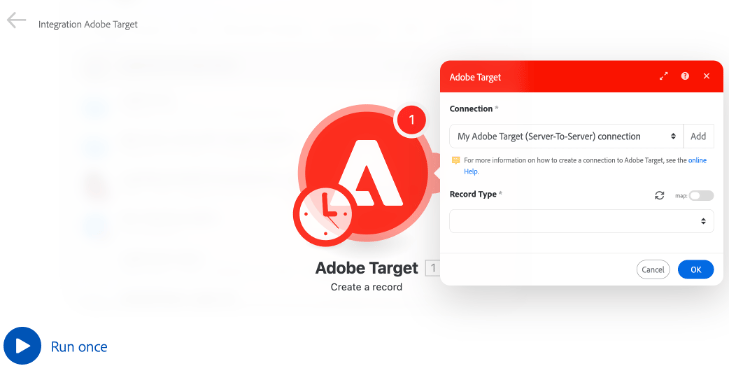
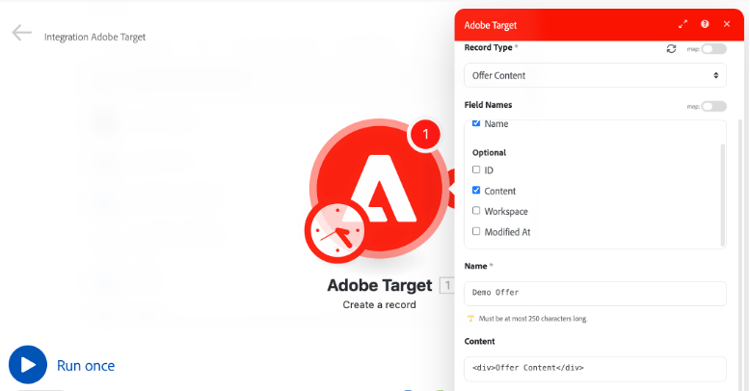
- Select ‘Offer Content’ under ‘Record Type’ make sure ‘Name’ and ‘Content’ are checked
-
Next let’s add some sample content for demonstration purposes, feel free to use something like ‘Demo Offer’ and some sample HTML for the content
-
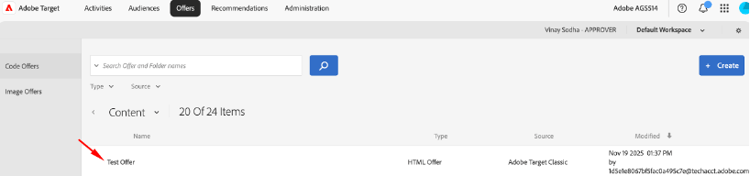
Once that’s complete let’s run the scenario, if successful you should see the offer under ‘Offers’ in Target
Conclusion
From this simple automation, there are many more possibilities. Any sort of user-driven workflow you’re currently using can most likely be adapted to an equivalent automation.
As the Adobe ecosystem expands, hopefully this overview demonstrates how powerful innovations such as these integrations are. With these automations, here are the main benefits that I’ve observed:
-
There can be a reduction in manual repetitive work
-
Automation can result in fewer errors along with greater scalability for large scale personalization and testing programs
-
Lastly, users can gain from more accurate reporting and improved cross team collaboration