Choosing the right payment architecture prevents technical debt as markets and payment methods expand. This article compares Payment Services and third-party gateways, B2C/B2B payment methods, PCI scope, fraud protection, and the impact of agentic payment protocols announced in 2026.
Payment strategy is one of the most consequential technical decisions in any Adobe Commerce project and also one of the most frequently scoped too narrowly.
Payment is the moment of maximum commercial risk in a shopper's journey. A frictionless checkout converts. A confusing or slow one abandons. A checkout that fails silently due to a gateway timeout, a 3DS (3-D Secure) authentication problem, or an incorrect payment method configuration loses both the sale and the customer. Payment architecture in Adobe Commerce involves more decisions than most implementation teams initially anticipate: which gateway or gateways to use, where to surface each payment method on the storefront, how to manage PCI (Payment Card Industry) compliance scope, how to handle fraud, and what the B2B payment workflow looks like when purchase orders and company credit are in scope.
This article provides the decision framework and implementation guidance for each of those questions, with specific attention to Payment Services (Adobe's native payment solution, supported on ACCS), the architectural considerations for multi-gateway deployments, the agentic payment protocols that Adobe committed to supporting in February 2026, and how payment architecture changes when you deploy on the EDS (Edge Delivery Services) storefront versus a traditional theme-based storefront.
Adobe Payment Services vs third-party gateways: The decision framework
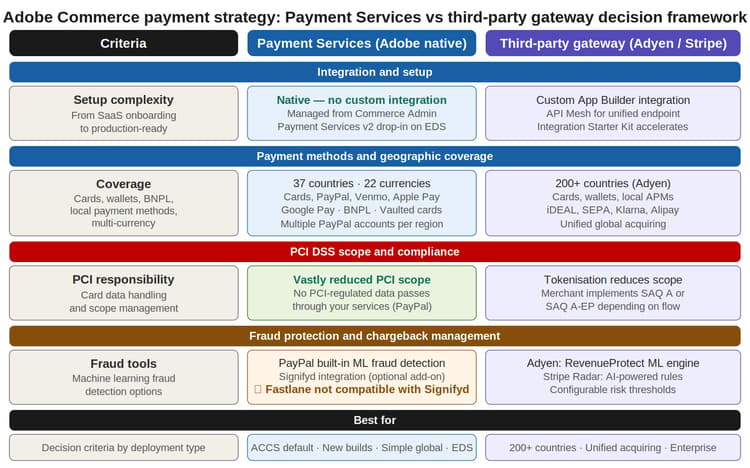
The first strategic question in any Commerce payment architecture is whether to use Payment Services for Adobe Commerce, Adobe's native, managed payment solution, or a third-party gateway such as Adyen or Stripe. The answer is not always one or the other. Many enterprise implementations use both in a complementary model.
Payment Services: The case for Adobe's native solution
Payment Services is Adobe's native, managed payment solution, confirmed in Adobe's own release documentation as the default payments solution on Adobe Commerce as a Cloud Service (ACCS). It is a SaaS-based solution that requires no custom gateway integration, and is configured directly from Commerce Admin and managed through the same interface as the rest of the storefront.
Geographic coverage: per Adobe's current published figures, Payment Services supports 35+ countries and 20+ currencies (Adobe describes this as an ever-growing list), covering major markets in North America, Europe, and Asia-Pacific. Coverage is split into two tiers: Advanced (fully supported) onboarding, with the full payment option set, and Standard onboarding, a subset of options (Express Checkout, meaning PayPal credit and debit cards) available in additional supported countries beyond the Advanced tier. Payment methods include credit and debit cards, PayPal, Venmo, PayPal Pay Later, PayPal Credit, Apple Pay, Google Pay, and card vaulting for repeat purchases; Buy Now Pay Later is supported through PayPal Pay Later specifically, rather than as a generic native BNPL category spanning multiple providers. Merchants can attach multiple PayPal accounts per region and brand, a significant improvement that enables multi-brand and multi-region deployments on a single Commerce instance.
Third-party gateways: When Adyen or Stripe fits
For merchants who need coverage beyond Payment Services' range, or who require specific local payment methods (iDEAL, SEPA, Alipay, GrabPay, PIX, Interac) not available through Payment Services, a third-party gateway is the correct choice. Adyen holds direct acquiring licenses in 40+ countries and can process payments across 200+ markets worldwide through a single integration, making it a common choice for large enterprise merchants with complex multi-region operations; the acquiring-license footprint and the broader processing reach are two different figures worth keeping distinct when quoting Adyen's coverage.
Third-party gateways integrate with Adobe Commerce through several paths depending on architecture: App Builder, native modules and extensions, hosted payment SDKs, or direct API integrations. For SaaS/ACCS deployments specifically, Adobe's own reference architecture documents App Builder together with API Mesh as the standard extensibility layer, with the Integration Starter Kit's Server-Side Gateway Integration pattern (an AIO Runtime Action handling gateway communication, called from the storefront via GraphQL) as the documented approach for third-party payment gateway integrations. API Mesh itself is confirmed in Adobe's ACCS architecture documentation as the API-first supergraph layer that Commerce SaaS is built on, so its role as a unified integration and routing layer for multi-gateway, multi-currency deployments is genuinely part of the documented architecture, not just one composable option among many. The specific claim that it "routes payment context per store scope" is a reasonable implementation pattern within that architecture, but is not itself a named, official Adobe payment-routing feature.
PCI DSS scope: What your payment choice means for compliance
One of the most underweighted factors in payment gateway decisions is PCI DSS scope, or how much compliance work your payment architecture creates. The Payment Card Industry Data Security Standard governs how merchants handle, process, and store cardholder data. The scope of your PCI obligation depends directly on how card data flows through your systems.
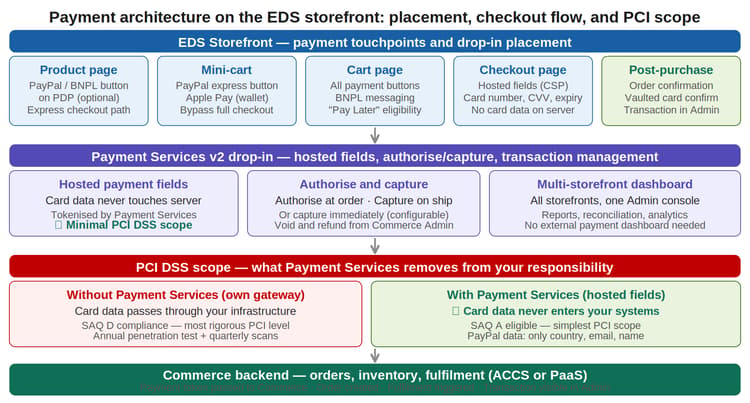
With Payment Services hosted fields, card data (card number, CVV, expiry) never passes through your servers. The fields are rendered by Payment Services and tokenized before the payment request reaches Commerce. Per Adobe's official security documentation, no PCI-regulated data is passed across your services with PayPal payment buttons. Hosted fields can help merchants qualify for Self-Assessment Questionnaire (SAQ) A or SAQ A-EP, the simpler and less burdensome compliance paths, depending on implementation details, scripts, and page control. Final PCI scope classification, including SAQ (Self-Assessment Questionnaire) A eligibility, is ultimately determined by a Qualified Security Assessor based on the merchant's full architecture, not automatically conferred by using hosted fields alone.
If card data passes through your own servers before reaching the gateway, without hosted fields, you may fall into SAQ D territory: the most rigorous PCI compliance level, requiring annual penetration testing, quarterly network scans, and extensive documentation. Direct handling of cardholder data substantially increases PCI scope and may require SAQ D, but as with SAQ A above, the applicable SAQ level should be confirmed with a Qualified Security Assessor rather than assumed from architecture alone. The difference in compliance overhead between SAQ A and SAQ D is measured in months of work and thousands of dollars annually.
Building the right payment method mix
Payment method strategy is not just about offering more options; it is about offering the right options at the right points in the shopper journey, for the right customer segment, in the right market. Three dimensions govern the payment method mix decision: customer segment (B2C vs B2B), geography, and purchase context.
B2C: Cards, wallets, and buy now pay later
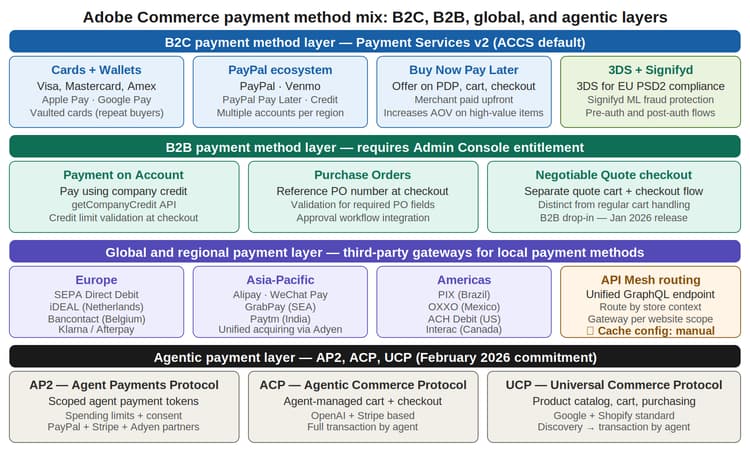
The B2C payment method baseline covers three categories that should be active on every commerce deployment:
-
Cards and digital wallets: Visa, Mastercard, Amex, Apple Pay, and Google Pay are the non-negotiable baseline. Digital wallet share of checkout is growing in every market; Apple Pay reduces checkout friction on mobile to a single touch. Configure Apple Pay on the product page, mini-cart, and checkout for maximum conversion coverage.
-
Card vaulting for repeat buyers: Payment Services supports card vaulting, saved payment methods that let returning customers complete purchases without re-entering card data. This directly improves repeat purchase conversion rates. Merchants can also create orders in Admin using a customer's vaulted card for phone and assisted orders.
-
Buy Now Pay Later: BNPL options can be placed on product pages, mini-cart, shopping cart, and checkout, not just at the final payment step. Showing BNPL messaging on the product page (for example, "From $X/month with Pay Later") increases conversion on high-value items and AOV (average order value). The merchant is paid upfront; the BNPL provider manages the consumer instalment relationship.
B2B: Payment on account, purchase orders, and negotiable quotes
B2B payment workflows in Adobe Commerce are fundamentally different from B2C. Adobe's Checkout drop-in changelog confirms a major version upgrade (Checkout v3.0.0) released January 8, 2026, described as bringing comprehensive B2B checkout support, and it added exactly the three payment methods described below. The same release disables Fastlane for B2B checkout specifically, to prevent conflicts with B2B payment workflows.
-
Payment on Account: allows B2B customers to pay using their company credit balance. The checkout drop-in uses the getCompanyCredit API to retrieve available credit and credit limit in real time, with validation to prevent orders that exceed the credit limit.
-
Purchase Orders: enables B2B customers to reference a purchase order number at checkout, with validation to ensure required PO fields are provided. This is the standard payment method for procurement workflows where the actual financial settlement happens outside the Commerce system through finance and AP processes.
-
Negotiable Quote checkout: checkout distinguishes between regular carts and negotiable quotes, with separate event handling and containers for each flow. This enables quote-based purchasing where the price was negotiated before checkout, a fundamental B2B capability.
Global and regional: Local payment methods
For merchants operating across multiple regions, local payment methods (APMs) are not optional; they are conversion-critical. In the Netherlands, iDEAL accounts for over 60% of online payments. In Brazil, PIX is the dominant digital payment method. In Germany and Austria, SEPA Direct Debit is expected. A storefront that only offers international card brands in these markets will underperform against local competitors who offer the preferred local method.
Third-party gateways (Adyen for enterprise, Stripe for mid-market) provide the local payment method coverage required for true global commerce. Routing by store context, using API Mesh as the documented integration layer for SaaS/ACCS deployments, can help ensure the correct gateway and local methods are presented for each regional storefront. Each gateway connection is configured per website scope in Commerce Admin.
Payment architecture on the EDS storefront
The EDS-based Commerce storefront changes how payment methods are implemented and where they appear. Understanding the payment touchpoint model and the checkout drop-in architecture is essential for correct EDS payment configuration.
Payment touchpoints: Where methods surface on the storefront
Payment Services supports four payment touchpoints on the storefront, and the optimal configuration differs by method:
-
Product page (PDP): PayPal express button and BNPL messaging. Not recommended for all implementations; adding payment buttons to the PDP bypasses the cart, which may conflict with promotions, gift wrapping, or quantity-based rules. Test thoroughly before enabling.
-
Mini-cart: PayPal express and Apple Pay wallet buttons. These allow shoppers to bypass the full checkout from the cart drawer, the highest-friction reduction for impulse and repeat purchases.
-
Cart page: all payment method buttons plus BNPL messaging and Pay Later eligibility. The cart page is the recommended primary location for showing the full payment method range before checkout begins.
-
Checkout page: hosted payment fields for card entry (Content Security Policy (CSP) -compliant, no card data on server), plus all wallet methods. This is the conversion-critical page; minimize friction and ensure all configured payment methods render without JavaScript errors.
Authorize and capture: Configuring the right action for your fulfilment model
Payment Services supports two payment action modes: Authorize only (capture separately at fulfilment) and Authorize and Capture (capture immediately at order). The correct configuration depends on your fulfilment model:
-
Authorize only (recommended for physical goods): authorize at order, capture at shipment. This prevents charging the customer before goods are actually shipped and reduces chargeback risk on orders that are cancelled before fulfilment. Configure the capture as part of the shipment workflow.
-
Authorize and Capture (recommended for digital goods): immediate capture at order is correct when the goods are delivered instantly (software downloads, digital licenses, SaaS subscriptions). Authorize-only makes no sense when fulfilment is instantaneous.
Fraud protection: The payment architecture layer teams forget
Fraud protection is frequently treated as an afterthought in payment architecture, addressed after the first chargebacks arrive rather than before launch. The cost of reactive fraud management is significantly higher than proactive prevention: chargebacks carry fees, elevated chargeback rates trigger gateway penalties, and manual review teams are expensive.
Payment Services includes PayPal's built-in machine learning fraud detection for PayPal payment flows. For card and Apple Pay transactions, Signifyd fraud protection integrates with Payment Services, providing risk coverage for credit cards, debit cards, vaulted cards, checkout through Admin, and Apple Pay. Signifyd supports both pre-auth and post-auth flows.
For third-party gateways, fraud protection is built into the gateway layer: Adyen's RevenueProtect uses ML-based risk scoring with configurable thresholds per payment method and region. Stripe Radar provides AI-powered rules with a visual rule builder. Both solutions integrate with the gateway's dispute management workflow, reducing manual chargeback handling.
Future-proofing: The agentic payment layer
Adobe's agentic commerce commitments arrived in two stages: an earlier commitment to Google's Agent Payments Protocol (AP2), followed by a dedicated announcement on February, 2026 that Adobe Commerce would also support the Universal Commerce Protocol (UCP, led by Google, covering discovery through post-purchase) and the Agentic Commerce Protocol (ACP, co-developed by OpenAI and Stripe, covering in-chat checkout execution). AP2 itself has since moved to governance under the FIDO Alliance and has attracted 60+ initial partners, including Mastercard, PayPal, Adyen, and Coinbase among others. These standards were still maturing as of the original announcement, and one notable data point on adoption: OpenAI shut down ACP's flagship consumer surface, Instant Checkout, in March 2026 after roughly five months of limited sales, though the ACP protocol itself continues.
The practical payment architecture implication: agentic shoppers do not interact with payment buttons. They programmatically execute cart, checkout, and payment operations through the Commerce MCP (Commerce Model Context Protocol) server and the AP2 payment token layer. AP2 provides scoped agent payment tokens with spending limits and consent-based transaction approval, addressing the consumer concern about autonomous agent spending.
Payment architecture decisions made today should not block agentic commerce readiness. Specifically:
-
Payment Services on ACCS: the payment stack on ACCS is aligned with Adobe's agentic commerce roadmap. Of Payment Services' partners, PayPal and Adyen are confirmed among AP2's 60+ initial partner list directly; Stripe's primary agentic-commerce alignment is with ACP, which it co-developed with OpenAI, rather than being confirmed specifically as an AP2 rail partner. Treat the AP2 alignment as confirmed for PayPal and Adyen, and as ACP-side (not AP2-side) for Stripe.
-
API Mesh as the payment routing layer: API Mesh's role as the unified GraphQL endpoint and supergraph for Commerce SaaS is documented Adobe architecture, not a speculative pattern, which makes it a reasonable foundation for agentic payment queries as well as current-generation multi-gateway routing. Implementing API Mesh now is a solid current-generation architecture decision that also positions you for agentic commerce.
-
Headless checkout with EDS drop-ins: the EDS storefront with checkout drop-ins creates a programmatic checkout interface well suited to agentic flows. Traditional theme-based checkouts (Luma, PWA, and similar) can also be interacted with programmatically, through existing APIs and browser automation; the more accurate distinction is that EDS drop-ins provide a cleaner, API-oriented architecture better suited to agentic and composable commerce flows, not that traditional checkouts are inherently non-programmatic.
Common mistakes to avoid
-
Configuring payment buttons only on the checkout page. PayPal express, Apple Pay, and BNPL messaging on the cart page and mini-cart reduce checkout friction for the highest-intent shoppers. Start with the cart page; it is the lowest-risk place to add payment methods.
-
Using Authorize and Capture for physical goods. Capturing payment before fulfilment is confirmed increases chargeback risk and complicates partial fulfilment scenarios. Use Authorize only for physical goods and capture at shipment.
-
Not configuring 3DS for EU/UK stores. 3DS is required under PSD2 (Revised Payment Services Directive) for EU and UK card transactions. Missing 3DS causes legitimate transactions to be declined by issuing banks in compliant markets.
-
Enabling both Fastlane and Signifyd. This is a documented incompatibility: Adobe's own Signifyd fraud protection documentation states plainly that Fastlane is not compatible with Signifyd, and separately, Adobe's January 2026 B2B checkout release disables Fastlane for B2B checkout specifically to avoid conflicts with B2B payment workflows. Choose one or the other for the affected flow rather than assuming both can run together.
-
Routing all regions through a single Payment Services account. Payment Services supports multiple PayPal accounts per region and brand. Configuring separate accounts per website scope enables per-region reporting, currency management, and risk controls.
-
Choosing a gateway that cannot support future local markets. If global expansion is on the roadmap, choose a gateway with the global APM coverage you will need, not just the coverage you need today. Migrating gateways after launch disrupts payment history, vaulted cards, and fraud model data.
-
No documented reconciliation process before launch. Payment Services provides reconciliation reporting within Commerce Admin. Third-party gateways export to separate dashboards. Whether reporting and reconciliation access is uniform between PaaS and ACCS deployments was not confirmed in this pass and is worth checking directly with Adobe for your deployment model. Define and test your reconciliation workflow in staging; financial discrepancies found in production are expensive to resolve retroactively.
Key takeaways
-
Payment Services is Adobe's native, managed payment solution, confirmed as the default on ACCS and (per Adobe's January 2026 changelog) currently on its v2 drop-in generation. Coverage is currently published at 35+ countries and 20+ currencies, split between Advanced (fully supported) and Standard (Express Checkout) tiers.
-
PCI scope reduction is a strategic benefit, not just a compliance checkbox. Hosted fields keep card data from entering your systems and can help qualify for SAQ A or SAQ A-EP rather than the more burdensome SAQ D, though final classification is set by a Qualified Security Assessor.
-
BNPL on the product page and cart increases AOV, not just conversion. BNPL messaging early in the funnel influences purchase decisions, not just checkout completion.
-
B2B payments require separate payment drop-ins with entitlement. Payment on Account, Purchase Orders, and Negotiable Quote checkout were added together in the confirmed January 8, 2026 Checkout v3.0.0 release. Confirm Admin Console entitlement before scoping.
-
Fastlane and Signifyd are documented as incompatible in Adobe's own Signifyd integration guide; Fastlane is also disabled outright for B2B checkout. Plan around this rather than treating it as a soft constraint.
-
API Mesh is Adobe's documented supergraph and integration layer for ACCS, and a solid foundation for multi-gateway routing by store context; it also positions you for agentic payment routing, though it is not itself a named payment-routing feature.
-
Agentic payment protocols have moved from roadmap to partly shipped. Adobe's Commerce MCP server went live in April 2026. AP2 is now FIDO Alliance-governed with PayPal and Adyen as confirmed partners; Stripe's agentic alignment is via ACP, not confirmed AP2 partnership. Choose a payment stack today that does not block agentic readiness, informed by these specifics rather than a blanket "still maturing" caveat.
Adobe tools and resources for payment strategy:
Actionable next steps
-
Audit your current payment configuration: list every payment method enabled, every page where it appears, and whether Authorise only or Authorise and Capture is configured. This baseline exists in most deployments only informally.
-
Review the Payment Services coverage map (currently 35+ countries, 20+ currencies, split into Advanced and Standard/Express Checkout tiers) and validate that it covers all your current and planned markets. Document which markets require third-party gateway coverage and which gateway provides the local APMs needed.
-
Confirm your PCI self-assessment questionnaire level. If you are using a gateway that passes card data through your servers, evaluate hosted fields migration to work toward SAQ A scope, and confirm the resulting classification with a Qualified Security Assessor.
-
For EU/UK stores: verify that 3DS is configured and tested on all card payment flows. A failed 3DS transaction is a declined payment; test with real EU-issued cards in staging.
-
For B2B deployments: confirm Admin Console entitlement for B2B drop-ins before scoping Payment on Account or Purchase Order workflows, and confirm you are on Checkout drop-in v3.0.0 or newer (January 2026 release) to have these payment methods available. Test credit limit validation and PO number validation in staging with realistic data.
-
If you have both Fastlane and Signifyd configured, disable one: Adobe documents these as incompatible, and running both is not a supported configuration.
-
Define and test your reconciliation workflow in staging: how payment data flows from Commerce Admin to your finance system, how daily reconciliation is validated, and who is responsible for investigating discrepancies. Confirm directly with Adobe whether this differs between PaaS and ACCS if you operate on both.