Migrating from Adobe Analytics to Customer Journey Analytics offers a chance to modernize your data workflows. Using the CJA API with Python and Databricks, our team automated SDR creation, monitored dashboard adoption, and streamlined shared metrics management.
One of the most important milestones in our Digital Analytics journey is the migration from Adobe Analytics (AA) to Customer Journey Analytics (CJA). This isn't just a tech upgrade—it’s a strategic leap into a more flexible, real-time, and queryable analytics world built on top of Adobe Experience Platform.
The migration offers the opportunity not only to replicate an existing analytics stack in CJA, but to rethink and rebuild it better. One of the enablers in this migration has been the CJA API, especially when used in combination with the excellent Python wrapper cjapy developed by Adobe.
This blog post highlights three real-world use cases where the API helped scale, automate, and improve an analytics setup. All examples use Databricks to run Python-based workflows
Use case 1: Generating a new solution design reference (SDR)
A migration is the perfect moment to rethink the Solution Design Reference (SDR). Instead of copying the old SDR 1:1, this phase can be used to create a clean, modern SDR that aligns with CJA’s logic and new capabilities such as schema-based tracking.
The cjapy wrapper made the process a lot easier by providing ready-made functions to pull metadata from our CJA data views—such as metrics and dimensions. This information can then be formatted into an SDR template, providing a fast and accurate starting point.
Use Case 2: Audit log monitoring for dashboard usage
We’re strong believers in self-service analytics. But self-service only works if people actually use what’s available—and if they find it valuable.
To monitor adoption, we use the CJA Audit Logs API to pull usage data into Databricks.
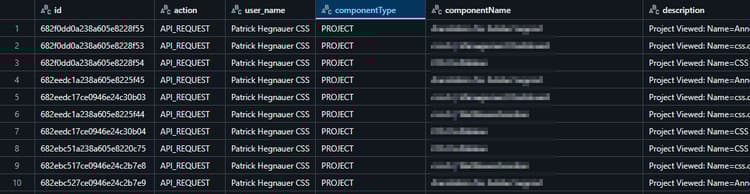
Figure 1: Dataframe from audit logs
With this setup, we can track:
- Which dashboards (aka “projects”) are being opened
- By whom
- How often
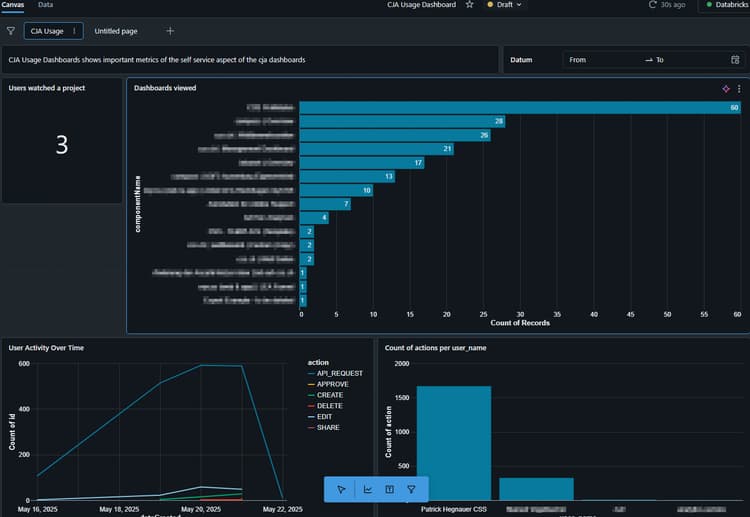
Figure 2: Usage Dashboard within Databricks
This dashboard gives us clear visibility into adoption trends and helps us understand which dashboards are being accessed regularly—pointing to areas where the self-service offering is working.
However, these logs only give us a quantitative view, not a qualitative understanding of value. Just because a dashboard is opened frequently doesn’t mean it's understood, trusted, or helpful. Likewise, a dashboard with fewer opens might serve a critical purpose for a small audience.
To bring in qualitative improvement, we are exploring:
- Short surveys tied to key dashboards or shared metrics
- User interviews or targeted feedback rounds with business teams
- Regular internal reviews with dashboard owners to interpret data in context
It’s also worth noting: Adobe offers Product Usage analytics in the CJA interface itself (see Product Usage Overview).
While this is a helpful feature, we currently don't use it within CJA. The Audit Logs API fits our needs better, especially because:
- Data minimization
- The usage data retrieved (via CJA) does count against contracted row limits in AEP (total data volume), as it creates an additional dataset in AEP
While not perfect, this API-based approach provides a scalable, low-cost foundation for monitoring self-service adoption and prioritizing improvements over time.
Use case 3: Managing shared dimensions & metrics + dependency checks
CJA’s shared dimensions and metrics feature is a major win for data governance and consistency. It allows us to define the building blocks for analysis—ensuring alignment across business units and dashboards.
But to set it up correctly and cleanly across multiple data views, we first need deep visibility into what’s actually being used.
That’s where the CJA API, combined with Databricks, plays a central role. Using the API, we extract project-level metadata, including:
- Which dimensions and metrics are used
- Which filters and calculated metrics are referenced
- Any linked components that connect the above
This gives us a detailed understanding of what is active and necessary.
Current process for shared component planning
Right now, shared dimensions and metrics are not yet fully set up. We’re following a structured, API-driven approach as part of our migration from Adobe Analytics (AA) to Customer Journey Analytics (CJA):
- Dashboards are migrated from AA to CJA, starting within a central "master" data view.
- After each dashboard migration is complete, we use the CJA API (via cjapy) to pull all relevant metadata:
-
- Dimensions used
- Metrics used
- Filters and calculated metrics used
- All components are connected across layers This metadata is then processed in Databricks, where we perform lookups and normalization.
- The result: a consolidated list of all components used per dashboard.
- This list is exported to Excel, giving us a clear, manual overview:
-
- Which dashboards use which components
- Which components qualify as shared by candidates
- Which data view each dashboard belongs in After all dashboards have been migrated and analyzed, we:
- Share the relevant dimensions and metrics with the appropriate data views
- Re-map dashboards from the master data view to their final, targeted data views
By combining automation (API), collaboration (Excel), and governance (shared components), we’ve built a repeatable and scalable process to enable clean, self-service-friendly data views in CJA.
Final thoughts
Migrating to CJA is a unique chance to modernize your analytics stack. The CJA API—especially when paired with cjapy—gives you the tools to automate, monitor, and scale your work in ways that weren’t easily possible before.
Whether you're rebuilding your SDR, tracking dashboard usage, or setting up shared components, the API is a strategic asset. We’ve found great value in combining it with Databricks and Python to create flexible pipelines that fit our needs.