Spline Sample Thickness

In: Spline & Path Tools > Spline Tools
Description
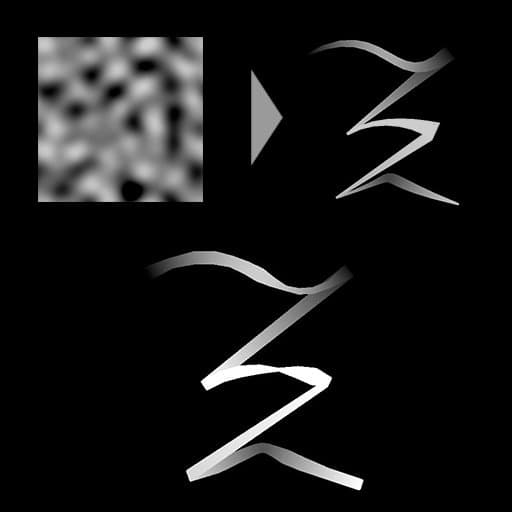
Modifies the thickness of the input splines by mapping an input Thickness Map onto them.
The effect of the mapped height map can be adjusted by changing its blending mode and the opacity of that effect.
Inputs
Preview Grayscale
The preview of the input splines as a grayscale image.
Spline Coords Color
The coordinates of the input splines’ points encoded in the RGBA channels of a color image:
R - X position
G - Y position
B - Height
A - Packed data:
- Sign: Spline is closed (negative) or open (positive);
- Absolute value: Thickness + 1.
R - X position
G - Y position
B - Height
A - Packed data:
- Sign: Spline is closed (negative) or open (positive);
- Absolute value: Thickness + 1.
Spline Data Color
Additional data of the input splines encoded in the RGBA channels of a color image.
R - Tangents X
G - Tangents Y
B - Unused
A - Unused
R - Tangents X
G - Tangents Y
B - Unused
A - Unused
Spline Amount Integer
The number of input splines.
Thickness Map Grayscale
The input grayscale image used to change the input spline’s thickness.
Outputs
Preview Grayscale
The preview of the output splines as a grayscale image.
Spline Coords Color
The coordinates of the output splines’ points encoded in the RGBA channels of a color image.
R - X position
G - Y position
B - Height
A - Packed data:
- Sign: Spline is closed (negative) or open (positive);
- Absolute value: Thickness + 1.
R - X position
G - Y position
B - Height
A - Packed data:
- Sign: Spline is closed (negative) or open (positive);
- Absolute value: Thickness + 1.
Spline Data Color
Additional data of the output splines encoded in the RGBA channels of a color image.
R - Tangents X
G - Tangents Y
B - Unused
A - Unused
R - Tangents X
G - Tangents Y
B - Unused
A - Unused
Spline Amount Integer
The number of output splines.
Parameters
Sampling Mode Integer
The method of mapping the values in the Thickness Map to the splines:
- Texture space: The values are applied to the splines where they would be if placed in a texture using the texture’s UV coordinates. This effectively applies the value to the splines ‘in place’;
- Horizontal along spline: The values are applied to the encoded splines’ coordinates directly (see Spline Coords input), where each row is applied to a different spline from top to bottom;
- Hor. along spline (rand. offset X): The values are applied to the encoded splines’ coordinates directly (see Spline Coords input), with a random horizontal offset in the Scale map for each spline (I.e., each row in Spline Coords);
- Hor. along spline (rand. offset Y): The values are applied to the encoded splines’ coordinates directly (see Spline Coords input), with a random vertical offset in the Scale map for each spline (I.e., each row in Spline Coords).
- Texture space: The values are applied to the splines where they would be if placed in a texture using the texture’s UV coordinates. This effectively applies the value to the splines ‘in place’;
- Horizontal along spline: The values are applied to the encoded splines’ coordinates directly (see Spline Coords input), where each row is applied to a different spline from top to bottom;
- Hor. along spline (rand. offset X): The values are applied to the encoded splines’ coordinates directly (see Spline Coords input), with a random horizontal offset in the Scale map for each spline (I.e., each row in Spline Coords);
- Hor. along spline (rand. offset Y): The values are applied to the encoded splines’ coordinates directly (see Spline Coords input), with a random vertical offset in the Scale map for each spline (I.e., each row in Spline Coords).
Opacity Float
A multiplier for the intensity of the Thickness Map input’s contribution to the spline’s thickness.
Blending Mode Integer
The method of blending the Thickness Map’s data with the input spline’s thickness:
- Copy: Override the spline’s thickness with the Height Map values;
- Add: Add the Thickness Map values to the spline’s thickness;
- Subtract: Subtract the Thickness Map values to the spline’s thickness;
- Multiply: Multiply the Thickness Map values against the spline’s thickness.
- Copy: Override the spline’s thickness with the Height Map values;
- Add: Add the Thickness Map values to the spline’s thickness;
- Subtract: Subtract the Thickness Map values to the spline’s thickness;
- Multiply: Multiply the Thickness Map values against the spline’s thickness.
Preview
Segments Amount Integer
Adjusts the number of segments used to draw the spline visualization in the Preview output.
A higher value results in a smoother line.
A higher value results in a smoother line.
Show Direction Helper Boolean
Displays a dot at the start of the spline and an arrowhead at its end in the Preview output.
Show Thickness Envelope Boolean
Displays additional lines at the edges of the spline’s thickness.
Thickness (px) Float
Adjusts the thickness of the spline visualization in pixels in the Preview output.
Examples
| table 0-row-2 html-authored no-header | |
|---|---|

Before |

After |
| table 0-row-2 html-authored no-header | |
|---|---|

Before |

After |

recommendation-more-help
substance-3d-designer-help-guide