Material Selector
In: Mesh Based Generators > Utilities
Description
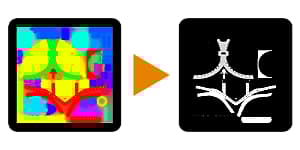
Converts a full-color ID map to a binary, black and white mask. Allows blending and combining of different colors into one mask.
This is handy if you don’t want to use Multi-Material Blend and prefer to use the mask manually, or alternatively if you want to manually use those same masks in other locations.
Parameters
Materials 1 - 16
Sets number of materials that combining is enabled for.
Enable Material #1-16 False/True
Toggles blending and combining of colors into the final output mask. Can be enabled for as many colors as you want to combine.
Material #1-16 (Color value)
Colorpicker for the materials color that will be converted to black and white.
Color Picker Parameters
Modifies blending and conversion of the color to black and white.
Fuzziness 0.01 - 1.0
How much to blend in with neighbouring colors.
Padding 0.0 - 1.0
Sharpness of the transition, like Contrast.
Examples
recommendation-more-help
substance-3d-designer-help-guide