Water Level
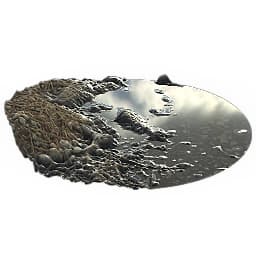
Water Level
In: Material Filters/Effects
Complex
Description
All-in-one effect that adds a water level to a full material input. Input material must have a good, high-quality Heightmap for the effect to work. The result is PBR-correct.
Parameters
Inputs
- Mask: Grayscale Input
Mask slot used for masking the node’s effects.
Parameters
- Channels
Toggle material channels on and off in this group, for example when using Specular/Glossiness maps instead of Metallic/Roughness. - Water Level: 0.0 - 1.0Main control to raise or lower the water level.
- Water Darkness: 0.0 - 1.0Sets general “transparency” of the water.
- Edges Wetness: 0.0 - 1.0Determines how much of a wet look the water edges should have.
- Edges Wetness Distance: 0.0 - 1.0Sets how far the wet edges reach.
- Depth Blur Amount: 0.0 - 1.0Sets amount of blur based on depth below water. Modifies blur radius.
- Depth Blur Opacity: 0.0 - 1.0Determines how much depth blur is blended in, can be used to lower the effect of the blur.
- Sludge Color: *(Color value)*Sets the color of the sludge effect.
- Sludge Depth: 0.0 - 1.0Sets the depth at which sludge starts appearing, relative to water level.
- Sludge Opacity: 0.0 - 1.0Sets global opacity of the sludge effect.
- Frost: 0.0 - 1.0Sets the amount of frost. Starts appearing from the outer edges and moves inwards.
- Frost Intensity: 0.0 - 1.0Sets the intensity of frost, controls the “opacity” of the effect.
- Frost Cracks: 0.0 - 1.0Sets the amount of cracks in the transitions from frozen to liquid.
- Frost Normal Format: DirectX/OpenGLSwitches Frost Normalmap effect green channel.
Example Images
| table 0-row-1 1-row-1 |
|---|
| There are no images attached to this page. |
recommendation-more-help
substance-3d-designer-help-guide