Clone (Filter Node)
Clone
In: Filters/Transforms
Intermediate
Description
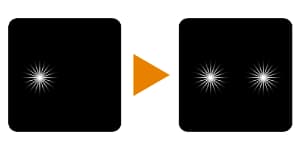
Clones input image once to a specified location. Can function as a crude “clone stamp” tool.
Requires some care to get the intended results:
- Ideally, the input image will have an alpha channel (like a decal), since blending is just a straight copy.
- Mask defaults to black, so to see any results a uniform white grayscale value needs to be plugged in at least.
- Offset will clip outside of the image easily, so use small values.
Parameters
Inputs
- Source: Color Input
Image to clone. Important: ideally, the image will have an alpha channel! - Mask: Grayscale Input
Mask slot used for masking the node’s effects. Defaults to black!
Parameters
- Offset: -
Moves or translates the result. Positive is Left and Up, Negative is Right and Down. Use small values, 1.0 and above moves it outside of the image! - Blur Mask: 0.0 - 10.0
Apply a blur filter to mask, to soften edges.
Example Images
| table 0-row-1 1-row-1 |
|---|
|
recommendation-more-help
substance-3d-designer-help-guide