Replace Color Range
Replace Color Range
In: Filters/Adjustments
Simple
Description
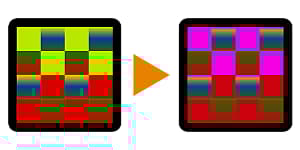
Replaces Source Color by Target Color, with additional controls. Can for example be used to re-color parts of a Material ID map (bake).
For a more advanced version, see Color Match.
Parameters
- Source Color: *(Color value)*Color to replace.
- Target Color: *(Color value)*Color to replace with.
- Source Range: 0.0 - 1.0
Range or tolerance of the picked Source. Can be increased so further neighbouring colours are also hue-shifted. - Threshold: 0.0 - 1.0Falloff/contrast for range. Set low to replace only Source color, set higher to replace colors blending into Source as well.
Example Images
| table 0-row-1 1-row-1 |
|---|
|
recommendation-more-help
dd48abc6-e399-43d2-9777-578ec70c5a23