Activation process per application type
The activation process depends on where you purchased or have access to Designer:
Edition
Activation process
Creative Cloud Desktop (CCD)
Install the product from the CCD app, then launch it. Go to these pages if you experience issues with your license: Apps won’t launch due to subscription error / Account, plans, and billing help
Steam
Launch the product directly from your Steam library.
Substance (standalone)
See the activation process described below.
Activation steps (Substance edition)
Using the activation wizard
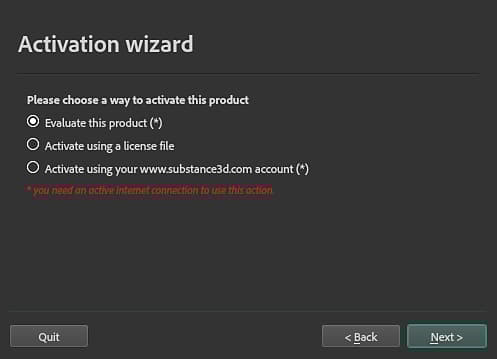
When you launch Designer for the first time, the Activation Wizard will open and guide you through the activation process.
Three choices are available:
- Evaluate this product: Legacy trials are no longer available. Instead, you can start a 30 day trial for each Substance 3D application here or with Creative Cloud Desktop. Each trial is independent of the other Substance 3D applications, so you can try them one at a time or all at once.
- Activate using a license file: activate the product with a license file (*.key) downloaded from your account page on the Substance 3D website before 30 Sep 2022.
- Activate using your account: Legacy substance accounts can no longer be used for activation.
IMPORTANT
To install the license file with the Activation Wizard, make sure you run Designer as an administrator and temporarily disable your anti-virus.
Manual activation
You can manually activate Designer by putting the license.key file in the following folder:
NOTE
Some of the directories in the paths mentioned above may be hidden by default. Type the path manually in the file explorer or display hidden files to view them.
IMPORTANT
Make sure that the file is called
license.key otherwise the application will not be able to find it.Environment variable
You can override the location that Designer checks for the license.key file with an environment variable.
recommendation-more-help
substance-3d-designer-help-guide