Bakers Legacy Interface
Here is the description of the baker interface available in Adobe Substance 3D Designer versions before 6.0.4.
Overview
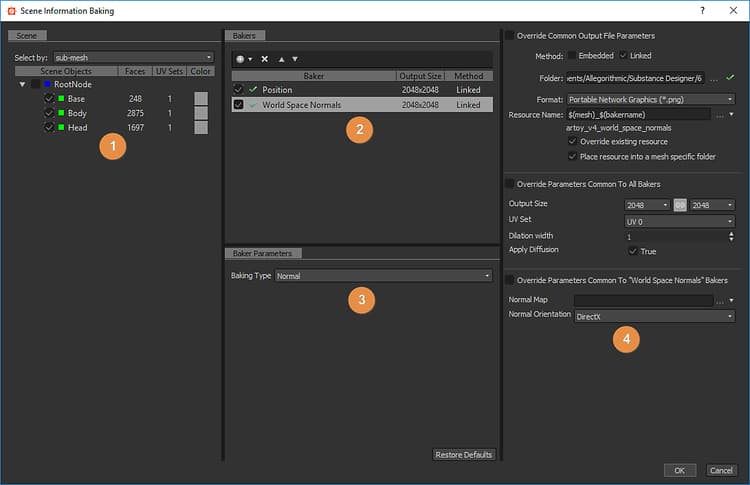
The baker panel is divided in 4 parts:
1: Scene
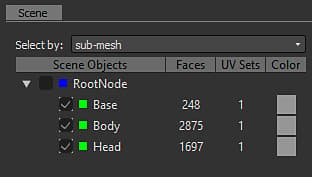
Let you define which part of the mesh is involved in the baking process.
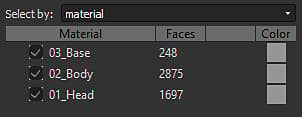
New in version 6, you can also select by material:
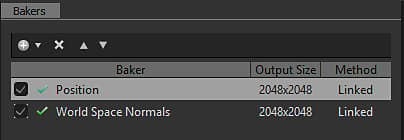
2: Bakers
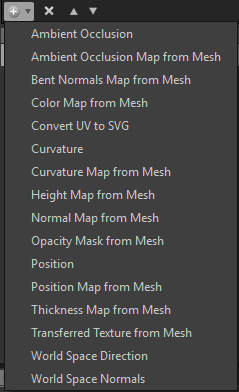
By pressing the

Clicking on the “+” in the bakers layout lets you add the bakers in a stack (You can put as many bakers as you want in a stack).
.
You can remove a baking process from the list by pressing

You can reorder the baking process list by selecting a baking process and using

3: Bakers parameters
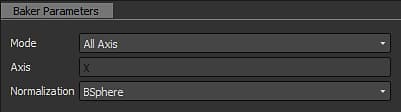
This section displays the specific options for the current selected baker.
4: Common Parameters
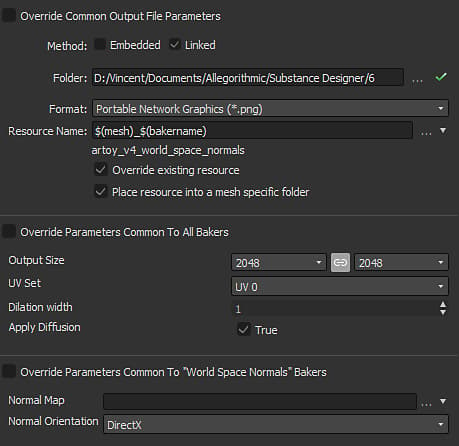
Displays the parameters that are shared between bakers.
- The Resource Name field lets you change the name of the generated bitmap, if desired.
- The File Format drop-down list lets you change file format from the default (Windows or OS/2 Bitmap format, “BMP”).
- The Place resource into a mesh specific folder check-box lets you choose whether the generated bitmap is stored at the same level as the model, or inside a new sub-folder named “Resources”.
- The Method lets you define whether the new bitmap resource should be linked or embedded into the Substance package.
- The Folder lets you define where to save the maps.
Pressing the OK button at the bottom right of the bakers window will start the baking process.
New in version 6: you can now cancel the baking process with the cancel button: