LIFO vs FIFO Strategies lifo-fifo-strategies
When implementing Concurrency Monitoring, you need to choose between two fundamental strategies for handling conflicts when usage limits are reached: LIFO (Last In, First Out) or FIFO (First In, First Out). Understanding these strategies is crucial for designing the right user experience and implementing the appropriate error handling.
Concurrency Monitoring Session Strategies concurrency-monitoring-session-strategies
Both LIFO and FIFO are based on stack theory from computer science:
LIFO (Last In, First Out) - Stack Behavior
In Concurrency Monitoring:
- Older sessions are protected from newer ones
- New sessions are blocked when limits are reached
- Users must manually terminate existing sessions to start new ones
FIFO (First In, First Out) - Queue Behavior
In Concurrency Monitoring:
- New sessions can terminate older sessions when limits are reached
- The most recent stream can “kick out” an older stream
- Users can start new content by replacing what they were watching
LIFO Strategy lifo-strategy
How LIFO Works
In LIFO mode, when a user tries to start a new stream and hits the concurrent limit:
- New session is blocked with a 409 Conflict response
- Existing sessions remain untouched
- User must manually terminate an existing session to proceed
LIFO Flow Diagram
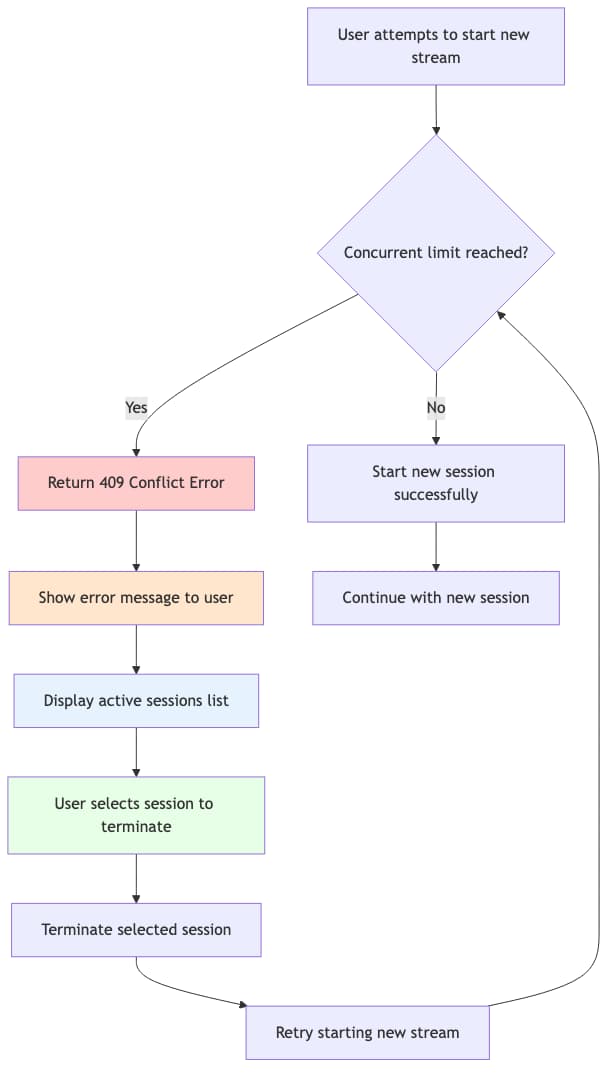
Figure: LIFO (Last In, First Out) strategy flow - New sessions are blocked when limits are reached, requiring manual termination of existing sessions.
When to Use LIFO
Use LIFO when:
- Users expect their current content to be protected from interruptions
- You want to encourage conscious decisions about content switching
- Your application has limited UI complexity for conflict resolution
- Users typically watch content for extended periods
Examples:
- Movie streaming services where users watch full-length content
- Educational content platforms where interruptions are disruptive
- Applications with simple UI that can’t handle complex session selection
FIFO Strategy fifo-strategy
How FIFO Works
In FIFO mode, when a user tries to start a new stream and hits the concurrent limit:
- New session is allowed to start
- Oldest session is automatically terminated (or user chooses which to terminate)
- User continues with new content
FIFO Flow Diagram
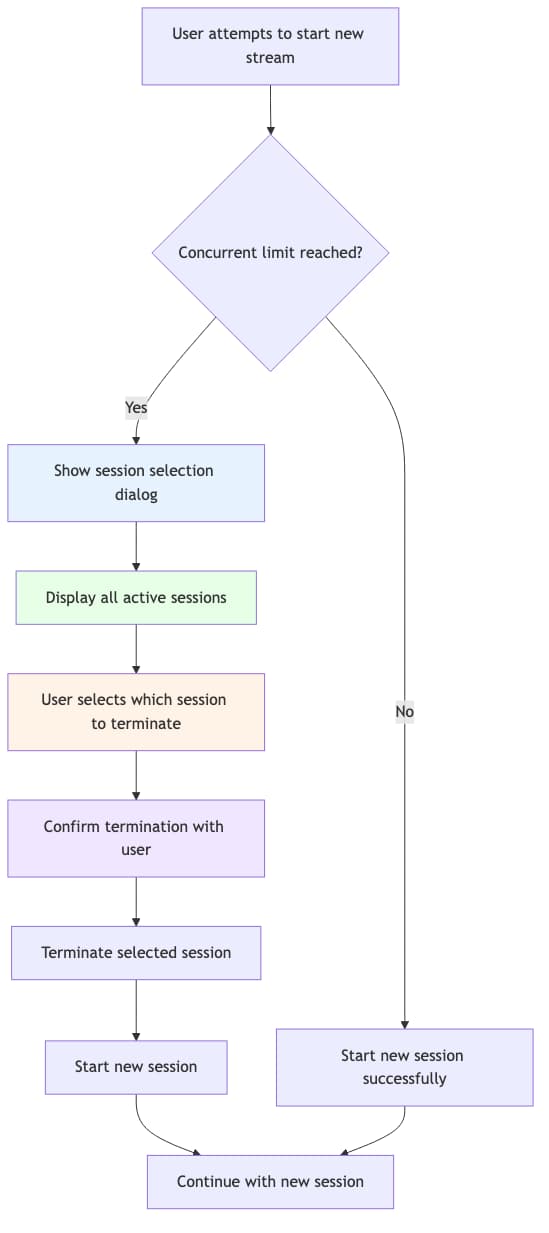
Figure: FIFO (First In, First Out) strategy flow - New sessions can start by terminating existing sessions with user selection.
When to Use FIFO
Use FIFO when:
- Users frequently switch between content (channel surfing, browsing)
- You want to prioritize the user’s current intent over past activity
- Your UI can handle session selection when conflicts occur
- Users expect to be able to start new content even when limits are reached
Examples:
- Live TV applications where users switch channels frequently
- Content discovery apps where users browse and preview content
- Mobile applications where users expect immediate response
FIFO User Experience
When a conflict occurs in FIFO mode:
- Show a dialog with all active sessions
- Allow user to select which session to terminate
- Provide session details (device, content, duration)
- Confirm the action before proceeding
- Start the new session after termination
Key Differences Summary key-differences-summary
Best Practices best-practices
For LIFO Implementations
- Show clear error messages explaining the limit
- Provide easy access to session management
- Display active sessions for user reference
- Implement session termination in your app’s settings
- Consider showing usage indicators before conflicts occur
For FIFO Implementations
- Always provide session selection UI when conflicts occur
- Show meaningful session details (device, content, duration)
- Implement confirmation dialogs to prevent accidental terminations
- Handle edge cases where termination fails
- Provide clear feedback about what’s happening
Choosing Your Strategy choosing-your-strategy
Consider these factors when choosing between LIFO and FIFO:
- User behavior patterns - How do users typically interact with your content?
- Content type - Live TV vs. movies vs. educational content
- UI complexity - Can your app handle sophisticated session selection?
- User expectations - Do users expect to be able to switch content easily?
- Business requirements - Do you need to protect certain types of viewing?