This document describes use cases, endpoints and API for Adobe Single Sign-On Service.
Current Revision - 1.0.0
Scope scope
Adobe Pass SSO Service enables seamless authentication across multiple devices and applications, providing a unified user experience while maintaining security and compliance standards. This service addresses the growing need for cross-platform authentication in today’s multi-device streaming landscape.
Overview overview
What it is what-it-is
A comprehensive Single Sign-On solution that allows users to authenticate once and manage the transfer of authentication in an informed way to other devices
Current challenges for authentication current-challenges
User must authenticate with every streaming service he has a subscription to
User must authenticate separately on each device or application
Due to difficulty typing a password in authentication flow on some platforms, this may lead to increased abandonment rates
Opportunity for an Adobe Pass SSO Service opportunity
Increasing number of streaming services requiring their own authentication
Growing demand for seamless cross-device experiences
Increasing number of streaming devices per household
Need for unified authentication per household
Business Benefits business-benefits
Content Providers content-providers
Increased User Engagement - Seamless experience leads to longer session times
Device Flexibility - Switch between devices without interruption
Consistent Experience - Uniform authentication across all platforms
IdPs (MVPDs, Telcos, etc) idps
MVPDs can be informed of additional devices using an authenticated SSO
Enhanced User Satisfaction - Improved authentication experience
Reduced Support Load - Fewer authentication-related support calls
Competitive Advantage - Better user experience than competitors
Use Cases use-cases
Identity mapping identity-mapping
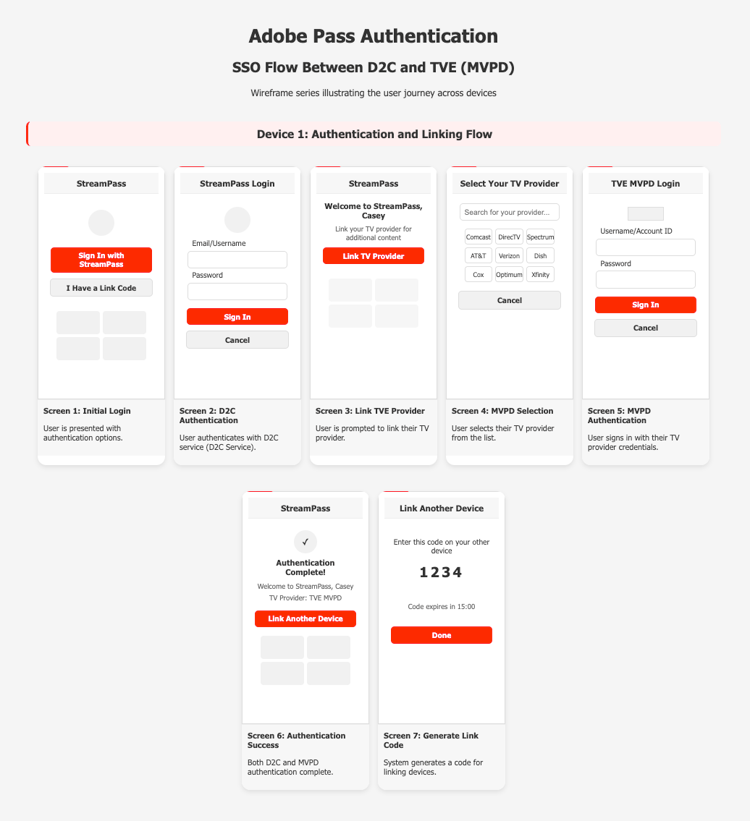
The service builds the ability to link a D2C and a TVE account in the same app.
More streaming services are building bundles to be sold to a third party (MVPD/virtual MVPD/Telco, etc.). Users may end up having to handle multiple accounts in the same app. To create a seamless authentication experience, a service needs to bridge these accounts to simplify the login experience.
User will authenticate with their D2C account, then authenticate ONCE with a different account (ex. MVPD). With our service, these accounts will be linked, which means that going forward, subsequent authentications on different devices can be done only with the D2C account.
Cross-Device SSO cross-device-sso
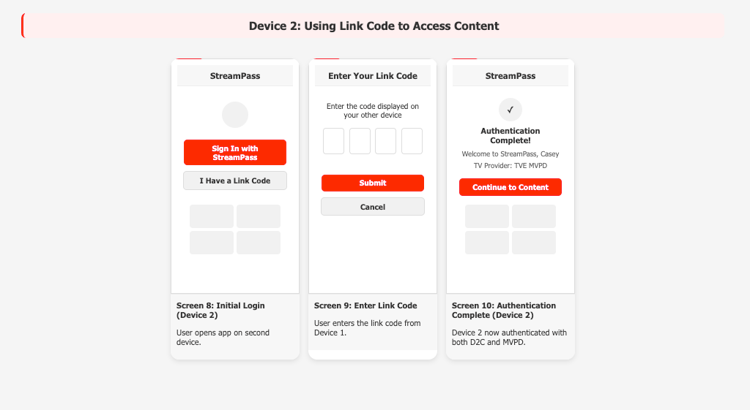
Authentication on a TV-connected device can be more cumbersome than on a mobile phone. A good user experience would be to authenticate on the phone and then pass that authentication on to the smart TV.
Key Components key-components
Service Token API - key component that manages securely the Single Sign On mechanism
List API - Application can help the user understand the list of devices in its ecosystem
Link API - Application enable the user to add additional devices in its ecosystem
Unlink API - Application enable the user to remove devices in its ecosystem
Use Cases Detailed use-cases-detailed
D2C-TVE SSO d2c-tve-sso
This use case enables linking between D2C and TVE(MVPD) credentials on one device and leveraging that linked profile on other devices within the same application.
Cross-Device SSO cross-device-sso-detailed
This use case enables users that already authenticated on one device to reuse the authenticated profile on the same D2C or TVE application installed on other devices (application required to implement Adobe Pass REST V2 for authentication and authorization).
How to integrate Adobe SSO Service in a D2C-TVE application integration
Step 1 - Get a common identifier step-1
To integrate Adobe SSO Service, an application implementation should establish an unique and persistent ID to use as common identifier SSO attribute in X-SSO-ID. This can be obtained by authenticating a user with a D2C service and retain an attribute about this authentication.
Step 2 - Obtain a Service Token step-2
Using the common identifier in X-SSO-ID in POST /serviceToken endpoint will retrieve a signed JWT with the following payload:
The Service Token has “iat” - issued at and “exp” - expiration time in which interval the Service Token is valid. In case of expiration, a new JWT can be obtain using GET /serviceToken endpoint with the expired Service Token.
Step 3 - Authenticate using Adobe Pass REST API V2 with a TVE MVPD step-3
The “code” is a short lived link code in a form of a sequence of 6 digits that the user will introduce in an unauthenticated application on a secondary device
Step 5 - Retrieve Single Sign On authentication step-5
On a different device, once the user introduced the code, the application can:
retrieve identity from the D2C Service
retrieve MVPD profile from Adobe Pass with REST V2 API
The MVPD profile will be valid thru SSO for the period the initial authentication was obtained.
In case MVPD invalidates the profile or the user choose to logout from MVPD, the application using Adobe Pass REST API V2 would no longer have a profile record and should require the user to authenticate again with the MVPD.
Step 6 - Manage Single Sign On on other devices step-6
An application can get information about all other devices linked with the same common identifier using /list API.
At any time, a device can be removed from the Single Sign On by unlinking that device with /unlink API.
APIs apis
Service Token API service-token-api
Description service-token-description
The Service Token API can be used to request and manage service tokens that enable Single Sign-On (SSO) functionality between multiple applications or devices. These service tokens identify authenticated profiles (SSO profiles) and are essential for establishing and maintaining SSO connections.
WARNING
Service tokens contain sensitive authentication information. Applications must handle these tokens securely and never expose them to untrusted parties.
The Service Token API provides two primary endpoints:
POST /api/{serviceProvider}/serviceToken - Obtain a newly created JWS service token
GET /api/{serviceProvider}/serviceToken - Refresh an existing JWS service token
In case the Service Token API request could not be serviced due to an Adobe Pass Authentication services error, additional error information will be included as part of the API response.
POST - serviceToken post-service-token
Request post-service-token-request
HTTP
path
/api/{serviceProvider}/serviceToken
method
POST
Path Parameters
serviceProvider
The service provider identifier for which the token is being requested.
required
Headers
Authorization
The generation of the bearer token payload is described in the Authorization header documentation.
required
AP-Device-Identifier
The generation of the device identifier payload is described in the AP-Device-Identifier header documentation.
This identifier is used as the default SSO identifier when X-SSO-ID is not provided.
required
X-Device-Info
The device information as specified in X-Device-Info header documentation.
Strongly recommended to use when the application's device platform allows providing valid values explicitly.
The Adobe Pass Authentication backend will merge explicitly set values with implicitly extracted values. When not provided, default extracted values will be used.
required
X-SSO-LINK
The link code that associates this request with an existing authenticated profile. When provided, the response will include a service token for SSO with the profile that generated the link code.
This is typically used when a secondary application or device wants to connect to an authenticated profile from a primary application or device.
required if x-sso-id is not provided
X-SSO-ID
The common identifier that the application requests to base SSO on.
When provided, this identifier will be used to establish a common SSO profile across devices and/or applications.
required if x-sso-link is not provided
Accept
The media type accepted by the client application.
If specified it must be application/json.
optional
User-Agent
The user agent of the client application.
optional
Response post-service-token-response
Code
Text
Description
201
Created
The service token was successfully generated and returned in the response body.
400
Bad Request
The request is invalid, the client needs to correct the request and try again. The response body may contain error information that adheres to the Enhanced Error Codes documentation.
401
Unauthorized
The access token is invalid, the client needs to obtain a new access token and try again. For more details refer to the Dynamic Client Registration Overview documentation.
500
Internal Server Error
The server side encountered an issue. The response body may contain error information that adheres to the Enhanced Error Codes documentation.
Success success-post-service-token
Headers
Status
201
required
Content-Type
application/json
required
Body
status
HTTP status (e.g., "CREATED")
required
jws
A Base64-encoded JSON Web Signature (JWS) containing the service token. This token can be used in subsequent API calls to identify the authenticated profile and enable SSO functionality.
required
notBefore
Epoch ms, or 0 on error
required
notAfter
Epoch ms, or 0 on error
required
Error error-post-service-token
Headers
Status
400, 401, 500
required
Content-Type
application/json
required
Body
The response body may provide additional error information that adheres to the Enhanced Error Codes documentation.
The service provider identifier for which the token is being requested.
required
Headers
Authorization
The generation of the bearer token payload is described in the Authorization header documentation.
required
AD-Service-Token
A previously obtained service token that needs to be refreshed.
This token must be valid or have expired recently to be eligible for refresh.
required
Accept
The media type accepted by the client application.
If specified it must be application/json.
optional
User-Agent
The user agent of the client application.
optional
Response get-service-token-response
Code
Text
Description
200
OK
The service token was successfully refreshed and returned in the response body.
400
Bad Request
The request is invalid, the client needs to correct the request and try again. The response body may contain error information that adheres to the Enhanced Error Codes documentation.
401
Unauthorized
The access token or service token is invalid, the client needs to obtain a new access token or service token and try again. For more details refer to the Dynamic Client Registration Overview documentation.
500
Internal Server Error
The server side encountered an issue. The response body may contain error information that adheres to the Enhanced Error Codes documentation.
Success success-get-service-token
Headers
Status
200
required
Content-Type
application/json
required
Body
status
HTTP status (e.g., "OK")
required
jws
A Base64-encoded JSON Web Signature (JWS) containing the refreshed service token. This token can be used in subsequent API calls to identify the authenticated profile and enable SSO functionality.
required
notBefore
Epoch ms, or 0 on error
required
notAfter
Epoch ms, or 0 on error
required
Error error-get-service-token
Headers
Status
400, 401, 500
required
Content-Type
application/json
required
Body
The response body may provide additional error information that adheres to the Enhanced Error Codes documentation.
The Link API can be used to request a link code (or QR code) that can enable Single Sign-On (SSO) between multiple applications or devices. This link code allows users to connect a new application or device to an existing authenticated profile (SSO profile), providing a seamless SSO experience across applications or devices.
The Link API requires a valid service token to be provided in the AD-Service-Token header.
The generated link code is typically displayed to users on a primary application or device and entered on a secondary application or device to establish the SSO connection. The link code has a limited validity period (typically 5-30 minutes) and is meant for one-time use.
In case the Link API request could not be serviced due to an Adobe Pass Authentication services error, then additional error information will be included as part of the Link API response result.
POST - link post-link
Request post-link-request
HTTP
path
/api/{serviceProvider}/link
method
POST
Path Parameters
serviceProvider
The service provider identifier for which the token is being requested.
required
Headers
Authorization
The generation of the bearer token payload is described in the Authorization header documentation.
required
AP-Device-Identifier
The generation of the device identifier payload is described in the AP-Device-Identifier header documentation.
required
AD-Service-Token
The generation of the service token is described by the Service Token API documentation.
This service token identifies the authenticated profile for which the link code will be generated.
required
Accept
The media type accepted by the client application.
If specified it must be application/json.
optional
User-Agent
The user agent of the client application.
optional
Response post-link-response
Code
Text
Description
201
Created
The link code was successfully generated and returned in the response body.
400
Bad Request
The request is invalid, the client needs to correct the request and try again. The response body may contain error information that adheres to the Enhanced Error Codes documentation.
401
Unauthorized
The access token is invalid, the client needs to obtain a new access token and try again. For more details refer to the Dynamic Client Registration Overview documentation.
500
Internal Server Error
The server side encountered an issue. The response body may contain error information that adheres to the Enhanced Error Codes documentation.
Success success-post-link
Headers
Status
201
required
Content-Type
application/json
required
Body
status
HTTP status (e.g., "CREATED")
required
link
A short numeric or alphanumeric code that can be used on a secondary application or device to establish an SSO connection.
required
notBefore
The timestamp (in milliseconds since epoch) when the link code becomes valid.
required
notAfter
The timestamp (in milliseconds since epoch) when the link code expires.
required
Error error-post-link
Headers
Status
400, 401, 500
required
Content-Type
application/json
required
Body
The response body may provide additional error information that adheres to the Enhanced Error Codes documentation.
required
Samples samples-post-link
1. Request a link code for an existing authenticated profile
The Unlink API can be used to request the removal of a device or multiple devices from an authenticated profile (SSO profile). This API allows users to disconnect devices from their SSO setup, providing control over which devices have access to their authenticated profile.
WARNING
The Unlink API requires a valid service token to be provided in the AD-Service-Token header.
In case the Unlink API request could not be serviced due to an Adobe Pass Authentication services error, then additional error information will be included as part of the Unlink API response result.
POST - unlink post-unlink
Request post-unlink-request
HTTP
path
/api/{serviceProvider}/unlink
method
POST
Path Parameters
serviceProvider
The service provider identifier.
required
Body Parameters
devices
Array of device identifiers to unlink.
Example: ["deviceid1", "deviceid2", "deviceid3"]
required
Headers
Authorization
The generation of the bearer token payload is described in the Authorization header documentation.
required
Content-Type
The accepted media type for the resources being sent.
It must be application/json.
required
AP-Device-Identifier
The generation of the device identifier payload is described in the AP-Device-Identifier header documentation.
required
AD-Service-Token
The generation of the service token is described by the Service Token API documentation.
This service token identifies the authenticated profile for which devices will be unlinked.
required
Accept
The media type accepted by the client application.
If specified it must be application/json.
optional
User-Agent
The user agent of the client application.
optional
Response post-unlink-response
Code
Text
Description
200
OK
The requested device(s) have been successfully unlinked from the SSO setup.
400
Bad Request
The request is invalid, the client needs to correct the request and try again. The response body may contain error information that adheres to the Enhanced Error Codes documentation.
401
Unauthorized
The access token is invalid, the client needs to obtain a new access token and try again. For more details refer to the Dynamic Client Registration Overview documentation.
405
Method Not Allowed
The HTTP method is invalid, the client needs to use an HTTP method that is permitted for the requested resource and try again.
500
Internal Server Error
The server side encountered an issue. The response body may contain error information that adheres to the Enhanced Error Codes documentation.
Success success-post-unlink
Headers
Status
200
required
Content-Type
application/json
required
Body
status
Information on operation result: "OK"
required
unlinkedDevices
List of successfully unlinked devices.
Example: ["deviceid1", "deviceid2", "deviceid3"]
required
Error error-post-unlink
Headers
Status
400, 401, 405, 500
required
Content-Type
application/json
required
Body
The response body may provide additional error information that adheres to the Enhanced Error Codes documentation.
The List API can be used to obtain a list of devices currently connected to an authenticated profile (SSO profile). This API allows users and applications to view which devices are part of their SSO setup, providing visibility and management capabilities for their authenticated experience across multiple devices.
WARNING
The List API requires a valid service token to be provided in the AD-Service-Token header.
The List API returns details about each device in the authenticated profile (SSO profile), including device identifiers and metadata that may help users recognize their devices. This information can be used to help users make informed decisions about which devices should remain in their SSO setup.
In case the List API request could not be serviced due to an Adobe Pass Authentication services error, then additional error information will be included as part of the List API response result.
GET - list get-list
Request get-list-request
HTTP
path
/api/{serviceProvider}/list
method
GET
Path Parameters
serviceProvider
The service provider identifier.
required
Headers
Authorization
The generation of the bearer token payload is described in the Authorization header documentation.
required
AP-Device-Identifier
The generation of the device identifier payload is described in the AP-Device-Identifier header documentation.
required
AD-Service-Token
The generation of the service token is described by the Service Token API documentation.
This service token identifies the authenticated profile for which the device list will be retrieved.
required
Accept
The media type accepted by the client application.
If specified it must be application/json.
optional
User-Agent
The user agent of the client application.
optional
Response get-list-response
Code
Text
Description
200
OK
The list of devices in the SSO setup was successfully retrieved and returned in the response body.
400
Bad Request
The request is invalid, the client needs to correct the request and try again. The response body may contain error information that adheres to the Enhanced Error Codes documentation.
401
Unauthorized
The access token is invalid, the client needs to obtain a new access token and try again. For more details refer to the Dynamic Client Registration Overview documentation.
405
Method Not Allowed
The HTTP method is invalid, the client needs to use an HTTP method that is permitted for the requested resource and try again.
500
Internal Server Error
The server side encountered an issue. The response body may contain error information that adheres to the Enhanced Error Codes documentation.
Success success-get-list
Headers
Status
200
required
Content-Type
application/json
required
Body
devices
JSON containing a map of key, value pairs.
Key: deviceId - The device identifier payload as described in the AP-Device-Identifier header documentation
Value: attributes - JSON containing a map of device metadata attributes including:
device type
platform
user agent
other relevant metadata that helps identify the device
The values for the attributes can be simple (string, integer, boolean, etc.)
required
Error error-get-list
Headers
Status
400, 401, 405, 500
required
Content-Type
application/json
required
Body
The response body may provide additional error information that adheres to the Enhanced Error Codes documentation.