Adobe Marketing Campaign Analytics is the evolution and rebranding of Adobe Mix Modeler. Some of the Experience League content might still refer to Mix Modeler instead of Marketing Campaign Analytics.
Marketing touchpoints are recipient, individual, and or cookie-level marketing events used to evaluate the impact of marketing investments on numeric or revenue-based conversions.
You define marketing touchpoints to assist you in attribution analysis.
Manage marketing touchpoints
To see a table of the available marketing touchpoints in the Marketing Campaign Analytics interface:
-
Select

-
Select Marketing touchpoint from the top bar. You see a table of the marketing touchpoints. If more pages are available, use


The table columns specify details about the marketing touchpoint:
Add a marketing touchpoint
To add a marketing touchpoint, in the
-
Select

-
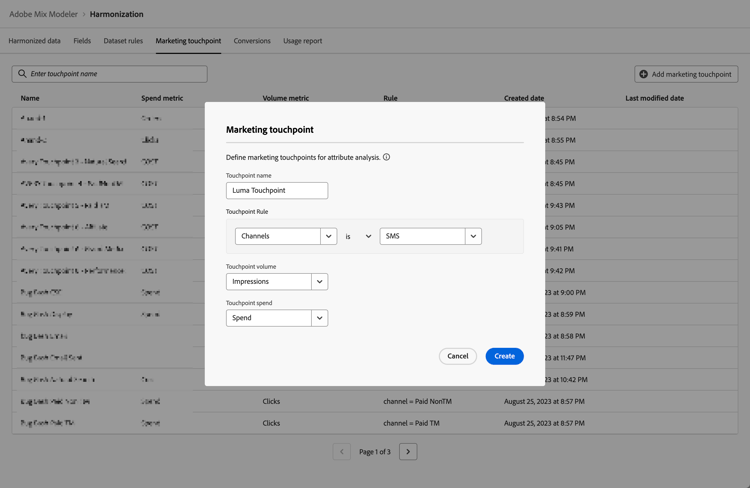
In the Marketing touchpoint dialog.
-
Enter a name for Touchpoint Name, for example
Luma Touchpoint. -
Define a Touchpoint rule.
-
Select a value from Select harmonized, for example Brand.
-
Select a value for operator

-
Select a value from Select value or enter a value, for example Luma.
-
-
Select a harmonized field from Touchpoint volume, for example Impressions.
-
Select a harmonized field from Touchpoint spend, for example Cost.
-
To create the marketing touchpoint, select Create. To cancel the creation of a marketing touchpoint, select Cancel .
-
-
When created, the touchpoint is added to the marketing touchpoints table.
View details
To view details of a marketing touchpoint:
-
Select

-
Select

View report
To view a report of a marketing touchpoint:
-
Select
-
Select


- To change the granularity to report on, select a value from the Weekly drop-down menu.
- To change the period to report on, enter a start and end date or use

-
Select Close to close the dialog.
Delete a marketing touchpoint
To delete a marketing touchpoint:
- Select

- In the Delete touchpoint dialog confirmation dialog select Delete to permanently delete the marketing touchpoint.