Azure Front Door (BYOCDN)
This configuration routes agentic traffic (requests from AI bots and LLM user agents) to the Edge Optimize backend service (live.edgeoptimize.net). Human visitors and SEO bots continue to be served from your origin as usual. To test the configuration, after the setup is complete, look for the header x-edgeoptimize-request-id in the response.
Azure Front Door does not run custom code at the edge. Routing is configured using a Rule Set together with a dedicated origin group for Edge Optimize. Failover is handled by Azure Front Door’s priority-based origin group health probes.
Prerequisites
Before you set up the Azure Front Door routing rules, ensure you have:
- Access to your Azure Front Door profile.
- An Edge Optimize API key retrieved from the LLM Optimizer UI. For steps, see Retrieve your API keys.
- (Optional) To test staging routing, see Staging API key.
Step 1: Create an origin group for Edge Optimize
Your Azure Front Door profile already has a default origin group that points to your origin. Create a new origin group for Edge Optimize:
-
Name:
edge-optimize-origin-group -
Origins (priority-based failover):
- Priority 1 —
live.edgeoptimize.net(Origin host header:live.edgeoptimize.net) - Priority 2 — your domain endpoint (for example,
www.example.com). This is for failover: if Edge Optimize is unhealthy, requests route to your domain, which re-enters Azure Front Door and is served from your default origin.
- Priority 1 —
-
Health probes: Enabled
- Path:
/health/<your-domain>(for example,/health/www.example.com) - Protocol: HTTPS
- Interval: 225 seconds
- Path:
-
Session affinity: Disabled
-
Certificate subject name validation: Enabled
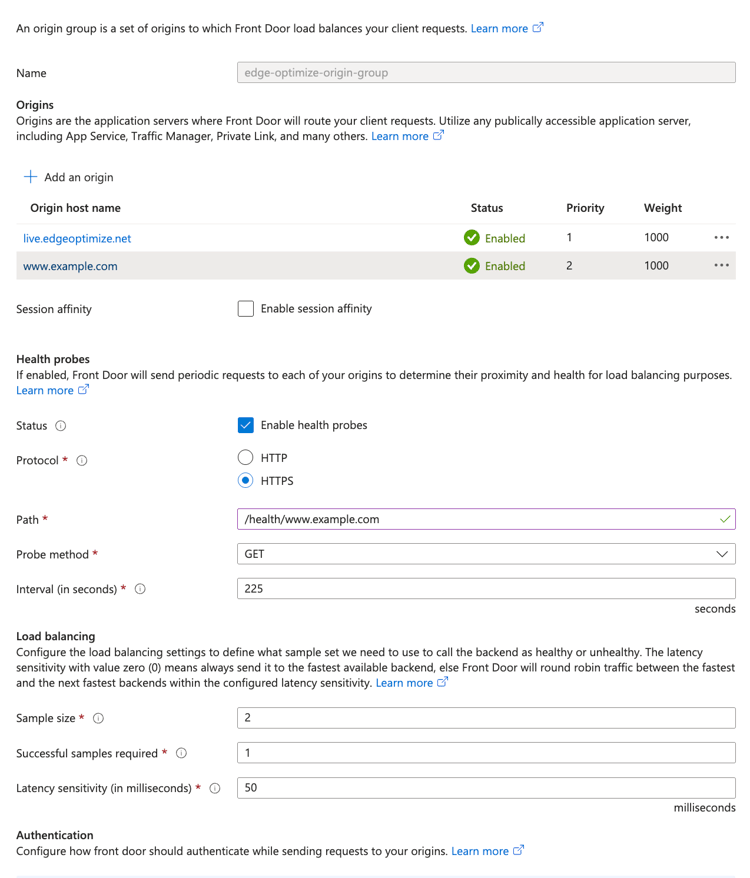
edge-optimize-origin-group origin group shows an “Unassociated” warning in the portal. This is expected — it is referenced through a Rule Set route override, not directly by a route.Step 2: Configure your route
A default route is typically created with your Azure Front Door profile. The Rule Set (Step 3) overrides the origin group for agentic traffic, so no separate route is needed for Edge Optimize.
Step 3: Create the rule set
Go to Rule sets > Add a rule set and name it EORouting. Add three rules in this order.
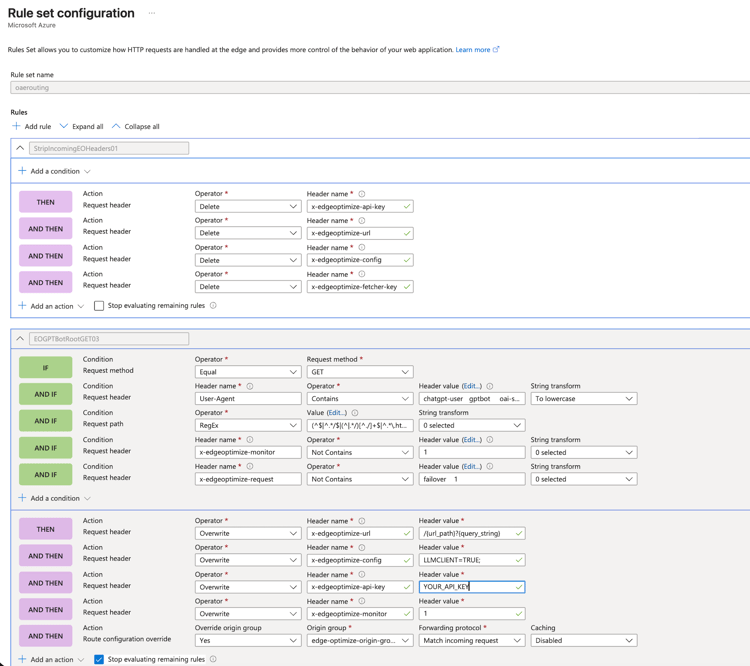
Rule 1: StripIncomingEOHeaders01
Strips incoming Edge Optimize headers to prevent spoofing. No conditions — applies to all requests. Stop evaluating: Off.
Actions — Delete request header for each of:
x-edgeoptimize-urlx-edgeoptimize-configx-edgeoptimize-api-keyx-edgeoptimize-fetcher-key
Rule 2: EOGPTBotRootGET03
Routes bot requests on HTML page paths to Edge Optimize. Stop evaluating: On.
Conditions (all must match):
- Request method: Equal
GET - Request path: RegEx
(^$|^.*/$|(^|.*/)[^./]+$|^.*\.html$)(matches the site root, paths ending in/, extensionless page paths, and.htmlpaths) - User-Agent: Contains any of
chatgpt-user,gptbot,oai-searchbot,adobeedgeoptimize-ai,perplexitybot,perplexity-user,claudebot,claude-user,claude-searchbot. Set String transform to To lowercase. x-edgeoptimize-monitor: Not contains1x-edgeoptimize-request: Not contains any offailover,1
Actions:
- Request header overwrite
x-edgeoptimize-url=/{url_path}?{query_string} - Request header overwrite
x-edgeoptimize-config=LLMCLIENT=TRUE; - Request header overwrite
x-edgeoptimize-api-key=YOUR_API_KEY - Request header overwrite
x-edgeoptimize-monitor=1 - Route configuration override: Origin group →
edge-optimize-origin-group, Forwarding protocol → Match incoming request, Caching → Disabled
Rule 3: HealthProbeRewrite03
Rewrites Azure Front Door health probe requests so they reach your origin as / instead of /health/<domain>. This lets Azure Front Door monitor Edge Optimize availability without requiring a dedicated health endpoint on your origin. Stop evaluating: On.
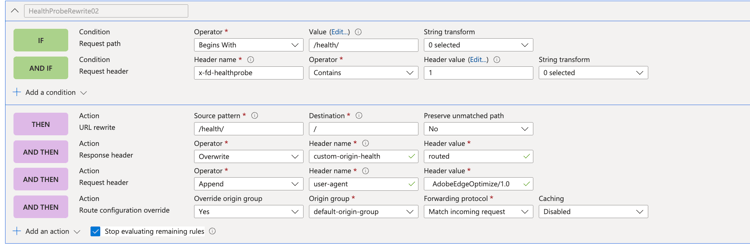
Conditions (all must match):
- Request URL path: Begins with
/health/ x-fd-healthprobe: Contains1
Actions:
- URL rewrite — Source pattern:
/health/, Destination:/ - Response header overwrite
custom-origin-health=routed(diagnostic — can be removed after verification) - Request header append
user-agent=AdobeEdgeOptimize/1.0(add a leading space — Azure Front Door appends the value as-is) - Route configuration override: Origin group →
default-origin-group, Forwarding protocol → Match incoming request, Caching → Disabled
Step 4: Associate the rule set with the route
Open your route, scroll to the Rules section at the bottom, and select the EORouting rule set from the dropdown. If you have existing rule sets, use Move to top to position EORouting at #1. The Optimize at Edge rules only intercept agentic traffic and Edge Optimize loop-back requests — all other traffic passes through unaffected to your other rules. Save and wait for propagation (approximately 20 minutes).
Allow Optimize at Edge through firewall rules (optional)
If your CDN uses a WAF or Bot Manager:
-
Allowlist the
*AdobeEdgeOptimize/1.0*user agent in your WAF or Bot Manager so the Optimize at Edge service can fetch your origin content. -
If your firewall requires additional verification beyond user agent, generate a secret (for example,
openssl rand -hex 32) and:- Add
x-edgeoptimize-fetcher-keywith the secret in your routing rules alongside the otherx-edgeoptimize-*headers. - Add a WAF or Bot Manager rule to allow requests where
x-edgeoptimize-fetcher-keymatches the same secret.
- Add
-
Optimize at Edge forwards this header as-is — you own the full key lifecycle.
Verify the setup
After completing the setup, verify that bot traffic is being routed to Edge Optimize and that human traffic remains unaffected.
1. Test bot traffic (should be optimized)
Simulate an AI bot request using an agentic user-agent:
curl -svo /dev/null https://www.example.com/page.html \
  --header "user-agent: chatgpt-user"
A successful response includes the x-edgeoptimize-request-id header, confirming that the request was routed through Edge Optimize:
< HTTP/2 200
< x-edgeoptimize-request-id: 50fce12d-0519-4fc6-af78-d928785c1b85
2. Test human traffic (should NOT be affected)
Simulate a regular human browser request:
curl -svo /dev/null https://www.example.com/page.html \
  --header "user-agent: Mozilla/5.0 (Macintosh; Intel Mac OS X 10_15_7) AppleWebKit/537.36"
The response should not contain the x-edgeoptimize-request-id header. The page content and response time should remain identical to before enabling Optimize at Edge.
3. How to differentiate between the two scenarios
x-edgeoptimize-request-idThe status of the traffic routing can also be checked in the LLM Optimizer UI. Navigate to Customer configuration and select the CDN configuration tab.

To learn more about Optimize at Edge, including available opportunities, auto-optimization workflows, and FAQs, return to the Optimize at Edge overview.