YouTube Sentiment Analysis
YouTube is one of the most influential platforms shaping consumer perception and brand reputation. When AI systems respond to prompts about your brand, they increasingly cite YouTube videos as sources, making how your brand is discussed in that content a direct input into AI-generated responses.
The YouTube Sentiment Analysis opportunity appears when YouTube videos are detected as citations for prompts in your Brand Presence dashboard prompt set. It analyzes those cited videos and their comments for sentiment, share of voice and recurring topics. It then surfaces prioritized recommendations to improve how your brand is perceived and represented in AI-generated responses.
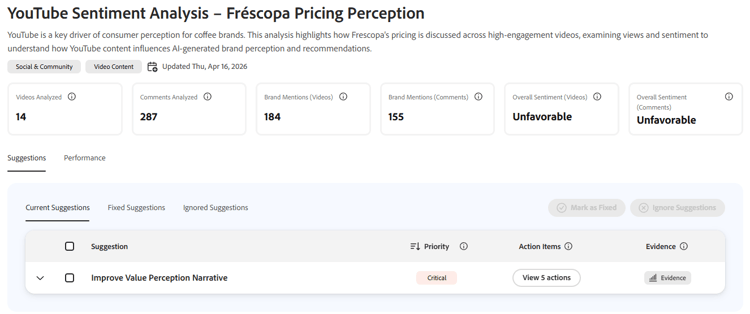
It analyzes your brand across six dimensions:
- Videos analyzed — Number of YouTube videos examined for brand mentions and sentiment.
- Comments analyzed — Number of comments examined across analyzed videos.
- Brand mentions (videos) — How frequently your brand is mentioned across video content.
- Brand mentions (comments) — How frequently your brand is mentioned in comments.
- Overall sentiment (videos) — Aggregated sentiment toward your brand across video content.
- Overall sentiment (comments) — Aggregated sentiment toward your brand across comments.
How it works
Adobe Brand Visibility monitors YouTube videos cited by AI systems for prompts in your Brand Presence dashboard prompt set. When cited videos are detected, it analyzes those videos and their comments for brand mentions, sentiment, share of voice and AI citations. It compares your brand’s performance against market competitors and associated brands, identifies recurring topics driving sentiment and generates recommendations to address perception gaps.
If no YouTube videos are cited for the prompts in your prompt set, this opportunity will not appear in your dashboard.
The results are displayed across two tabs: Suggestions and Performance.
Suggestions
This tab shows recommendations for improving your brand’s perception on YouTube. Suggestions are organized into three sub-tabs: Current Suggestions, Fixed Suggestions and Ignored Suggestions.
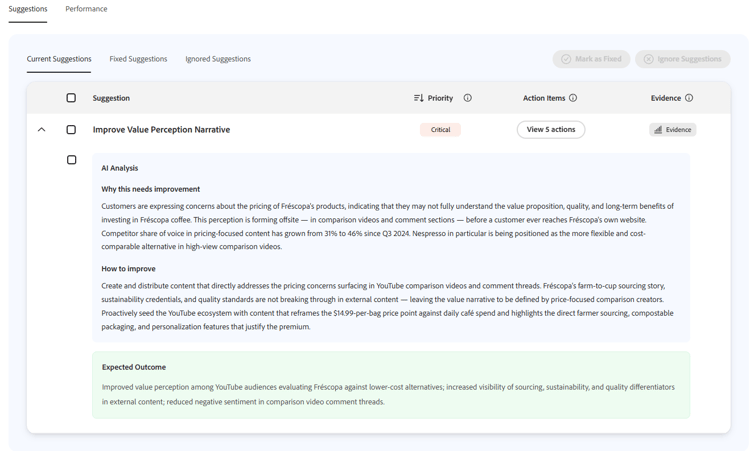
The suggestions table includes the following columns:
- Suggestion — The recommended improvement to address a perception gap.
- Priority — Urgency level (Critical, High, Medium, Low).
- Action Items — Opens a panel with specific steps to implement the recommendation, including the teams responsible (for example, Content Strategy, Influencer Marketing, Product Marketing).
- Evidence — Opens a Sources table showing the videos behind the suggestion.
Expanding a suggestion reveals an AI Analysis section with:
- Why this needs improvement — An explanation of the perception gap identified, including competitive context and how the issue is forming across YouTube content.
- How to improve — Specific guidance on what content or actions would address the gap.
- Expected Outcome — The anticipated result of implementing the recommendation.
The Sources table shows the YouTube videos driving the suggestion, with the following columns:
- Video — Title and link to the YouTube video.
- Channel — The YouTube channel that published the video.
- Engagement — Engagement level (Low, Medium, High).
- Brand Mentions — Count of your brand mentions versus total mentions in the video.
- Share of Voice — Your brand’s share of mentions relative to all brands mentioned.
- Top 5 Brands — The most mentioned brands in the video.
- Sentiment — Overall sentiment toward your brand in the video.
- AI Citations — Number of AI answers that cited this video.
Performance
The Performance tab provides a detailed breakdown of how your brand is performing across YouTube content. It is organized into four sections.
Market Landscape
Compares your brand’s performance against associated brands and market competitors based on mentions.
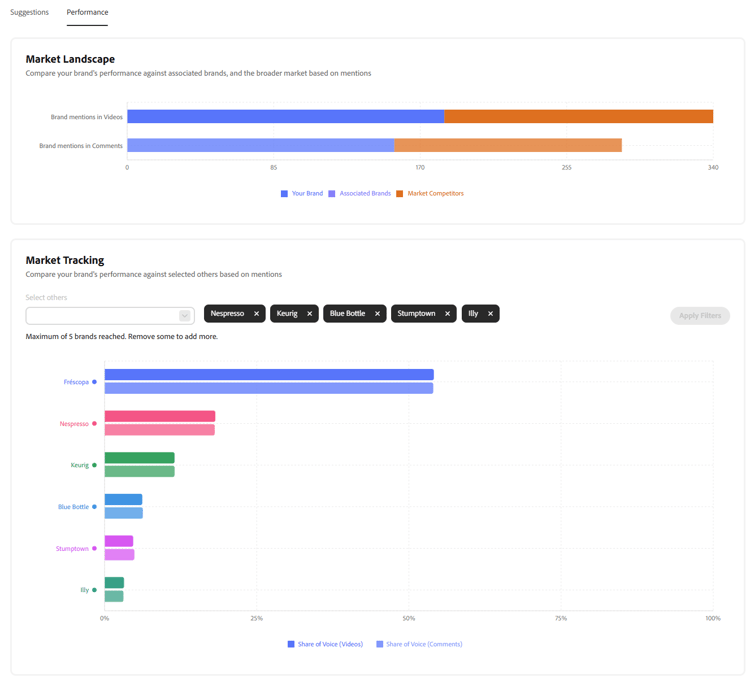
It shows:
- Brand mentions in videos — Your share of voice versus associated brands and market competitors.
- Brand mentions in comments — The same comparison across comment content.
- Market Tracking — A filterable chart where you can select up to five competitor brands to compare share of voice across videos and comments.
Sentiment Analysis
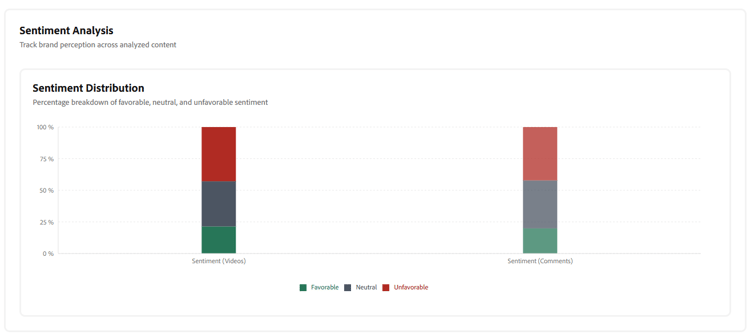
Tracks brand perception across analyzed content with a Sentiment Distribution chart showing the percentage breakdown of favorable, neutral and unfavorable sentiment for both videos and comments.
Videos
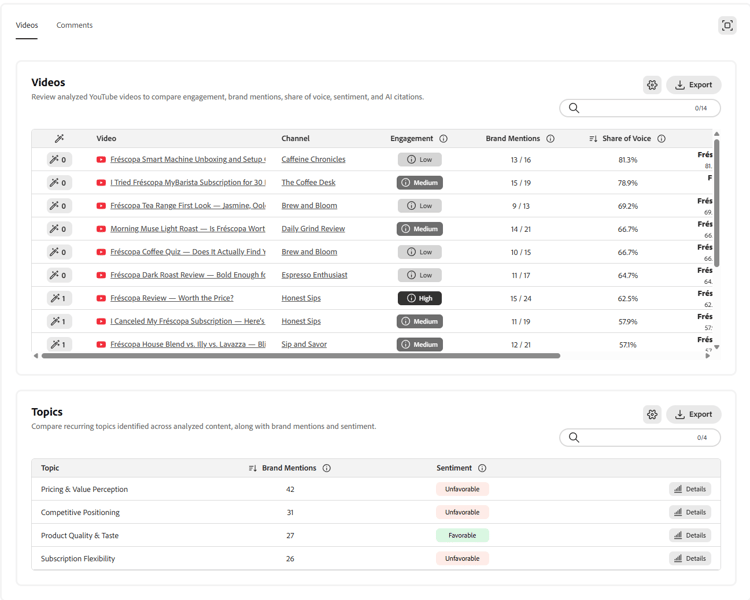
A detailed table of analyzed YouTube videos with the following columns:
- Video — Title and link to the YouTube video.
- Channel — The YouTube channel that published the video.
- Engagement — Engagement level (Low, Medium, High).
- Brand Mentions — Count of your brand mentions versus total mentions in the video.
- Share of Voice — Your brand’s share of mentions relative to all brands mentioned.
- Top 5 Brands — The most mentioned brands in the video.
- Sentiment — Overall sentiment toward your brand in the video.
- AI Citations — Number of AI citation signals associated with the video.
The Performance tab shows the Videos and Topics panels in one view (with Videos selected). The following figure includes the video-level table and below it, the Topics summary.
Comments
A detailed table of analyzed YouTube comments with the same columns as the Videos table, filtered to comment-level data.
Topics
A table of recurring topics identified across analyzed content, showing:
- Topic — The recurring theme or subject identified.
- Brand Mentions — Number of brand mentions associated with the topic.
- Sentiment — Overall sentiment associated with the topic.
The Topics table appears in the same Performance view as the Videos table, see the figure in the Videos section above.
Try it in the demo
See the YouTube Sentiment Analysis opportunity in action by using the Frescopa demo environment.
View YouTube Sentiment Analysis in the Frescopa demo
Frequently asked questions
Why does YouTube matter for AI search?
AI systems increasingly cite YouTube videos when generating responses about brands, products and topics. When those cited videos discuss your brand unfavorably or inaccurately, that sentiment feeds directly into how AI systems represent your brand. Improving how your brand is discussed in YouTube content that AI systems are already citing is one of the most direct ways to influence AI-generated brand perception.
Why is this opportunity not showing in my dashboard?
This opportunity only appears when YouTube videos are detected as citations for prompts in your Brand Presence dashboard prompt set. If no YouTube videos are being cited for those prompts, the opportunity will not be shown. As your brand gains more YouTube coverage and those videos are cited by AI systems for your prompt set, the opportunity will become available.
What does Overall Sentiment mean?
Overall sentiment reflects the aggregated tone of content where your brand is mentioned: favorable, neutral or unfavorable. It is calculated separately for videos and comments, as these can differ significantly.
What is Share of Voice?
Share of voice is your brand’s percentage of total brand mentions within a given piece of content or across all analyzed content, relative to all other brands mentioned.
What are AI Citations?
AI citations show how many AI answers cited a given video. Higher AI citation counts indicate the video is actively being used by AI systems when generating responses about related topics — making the sentiment in those videos especially important for your brand’s AI representation.
How are market competitors identified?
Competitors are identified automatically based on your brand’s industry and the brands most frequently co-mentioned in the analyzed content. You can also manually select up to five brands to compare in the Market Tracking chart.
How often is the analysis updated?
The YouTube analysis reflects content analyzed up to the date shown in the dashboard header. Revisit the opportunity after implementing recommendations to track changes in sentiment and share of voice.