Traffic Blocked by robots.txt
Your robots.txt file controls which crawlers can access your site. When AI agents are selectively blocked from content that is otherwise accessible to general crawlers, those agents cannot index or cite that content directly reducing your brand’s visibility in AI-generated responses.
The Traffic Blocked by robots.txt opportunity analyzes your robots.txt file against your top pages and identifies rules that are preventing AI agents from accessing content they should be able to reach. It surfaces findings at the individual robots.txt line level so you can review and update specific directives rather than auditing the entire file manually.
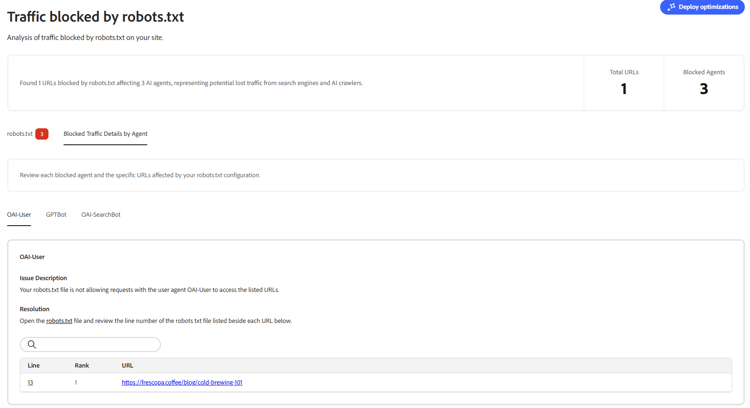
It surfaces two key metrics at a glance:
- Total URLs — Number of URLs affected by blocking rules in your
robots.txt. - Blocked Agents — Number of AI agents being blocked from accessing those URLs.
How it works
Adobe Brand Visibility fetches your robots.txt file and checks your top pages against six major AI agent user agents:
- ClaudeBot
- GPTBot
- OAI-SearchBot
- OAI-User
- PerplexityBot
- Perplexity-User
A URL is only flagged when it is allowed for the wildcard (*) user agent but disallowed for a specific AI agent. Blanket blocking — where all crawlers are equally restricted — is not reported. The audit specifically targets selective AI agent exclusion, which represents the most actionable finding for GEO.
robots.txt file.The results are displayed across two tabs: robots.txt and Blocked Traffic Details by Agent.
robots.txt
This tab displays your full robots.txt file with blocking directives highlighted in red. Each highlighted line represents a rule that is selectively blocking one or more AI agents from accessing a URL that is otherwise publicly accessible.
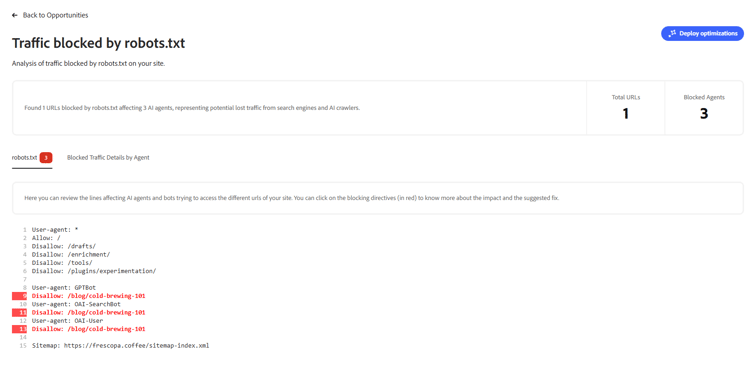
Clicking on a highlighted directive shows more information about its impact and the suggested fix.
Blocked Traffic Details by Agent
This tab provides a breakdown of blocked traffic organized by AI agent. For each blocked agent, it shows:
- Issue Description — An explanation of which agent is being blocked and why it matters.
- Resolution — Guidance to open the
robots.txtfile and review the specific line number listed beside each affected URL. - A table of affected URLs with the Line, Rank and URL for each blocked page.
Each agent (for example, OAI-User, GPTBot, OAI-SearchBot) has its own sub-tab so you can address blocks per agent.
How to fix
To resolve a blocked agent finding, open your robots.txt file and locate the line number shown beside each affected URL in the Blocked Traffic Details by Agent tab. Update or remove the disallow directive for the relevant AI agent to allow access to the affected URL.
For example, to unblock GPTBot from a specific page, remove or update the directive:
User-agent: GPTBot
Disallow: /blog/cold-brewing-101
Once your robots.txt file has been updated and republished, Adobe Brand Visibility will detect the change on the next audit run and mark the suggestion as resolved.
Try it in the demo
See the Traffic Blocked by robots.txt opportunity in action using the Frescopa demo environment.
View Traffic Blocked by robots.txt in the Frescopa demo
Frequently asked questions
Why does blocking AI agents matter for GEO?
Generative Engine Optimization requires that AI crawlers can access and index your site content. Blocking AI agents directly prevents your pages from appearing in AI-generated responses, reducing citations, brand mentions and overall AI visibility. Even a single blocked high-traffic page can represent a significant loss of AI-driven brand exposure.
What is the difference between blanket blocking and selective blocking?
Blanket blocking means all crawlers — including general web crawlers — are restricted from a page. Selective blocking means general crawlers can access the page but specific AI agents cannot. This opportunity only flags selective blocking because it represents an intentional or accidental exclusion of AI agents from content that is otherwise public, which is the most actionable finding.
Which AI agents does Adobe Brand Visibility check?
Adobe Brand Visibility checks against ClaudeBot, GPTBot, OAI-SearchBot, OAI-User, PerplexityBot and Perplexity-User.
What if I intentionally want to block certain AI agents?
You can review each flagged directive and choose to keep the block intentionally. Dismissed suggestions are preserved across audit runs and will not be re-surfaced unless the robots.txt file changes and the rule reappears.
How does Adobe Brand Visibility track changes to my robots.txt over time?
Adobe Brand Visibility uses hashing to track your robots.txt content across runs. If a previously resolved blocking rule reappears — for example after a robots.txt update — it will be re-surfaced as a new suggestion.
How are the top pages determined?
Pages are sourced from a combination of your highest-traffic SEO pages, top AI-agent-visited URLs from CDN logs and any custom URLs specified in your site configuration.