Recover Content Visibility
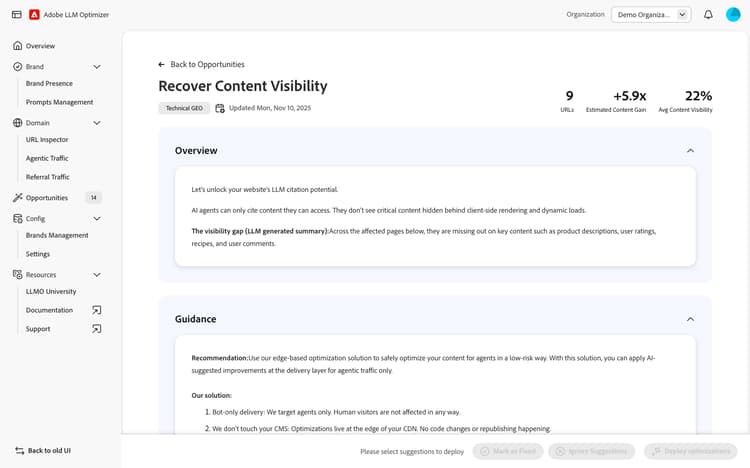
AI agents can only cite content they can access. When key content on your pages is hidden behind client-side rendering and dynamic loads (such as product descriptions, user ratings, recipes and comments) AI agents miss it entirely, leaving valuable content invisible to the systems that could be citing it.
The Recover Content Visibility opportunity identifies pages on your site where this visibility gap exists. For each affected page, it shows you exactly which content is missing from the AI agent view, highlights the gap and enables you to apply fixes without any CMS changes or developer involvement.
It surfaces three key metrics at a glance:
- URLs — Number of pages identified with a content visibility gap.
- Estimated Content Gain — The estimated multiplier of content that could be recovered by applying the optimization.
- Avg Content Visibility — The average percentage of content currently visible to AI agents across affected pages.
For a video overview of this opportunity, you can watch Recover Content Visibility.
This opportunity can be optimized by using Optimize at Edge. Optimizations are delivered exclusively to AI agents with no impact on human visitors (bot-only delivery). Optimizations are then applied at the CDN layer with no CMS changes required and can take effect in minutes with no developer engagement — making it a fast, low-risk deployment.
How it works
Adobe Brand Visibility analyzes your pages by comparing what AI agents can access against what is actually present on the page. Pages that receive high agentic traffic but have low content visibility are surfaced in the URLs with suggestions table, prioritized by agentic traffic volume.
For each affected URL, Adobe Brand Visibility provides:
- AI Analysis — A description of what content is missing and why it matters for LLM citability, along with a list of content references that could be recovered
- Content Visibility — The percentage of content currently visible to AI agents on that page
- Content Gain Ratio — The estimated multiplier of recoverable content if the optimization is applied
- Preview — A side-by-side HTML comparison showing how the page looks now vs. post-optimization, so you can validate the change before deploying
The fix is applied using Optimize at Edge — Adobe’s edge-based deployment capability that serves a fully pre-rendered, AI-friendly HTML snapshot to LLM user agents at the CDN layer, recovering previously hidden content without touching your CMS.
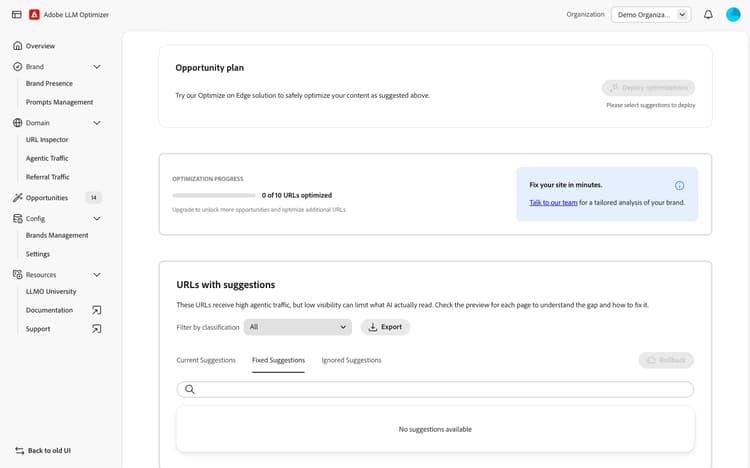
URLs with suggestions
The URLs with suggestions table lists all affected pages and can be filtered by classification. For each URL you can:
- Expand the row to view the AI Analysis, including what content is missing and why it matters.
- Preview the side-by-side HTML comparison of the current page versus the post-optimization version.
- Mark as Fixed once the issue has been addressed.
- Ignore suggestions that are not relevant.
Suggestions are organized into three views: Current Suggestions, Fixed Suggestions, and Ignored Suggestions. Once a suggestion is deployed, it moves to Fixed Suggestions with a status of Optimized and a View Live action to verify the optimization is live for agentic traffic. Fixed suggestions can also be rolled back at any time.
Deploying the optimization
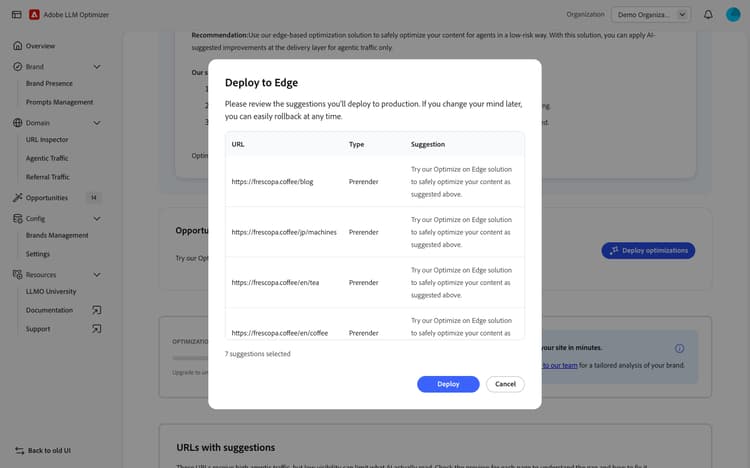
Once you have reviewed the suggestions and selected the URLs to optimize, click Deploy optimizations to publish the fix at the CDN edge. A Deploy to Edge confirmation dialog shows the selected URLs, their type (Prerender) and the suggestion being applied. After deployment, a confirmation screen confirms which URLs were successfully optimized.
Try it in the demo
See the Recover Content Visibility opportunity in action using the Frescopa demo environment.
View Recover Content Visibility in the Frescopa demo
Frequently asked questions
Why is my page content hidden from AI agents?
Most modern websites rely on JavaScript to load content dynamically after the initial page request. AI agents typically do not execute JavaScript, so content rendered client-side — product listings, user reviews, blog article links, and similar elements — is never seen by the AI agent, even if it is fully visible to human visitors.
Will this optimization affect my human visitors or SEO bots?
No. Optimize at Edge targets only AI user agents. Human visitors and SEO bots receive the original page exactly as before, with no changes to their experience or performance.
Do I need to change my CMS or involve developers?
No. The optimization is applied at the CDN edge and requires no authoring changes, code deployments or developer engagement. Once onboarded to Optimize at Edge, you can deploy and roll back changes in minutes directly from the Adobe Brand Visibility interface.
What happens if my page content changes after I deploy?
For Recover Content Visibility, Adobe Brand Visibility uses low cache TTL settings so that any content update on your site triggers a refresh within minutes. AI agents will always receive the most up-to-date version of your content.
How do I get started with Optimize at Edge?
See the Optimize at Edge page for the full onboarding process, CDN configuration guides, and prerequisites.