Enrich Product Catalog
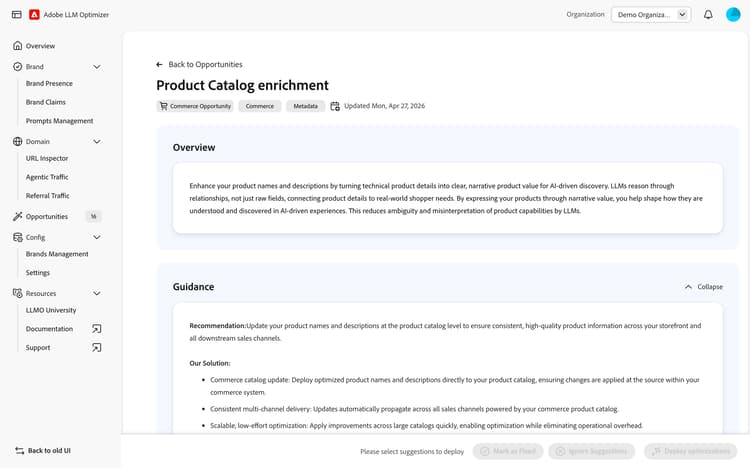
LLMs attempt to connect product attributes to real-world value, use cases, and shopper intent. When product names and descriptions fail to communicate that value clearly, your products are less likely to be cited, recommended, or surfaced in AI-driven discovery. That is because, AI agents reason through relationships, not raw data fields. A product listing with a name like “Coffee Grinder X200” and a description listing technical specs (motor wattage, grind settings etc.) gives an LLM very little to work with when a shopper asks for ‘the best espresso grinder for a home barista’.
The Product Catalog Enrichment opportunity identifies products in your Commerce catalog where names and descriptions are too generic, too technically dense or too ambiguous for LLMs to interpret accurately. Powered by Adobe Commerce, it generates narrative-driven, intent-rich enrichments for your product names and descriptions and applies them directly to your Commerce catalog with a single click.
It surfaces two key metrics at a glance:
- URLs — A list of Product Detail Pages (products in your catalog) that have been evaluated for enrichment quality.
- Agentic Traffic — The total visits and interactions on a site that are initiated and driven by autonomous AI agents (such as LLM-powered assistants or bots) acting on behalf of users to discover, retrieve, or engage with content.
How it works
The Adobe Commerce Catalog Agent reads your product catalog data and analyzes each product SKU — including all its technical attributes, category context, variants and existing name and description. It identifies products where the current name or description fails to communicate shopper-relevant value, and generates an enriched alternative that translates technical details into clear, intent-aligned language.
For example, a product named “Coffee Grinder X200” with a description listing “18 grind settings, 450W motor” may be enriched to explain that ‘The X200 delivers café-level espresso consistency because its 18-step grind system pairs with a high-torque motor for repeatable results at home’. Attributes like price and inventory are intentionally excluded from enrichment — the Catalog Agent focuses on value-driving attributes that explain what the product is, how it is used and why it matters to a shopper.
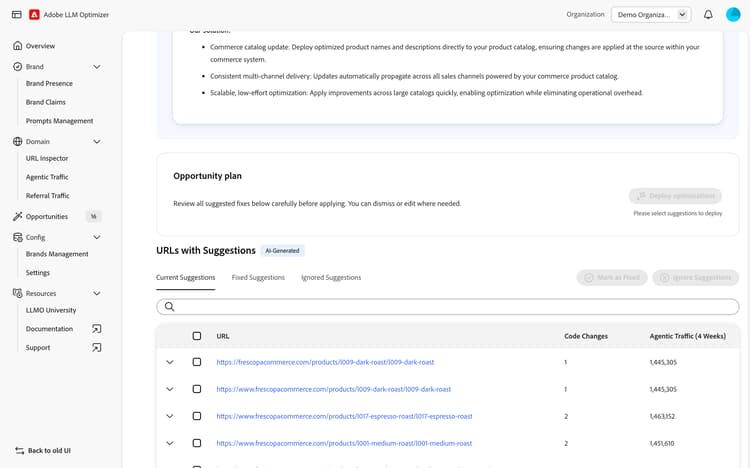
Products with enrichment suggestions are surfaced in the URLs with suggestions table, prioritized by enrichment impact. For each identified product, Adobe Brand Visibility provides:
- Current Name — The existing product name as it appears in your Adobe Commerce catalog.
- Updated Name — The AI-generated, value-driven product name that communicates shopper-relevant context and intent to LLMs.
- Current Description — The existing product description as it appears in your Adobe Commerce catalog.
- Suggested Description - The AI-generated description that translates your product’s technical attributes into a narrative that helps LLMs understand what the product is, the narrative value, and why it matters.
Products with suggestions
The URLs with suggestions table lists all products with enrichment opportunities. For each product you can:
- Expand the row to view the AI Analysis and the proposed enrichment.
- Edit the proposed product name or description before applying, to align with your brand voice and merchandising guidelines.
- Deploy the Optimization for the products you want to enrich and publish it directly to your Adobe Commerce catalog.
- Mark as Fixed once the enrichment has been reviewed and applied.
- Ignore suggestions that are not relevant to your catalog strategy.
Suggestions are organized into three views: Current Suggestions, Fixed Suggestions, and Ignored Suggestions. Once an enrichment is applied, it moves to Fixed Suggestions with a status of Applied and a View in Catalog action to verify the update in Adobe Commerce. Applied enrichments can be rolled back at any time, restoring the original product name and description.
Deploying the optimization
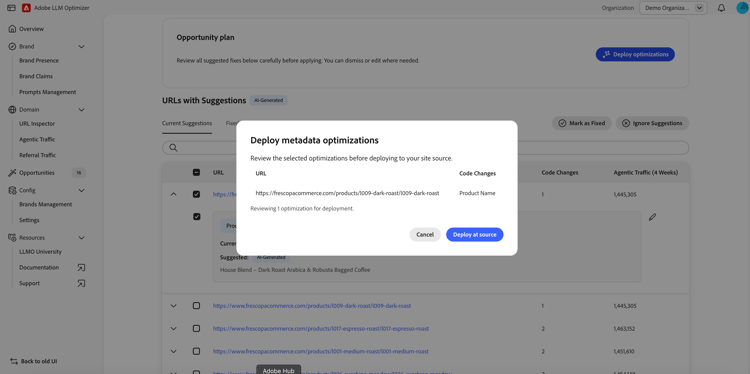
Once you have reviewed and optionally edited the suggestions for your selected products, click Deploy Optimizations to publish the updated product name and description to your Adobe Commerce catalog. A confirmation dialog shows the selected products and the changes being applied. After confirmation, a results screen confirms which products were successfully updated.
Because enrichments are applied directly to the Adobe Commerce catalog, the updated product names and descriptions are immediately available across all channels that use your catalog — including your storefronts, advertisement feeds, and any direct LLM product integrations. This ensures that every surface where your product appears communicates consistent and high-quality information.
Try it in the demo
See the Enrich Product Catalog opportunity in action using the Frescopa demo environment.
View Enrich Product Catalog in the Frescopa demo
Frequently asked questions
Why do generic product names and descriptions hurt AI discoverability?
LLMs do not match products to shopper queries by looking for keyword overlap. They reason about relationships, connecting what a shopper intends to find with what a product actually does, who it is for, and how it compares to alternatives. A product name or description that lists technical specifications without communicating real-world value gives an LLM very little context to work with. The result is that your product is less likely to be cited when a shopper asks a relevant question, even if your product is the best match for their need.
Which product attributes does the Catalog Agent use to generate enrichments?
The Catalog Agent uses value-driving attributes in your Commerce Catalog that help LLMs understand what a product is, how it is used, and why it matters. Value-driving attributes such as product features, use cases, material properties, category context and compatibility details. Attributes like price and inventory levels are intentionally excluded, as they do not contribute to semantic product understanding and can make descriptions less durable as conditions change.
Can I edit the AI-generated enrichment before applying it?
Yes. Every suggestion includes an editable preview of the proposed product name and description. You can modify the enrichment to align with your brand voice, correct any inaccuracies or incorporate additional context before applying it to your catalog.
Will the enrichment change what human visitors see on my storefront?
Yes, human visitors will see the updated product name and description on the storefront, along with all other channels that source from your Commerce catalog. This is intentional: the goal is to improve how your product is understood everywhere, not just by AI agents and also to avoid cloaking risks.
What happens across my other sales channels when I apply an enrichment?
Because the enrichment is written directly to your Adobe Commerce catalog, it propagates automatically to all channels that use your commerce catalog as their source of truth; including multiple storefronts, advertising pipelines and any direct LLM product feeds. This ensures brand consistency and coherent product information for LLMs crawling the internet for your products.
Can I roll back an enrichment if I am not satisfied with the result?
Yes. Applied enrichments can be rolled back at any time from the Fixed Suggestions view, restoring the original product name and description in your Adobe Commerce catalog.