Agentic Traffic Errors
AI agents crawling your site encounter the same HTTP errors as human browsers but the consequences are different. When an AI agent hits a 404, 403 or 5xx error, it cannot access or cite that content, directly reducing your brand’s visibility in AI-generated responses.
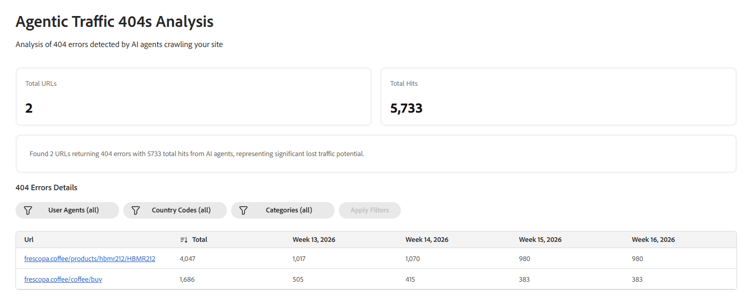
The Agentic Traffic Errors opportunity monitors your CDN logs for HTTP errors returned to AI agents and surfaces the affected URLs along with their hit volumes and fix suggestions. It covers three error types — each with its own opportunity in the dashboard:
- 404 Not Found — Broken links that prevent AI agents from accessing content that no longer exists at the expected URL.
- 403 Forbidden — Access restrictions that block AI crawlers from content they should be able to reach.
- 5xx Server Errors — Server-side instability that makes content temporarily or persistently unavailable to AI agents.
Each error type may appear as a separate opportunity in your dashboard depending on which errors are detected for your site.
The opportunity also surfaces two key metrics for each error type:
- Total URLs — Number of unique URLs returning errors to AI agents.
- Total Hits — Total number of error responses recorded across all AI agent requests.
How it works
Adobe Brand Visibility queries your CDN logs via Athena to identify URLs returning 404, 403 or 5xx status codes to AI agent user agents. The user agents include ChatGPT, Claude, Perplexity, and Gemini. Up to 500 URLs per audit are analyzed and ranked by traffic volume. The audit runs weekly by default.
URLs are validated before being surfaced to filter out false positives and stale data. Adobe Brand Visibility re-tests each URL to confirm its current status and compares AI agent responses against human browser responses to identify crawler-specific issues.
For 404 errors, suggestions are AI-powered. As such, Adobe Brand Visibility analyzes the broken URL’s structure and content to recommend alternative URLs that preserve user intent, along with a confidence score and rationale explaining the recommendation.
For 403 and 5xx errors, suggestions are template-based, providing targeted guidance for each error type.
Error details table
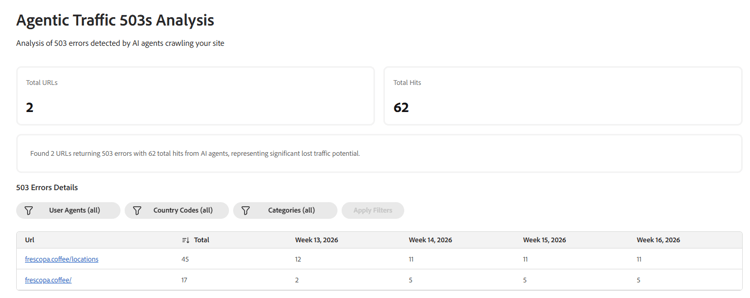
The error details table lists all affected URLs, filtered by User Agent, Country Code and Category. For each URL it shows:
- URL — The affected page.
- Total — Total number of error hits from AI agents.
- Weekly hit counts for recent weeks, so you can track whether the issue is persistent or improving.
Suggestion Details
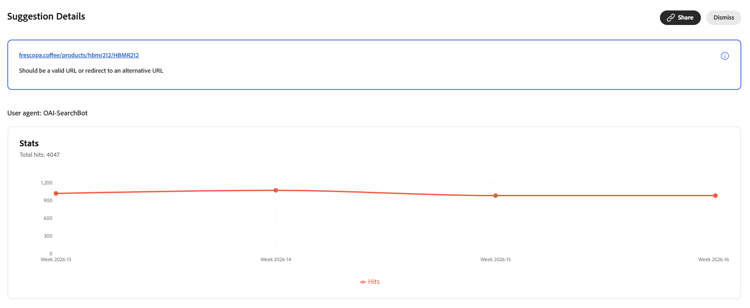
Clicking into any suggestion opens a Suggestion Details panel showing:
- The affected URL and the recommended action — for example, “Should be a valid URL or redirect to an alternative URL”.
- A Stats chart showing the total hits per week by AI agent user agent, so you can understand the traffic impact and whether the issue is persistent or improving.
- Share and Dismiss actions to manage the suggestion.
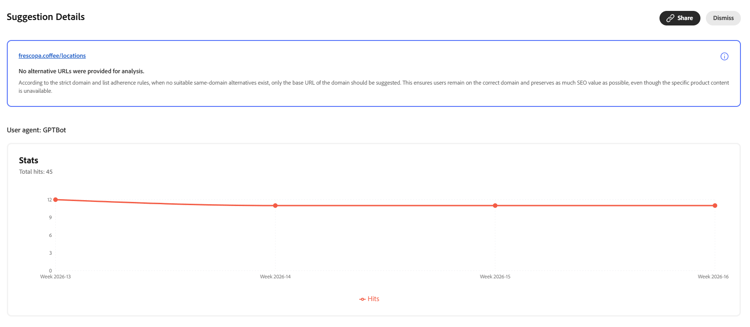
For some 5xx (and similar) cases, the panel may note when no same-domain alternative URLs are available and explain how recommendations follow domain and list rules. For example, suggesting the base domain URL to preserve SEO value when a closer match cannot be offered.
How to fix
The fix depends on the error type:
404 errors — The suggestion includes one or more alternative URLs recommended by AI, based on the broken URL’s structure and content, along with a confidence score and rationale. Implement a server-side redirect from the broken URL to the suggested alternative to restore AI agent access and preserve content discoverability.
403 errors — Review access permissions to ensure AI crawlers are not being blocked from content they should be able to access. Specifically:
- Review access permissions — AI crawler blocked.
- Verify that security settings don’t block legitimate crawlers.
5xx errors — Investigate server-side issues affecting the flagged pages. Specifically:
- Investigate server stability for high-traffic pages.
- Check application logs for recurring errors.
- Monitor infrastructure health and capacity.
Try it in the demo
See the Agentic Traffic Errors opportunity in action by using the Frescopa demo environment.
Frequently asked questions
Why do HTTP errors matter for AI visibility?
In retrieval-augmented systems, AI crawlers discover links and attempt to fetch page content for inclusion in their responses. If a page is missing, returns an error or is inaccessible, its content cannot be retrieved or cited. Fixing these technical errors directly improves the likelihood that your content is successfully indexed and cited by AI systems.
What is the difference between a 404 and a 403 error?
A 404 error means the page does not exist at the requested URL — it has either been deleted or moved without a redirect. A 403 error means the page exists but access is being denied, either to all crawlers or specifically to AI agents. Both prevent AI agents from accessing your content, but the fix is different for each.
Why might a 403 error only affect AI agents and not human visitors?
Some security configurations or access control settings may block AI agent user agents from content that human visitors can access normally. Adobe Brand Visibility specifically flags these cases by comparing AI agent responses against human browser responses.
How are false positives filtered out?
Adobe Brand Visibility re-tests URLs to confirm their current status before surfacing them as suggestions and compares AI agent responses against human browser responses to identify crawler-specific issues. URLs that no longer return errors are not shown.
How often is the analysis updated?
The audit runs weekly by default, pulling error data from the previous week’s CDN logs. The error details table shows weekly hit counts so you can track trends over time.
What AI agents are monitored?
Adobe Brand Visibility monitors error responses from all detected AI agent user agent patterns, including: ChatGPT, Claude, Perplexity and Gemini crawlers.