Using Adobe Journey Optimizer with the Experience Platform Web SDK
Adobe Experience Platform Web SDK can deliver and render personalized experiences managed in Adobe Journey Optimizer to the web channel. You can use a WYSIWYG editor, Adobe Journey Optimizer Web Channel, or a non-visual interface, the Code-based Experience Channel to create, activate, and deliver your Journey Optimizer Web campaigns and personalization experiences.
Terminology terminology
Surface: A web surface is a web page or location on a page identified by a URI where the Adobe Journey Optimizer experience content will be delivered.
Propositions: In Adobe Journey Optimizer, propositions correlate to the experience selected from a Journey Optimizer Campaign.
Enabling Adobe Journey Optimizer enable-ajo
To start using Adobe Journey Optimizer, follow the steps below.
-
Go through the prerequisites, specifically:
- Set up Adobe Experience Cloud Visual Editing Helper.
- Enable Adobe Journey Optimizer in your datastream.
- Enable the Active-On-Edge Merge Policy option.
-
Add the
renderDecisionsoption to your events. SetrenderDecisionstotruefor automatic rendering of delivered Journey Optimizer content propositions on your web page surfaces.code language-javascript alloy("sendEvent", { ..., "renderDecisions": true }) -
Optionally, specify additional surfaces in your events. By default, the Web SDK will automatically generate the web surface for the current web page and include it in the request to the Edge Network. If required, additional surfaces can be included in the request by specifying these in the
personalization.surfacesoption of thesendEventcommand, or in the corresponding Surfaces Send event action configuration of the Web SDK Extension.code language-javascript alloy("sendEvent", { ... "personalization": { "surfaces": [ "web://my.site.com/about.html", "web://my.site.com/contact.html" ] } })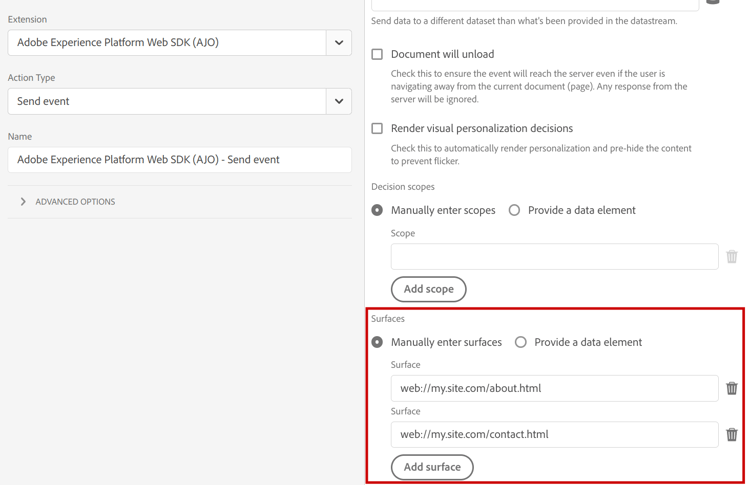
Event surfaces are included in the
query.personalization.surfacesrequest field:code language-json { "events": [ { "query": { "personalization": { "schemas": [ ... ], "decisionScopes": [ "__view__" ], "surfaces": [ "web://ajostage.weebly.com/" ] } }, ... } ] } -
Similar to other personalization features, you can add a prehiding snippet to hide only certain portions of the page while fetching experiences.
Rendering personalized content rendering-personalized-content
See the Adobe Experience Platform Web SDK documentation for more information on rendering personalized content.
Adobe Journey Optimizer propositions for web surfaces are processed in a similar manner to the __view__ decision scope propositions. Specifically, when renderDecisions option is set to true in the sendEvent command these will be automatically rendered by the Web SDK.
Sample Journey Optimizer content proposition:
{
    "scope": "web://ajostage.weebly.com/",
    "scopeDetails": {
        "correlationID": "ccfaf19c-6360-4aea-b464-0cf924db5da7",
        "characteristics": {
            "eventToken": "eyJtZXNzYWdlRXhlY3V0aW9uIjp7Im1lc3NhZ2VFeGVjdXRpb25JRCI6ImEzNDYxYTMzLTc5MjktNGQyNS1hNmMxLTVkYzM2YWY1NzRmMyIsIm1lc3NhZ2VJRCI6ImNjZmFmMTljLTYzNjAtNGFlYS1iNDY0LTBjZjkyNGRiNWRhNyIsIm1lc3NhZ2VUeXBlIjoibWFya2V0aW5nIiwiY2FtcGFpZ25JRCI6IjEzN2JmMzllLWM1ODgtNGI1My1iODQxLTJiMWZiZDYxM2JkYiIsImNhbXBhaWduVmVyc2lvbklEIjoiMTA1NzY1MmEtZWYwNS00YjE3LWExMmUtY2FlOTQyOTFhMWFjIiwiY2FtcGFpZ25BY3Rpb25JRCI6ImViNTlmODQ4LTk5ZDYtNGE1OC05YmU4LTk4MjIxODU0NmYzNiIsIm1lc3NhZ2VQdWJsaWNhdGlvbklEIjoiYzg2NzFjZmItNDdjYS00YTVjLTg4Y2YtNzYwZDFlZjU1MzQyIn0sIm1lc3NhZ2VQcm9maWxlIjp7ImNoYW5uZWwiOnsiX2lkIjoiaHR0cHM6Ly9ucy5hZG9iZS5jb20veGRtL2NoYW5uZWxzL3dlYiIsIl90eXBlIjoiaHR0cHM6Ly9ucy5hZG9iZS5jb20veGRtL2NoYW5uZWwtdHlwZXMvd2ViIn0sIm1lc3NhZ2VQcm9maWxlSUQiOiI2YTViY2I3ZC02MmYxLTQ5NDItODRkMC02MzE5ZjM5Zjk1ZGUifX0="
        },
        "decisionProvider": "AJO",
        "activity": {
            "id": "137bf39e-c588-4b53-b841-2b1fbd613bdb#eb59f848-99d6-4a58-9be8-982218546f36"
        }
    },
    "id": "002321c0-dff5-4153-b171-a9dfb70b9750",
    "items": [
        {
            "schema": "https://ns.adobe.com/personalization/dom-action",
            "data": {
                "uiData": {
                    "tagType": "Text",
                    "actionType": "changed"
                },
                "content": "Welcome AJO!",
                "prehidingSelector": "#wsite-content > DIV:nth-of-type(2) > DIV:nth-of-type(1) > DIV:nth-of-type(1) > DIV:nth-of-type(1) > DIV:nth-of-type(1) > DIV:nth-of-type(3) > FONT:nth-of-type(1) > SPAN:nth-of-type(1)",
                "type": "setHtml",
                "selector": "#wsite-content > DIV.wsite-section-wrap:eq(1) > DIV.wsite-section:eq(0) > DIV.wsite-section-content:eq(0) > DIV.container:eq(0) > DIV.wsite-section-elements:eq(0) > DIV.paragraph:eq(0) > FONT:nth-of-type(1) > SPAN:nth-of-type(1)"
            },
            "id": "0a522f66-9e6a-4ded-b1d0-e9167f103290"
        }
    ]
}
Debugging debugging
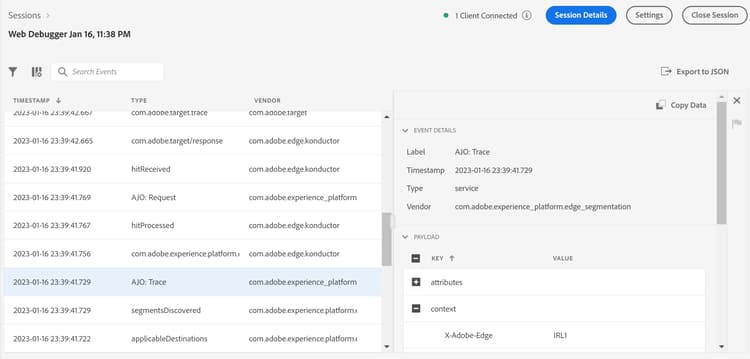
To debug Adobe Journey Optimizer personalization implementations, use Web SDK debugging. Adobe Journey Optimizer debug traces are available when troubleshooting using Adobe Experience Platform Assurance. Check for events with the AJO: prefix.
This section contains structured knowledge intended to support interpretation, retrieval, and question answering related to this topic.
For complete understanding, this information should be combined with the documentation on this page. Neither source is intended to stand alone; the page describes the feature, while this section provides additional context that helps disambiguate terminology, intent, applicability, and constraints.
- TL;DR: This page explains how the Adobe Experience Platform Web SDK delivers and renders personalized Adobe Journey Optimizer content to web surfaces, covering how to enable Journey Optimizer, render propositions, and debug the implementation.
Intents:
- Enable Adobe Journey Optimizer delivery through the Experience Platform Web SDK
- Render Journey Optimizer content propositions automatically on web page surfaces
- Specify additional web surfaces in
sendEventrequests - Add a prehiding snippet to hide portions of the page while fetching experiences
- Debug Journey Optimizer personalization implementations
Glossary:
- Surface: A web page or location on a page identified by a URI where the Adobe Journey Optimizer experience content will be delivered (product-specific)
- Proposition: In Adobe Journey Optimizer, correlates to the experience selected from a Journey Optimizer Campaign (product-specific)
renderDecisions: AsendEventoption that, when set totrue, automatically renders delivered Journey Optimizer content propositions on web page surfaces (product-specific)- Prehiding snippet: A snippet used to hide only certain portions of the page while fetching experiences (product-specific)
Guardrails:
- Prerequisites must be completed: set up Adobe Experience Cloud Visual Editing Helper, enable Adobe Journey Optimizer in your datastream, and enable the Active-On-Edge Merge Policy option.
- Automatic rendering of propositions requires
renderDecisionsto be set totruein thesendEventcommand. - By default the Web SDK automatically generates the web surface for the current web page; additional surfaces must be specified in the
personalization.surfacesoption or the Surfaces Send event action configuration. - Journey Optimizer debug traces are available through Adobe Experience Platform Assurance; check for events with the
AJO:prefix.
Terminology:
- Canonical name: Surface — Acronym: n/a — variants: web surface
- Synonyms: “propositions” = “experience selected from a Journey Optimizer Campaign”
- Do not confuse: “Surface” (URI location where content is delivered) ≠ “Proposition” (the experience content selected for delivery)
FAQ:
- Q: How do I turn on automatic rendering of Journey Optimizer content? — Set the
renderDecisionsoption totruein thesendEventcommand. - Q: Do I have to declare the web surface for the current page? — No; by default the Web SDK automatically generates the web surface for the current web page. You only specify additional surfaces via
personalization.surfaces. - Q: How are Journey Optimizer web propositions rendered? — They are processed similar to
__view__decision scope propositions and, whenrenderDecisionsistrue, are automatically rendered by the Web SDK. - Q: How do I debug the implementation? — Use Web SDK debugging and Adobe Experience Platform Assurance, checking for events with the
AJO:prefix.
Personas:
- developer: Can set the renderDecisions option to true in the sendEvent command so delivered propositions render automatically. Can specify additional surfaces in the personalization.surfaces option, for example web://my.site.com/about.html. The page states that event surfaces are included in the query.personalization.surfaces request field. Where: “Enabling Adobe Journey Optimizer”.
Onboarding:
- Level: Intermediate
- First minimal step: Add the renderDecisions option to your events and set it to true.
- Success check: Journey Optimizer debug traces appear in Assurance for events with the AJO: prefix.
- Previous: Complete prerequisites before enabling Journey Optimizer in the Web SDK: Web channel prerequisites (web/web-prerequisites.md); Create and activate a Journey Optimizer Web Channel campaign: Get started with web channel (web/get-started-web.md)