Nextdoor Conversion API Extension - User Guide
Overview
Nextdoor is a social networking service for neighborhoods that connects people to their local communities. It’s a platform where neighbors can communicate, share information, stay updated on local events and news, and buy and sell items with others in their area.
Use the Nextdoor Conversion API Extension to send conversion events directly to Nextdoor’s Conversion API. This extension helps you track and measure the performance of your Nextdoor advertising campaigns by sending server-side conversion data.
This guide shows you how to install, configure, and use the Nextdoor Conversion API extension in your event forwarding rules.
Prerequisites prerequisites
You need a valid Nextdoor Ads Manager account to use this extension. If you don’t have one already, go to the Nextdoor Ads registration page to register and create your account.
Gather required configuration details configuration-details
To connect Experience Platform to Nextdoor, you’ll need the following information:
Install and configure the Nextdoor extension install
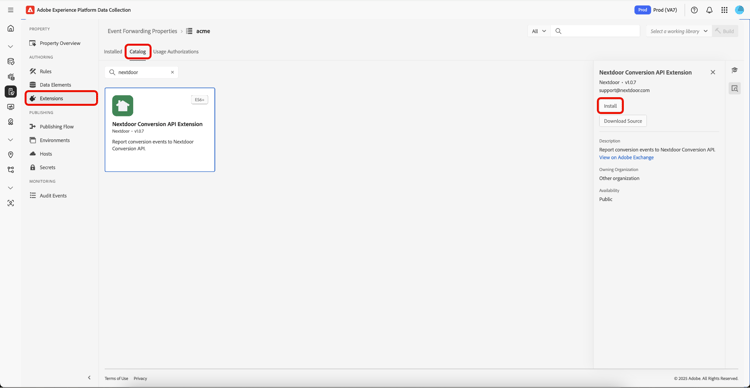
To install the extension, select Extensions in the left navigation. In the Catalog tab, select the Nextdoor Conversion API Extension and then select Install.
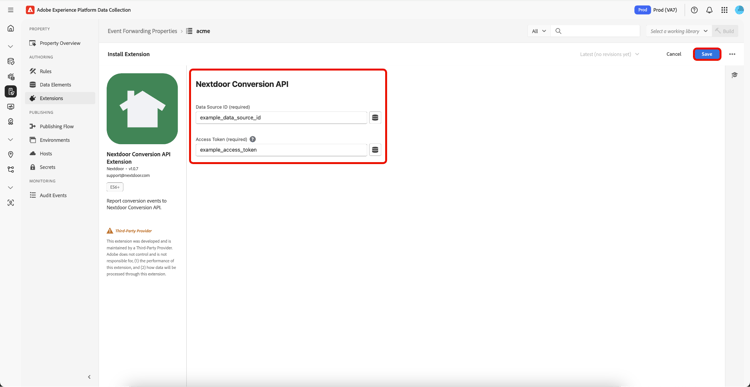
On the next screen, enter the configuration values you generated from your Nextdoor Ads Manager:
- Data Source ID
- Access Token
When finished, select Save.
Configure an event forwarding rule config-rule
Once all your data elements are set up, you can create event forwarding rules that determine when and how your events are sent to Nextdoor.
Create a new rule in your event forwarding property. Under Actions, add a new action and set the extension to Nextdoor Conversion API Extension. To send Edge Network events to Nextdoor, set the Action Type to Report Web Conversions.
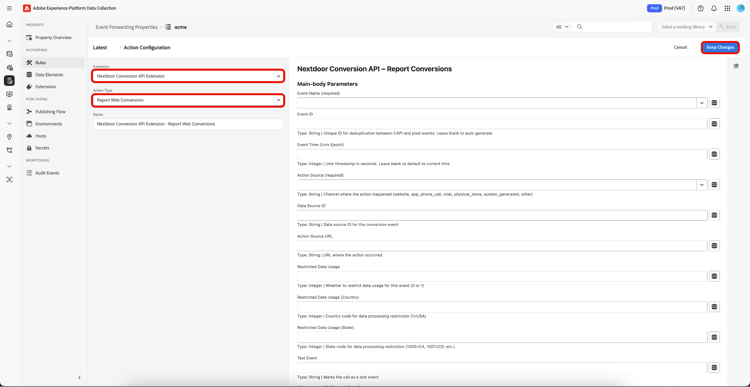
After you make this selection, additional controls appear that let you configure the event further, as outlined below. Once completed, select Keep Changes to save the rule.
Main-body parameters
These core parameters define your conversion event:
- Purchase
- Lead
- Sign Up
- Add to Cart
- Initiate Checkout
- Page View
- Search
- View Content
- Add to Wishlist
- Subscribe
- Custom Conversion 1-10
Purchaseorder_123451703980800 (Dec 30, 2023)- website
- app
- phone_call
- chat
- physical_store
- system_generated
- other
website12345Privacy and compliance parameters
Use these parameters to ensure privacy compliance:
- 0 = No restrictions
- 1 = Restrict
011000testCustomer information parameters
user@example.com+15551234567JohnSmith19900115Mcustomer_12345123 Main Street (hashed)San Francisco (hashed)CA (hashed)94102 (hashed)US (hashed)ndclid URL parameternd_click_12345abcdef192.168.1.1Mozilla/5.0 (Windows...)Custom parameters
These parameters provide additional context about your conversion event:
USD123.45order_12345in_storecurbsidehome_delivery
home_delivery[{"id":"SKU123","content_name":"Widget","item_price":29.99,"quantity":1}]Mobile app parameters
You must include these parameters when Action Source = 'APP':
- Bundle ID (iOS)
- Package Name (Android)
com.company.apptrueiOSAndroid
Android2.0.0-betaEvent types event-types
The following event types are supported for different conversion scenarios:
- Event Name
- Order Value
- Customer Info
- Event Name
- Customer Info
- Event Name
- Customer Info
- Event Name
- Customer Info
- Event Name
- Customer Info
- Event Name
- Customer Info
- Event Name
- Customer Info
- Event Name
- Customer Info
- Event Name
- Customer Info
- Event Name
- Customer Info
- Event Name
- Customer Info
Data elements integration data-element
All fields support Adobe event forwarding data elements. Select the data element icon

- Select Existing Data Elements: Select from data elements that have already been created.
- Add New Data Elements: Create and define new data elements as needed.
- Apply Dynamic Values: Populate fields with dynamic content sourced from your website.
Best practices best-practices
Follow these best practices to ensure accurate conversion tracking, improve data quality, and comply with privacy regulations. These recommendations will help you maximize the effectiveness of your Nextdoor Conversion API integration and optimize your advertising performance.
Data Quality and Privacy Compliance
Proper data handling is essential for maximizing conversion attribution accuracy while maintaining user privacy and regulatory compliance. These practices help ensure your customer data is formatted correctly, processed securely, and handled according to privacy regulations.
-
Use consistent data formatting: Format emails, phone numbers, and other data consistently:
- Email normalization: Convert emails to lowercase, trim whitespace, and remove dots from Gmail addresses.
- Phone number standardization: Use E.164 format (+1234567890) for international compatibility.
- Address normalization: Standardize street abbreviations (St., Ave., Rd.), and remove any extra spaces.
- Name formatting: Convert names to lowercase, remove extra spaces, and handle special characters consistently.
-
Hash sensitive data: Consider hashing sensitive customer data before sending it. Always normalize your data before hashing to ensure consistent hash values:
- Use SHA-256 hashing for phone numbers, addresses, and other PII.
- The extension automatically hashes plain text emails - you can send either format.
- Hash data consistently across all your tracking implementations.
- Example: Normalize “John@Example.COM” → “john@example.com” before hashing.
-
Provide complete information: Include as much customer information as possible for better matching:
- Include multiple identifiers (email + phone, or email + name + address) when available.
- Use external customer IDs to link conversion events to your CRM data.
- Provide demographic data (age, gender) when available and compliant with privacy laws.
-
Consent Management: Ensure you have proper consent for data collection:
-
Implement proper consent mechanisms before collecting customer data.
-
Respect user opt-out preferences and data deletion requests.
-
Use the Restricted Data Usage parameters for users who have opted out.
-
Resources:
-
-
Data Minimization: Only send necessary data for conversion tracking:
- Only collect and send data that’s essential for attribution and optimization.
- Regularly review and audit the data fields you’re sending.
- Remove unnecessary customer information to reduce privacy risk.
-
Use accurate timestamps: Ensure event timestamps are accurate for proper attribution.
- Use the actual time when the conversion occurred, not when you processed the data.
- Ensure timestamps are in Unix epoch format (seconds since January 1, 1970).
- Account for timezone differences in your timestamp calculations.
Event Deduplication
Prevent duplicate conversion events to ensure accurate campaign measurement and avoid inflated performance metrics. Implement proper deduplication so that each conversion is counted only once, providing reliable data for your optimization decisions.
- Provide unique event IDs: Always use unique event IDs to prevent duplicate conversions.
- Use consistent naming: Apply consistent event naming across your implementation.
Rate Limiting
The Nextdoor Conversion API is subject to rate limiting. The current rate limit is 100 requests/minute per advertiser. If you surpass the rate limit, the API will return an HTTP 429 Too Many Requests error code.
Conclusion conclusion
The Nextdoor Conversion API Extension provides a powerful way to track conversions and measure the effectiveness of your Nextdoor advertising campaigns. By following this guide and implementing the best practices, you can ensure accurate conversion tracking and optimize your advertising performance.
For the most up-to-date information and additional resources, visit Nextdoor Ads Manager.
Next steps next-steps
This guide showed you how to send server-side event data to Nextdoor using the Nextdoor Conversion API extension. To learn more about event forwarding capabilities in Adobe Experience Platform, see the event forwarding overview.