Identity configuration settings identity
This configuration section allows you to define the behavior of the Web SDK when it comes to handling user identification.
- Log in to experience.adobe.com using your Adobe ID credentials.
- Navigate to Data Collection > Tags.
- Select the desired tag property.
- Navigate to Extensions, then select Configure on the Adobe Experience Platform Web SDK card.
- Scroll down to the Identity section.
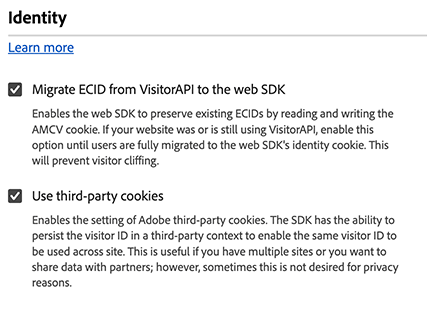
The following options are available:
Migrate ECID from VisitorAPI
A checkbox that allows the Web SDK to read the AMCV and s_ecid cookies and set the AMCV cookie used by Visitor.js. This feature is important when migrating from libraries that use VisitorAPI.js to the Web SDK, as some pages might still be using Visitor.js. This option allows the SDK to continue to use the same ECID so that users are not identified as two separate users. The JavaScript library equivalent to this checkbox is idMigrationEnabled.
Use third-party cookies
When this option is enabled, the Web SDK attempts to store a user identifier in a third-party cookie. If successful, the user is identified as a single user as they navigate across multiple domains, rather than being identified as a separate user on each domain. If this option is enabled, the SDK might still be unable to store the user identifier in a third-party cookie if the browser does not support third-party cookies or has been configured by the user to not allow third-party cookies. In this case, the SDK only stores the identifier in the first-party domain. The JavaScript library equivalent to this checkbox is thirdPartyCookiesEnabled.