Datastream configuration settings datastreams
This configuration section allows you to determine which datastream that you want to send data to. A datastream ID is required for all data sent to the Edge Network.
- Log in to experience.adobe.com using your Adobe ID credentials.
- Navigate to Data Collection > Tags.
- Select the desired tag property.
- Navigate to Extensions, then select Configure on the Adobe Experience Platform Web SDK card.
- Scroll down to the Datastreams section.
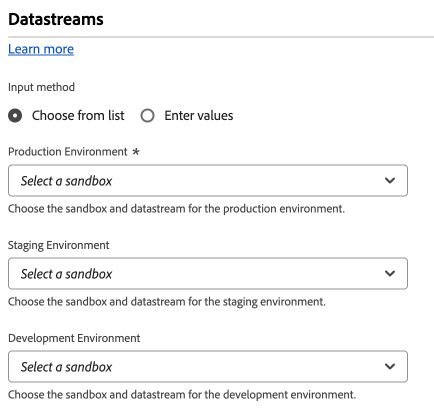
When selecting datastreams, you can do so for each environment (Development, Staging, and Production). These fields are valuable when you want to separate data sent between development, staging, and production environments. It enables a convenient workflow where you do not need to worry about sending data to the wrong datastream, as long as you install the correct tag loader in each respective environment.
You can populate datastream IDs using one of the following methods:
-
Choose from list: Each environment contains two drop-down menus, allowing you to select the sandbox and datastream for the selected environment. The values in each drop-down menu depend on your configured datastreams within each respective sandbox.
-
Enter values: As an alternative to using drop-down menus to select the desired datastream, you can manually specify the desired datastream ID directly. Each environment allows you to directly input a datastream ID, or populate this field using a data element.