Apply propositions
The Apply propositions action type allows you to render propositions in single-page applications without incrementing metrics. This action type is useful when working with single-page applications where portions of the page get re-rendered, potentially overwriting any personalizations already applied to the page.
- Log in to experience.adobe.com using your Adobe ID credentials.
- Navigate to Data Collection > Tags.
- Select the desired tag property.
- Navigate to Rules, then select the desired rule.
- Under Actions, select an existing action or create an action.
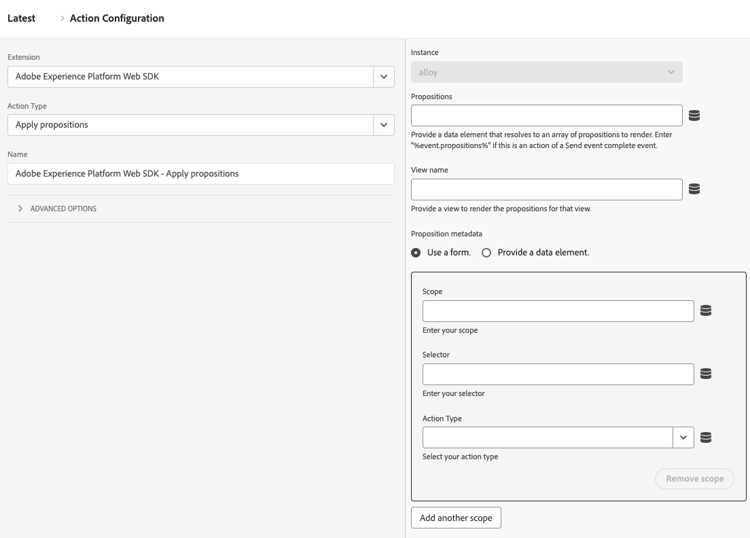
- Set the Extension dropdown field to Adobe Experience Platform Web SDK, then set the Action type to Apply propositions.
Use cases
You can use this action type for various use cases, such as:
- Render mbox HTML offers. Propositions explicitly requested via a scope or surface from a Send event action are not automatically rendered. You can use the Apply propositions action type to tell Web SDK where to render them by specifying the proposition metadata.
- Render the offers for a view on a single-page application. When rendering a view change event, if the analytics data is not ready yet, you can use the Apply propositions action to render the view propositions at the top of page. See top and bottom of page events (Second page view - Option 2) for more details. To use this, enter a View name in the form.
- Re-render propositions. When your site uses a framework like React to re-render content, you may need to re-apply personalization. In such cases you can use the Apply propositions action type to do this.
This action type does not send a display event for rendered propositions. It keeps track of rendered propositions so that they can be included in subsequent Send event calls.
Available fields
This action type supports the following fields:
-
Instance: The SDK instance that the action applies to. This drop-down menu is disabled if your implementation uses a single SDK instance.
-
Propositions: An array of proposition objects that you want to re-render.
-
View name: The name of the view to render.
-
Proposition metadata: An object that determines how HTML offers can be applied. You can provide this information either through the form or through a data element. It contains the following properties:
- Scope
- Selector
- Action type