Internal Links audit
The Internal Links audit reviews the links on your page that point back to your own site. The audit checks each internal link from the page you are editing and flags the ones that are broken, insecure, or pointed somewhere a visitor cannot follow.
Why it matters
A broken internal link is a dead end for the reader and a wasted crawl for a search engine, which passes no value on to the page it was meant to reach. Internal links are also the easiest kind to break by accident: a page gets moved or renamed, and every link to it silently stops working. Because the links are all on your own site, they are also the ones you can fix yourself.
What the audit checks
The audit reports an opportunity for each internal link that has one of the following problems:
- Broken link: the link returns an error, such as
Status 403orStatus 404, or still returnsStatus 500orStatus 501after Preflight retries it. A link that reaches the error after a redirect is reported the same way. - Insecure link: the link uses
http://instead ofhttps://. When the secure version of the same URL works, Preflight offers it as the suggestion. - Editor URL: the link points at an AEM editor URL instead of the content page. The link works for you while you are authoring, which is what makes it easy to miss, but every visitor lands on the authoring interface. Preflight suggests the content URL.
- Missing fragment: the link points at an anchor, such as
#pricing, that the target page does not have. The page still opens, but the reader arrives at the top of it instead of the section you meant, so it is less serious than a broken link. If the page has the same anchor capitalized differently, Preflight suggests the corrected anchor. If the target page itself is broken, it is reported as a Broken link instead. - Unverified link: the check timed out or hit a network error, or the link kept returning
Status 429(too many requests) or a server error other thanStatus 500orStatus 501, such asStatus 503. Preflight cannot tell whether the link works, so it asks you to check the link yourself rather than reporting it as broken.
A link that resolves successfully is not flagged, even when it has multiple redirects on the way. Neither is a link that redirects to a different site, because it is no longer an internal link.
How the links are checked
The audit checks links from your authoring session, so it sees them the way you are signed in to see them. A page that exists only on the author instance resolves correctly instead of looking broken. Because the site is running and you are signed in, an error such as Status 403 or Status 500 points to a problem with the linked page.
Links that AEM’s link checker has already marked as invalid are included in the audit, even though the editor removes the clickable link from the page. They are then rechecked rather than taken on trust, so a link that has since started working is not reported.
When a check times out, hits a network error, or returns Status 429 or a server error, Preflight retries the link up to two more times. A link that works on a retry is not reported.
One opportunity is reported for every place a link appears, so a bad link used in three spots gives you three instances to fix, each highlighting its own spot on the page. When one of those spots has more than one problem, Preflight shows them together on one card.
Include site navigation links
By default, the Internal Links audit skips site navigation links. These links are neither checked nor reported. A link in the page body is still checked even if the same URL also appears in a menu.
A link counts as navigation if the link itself or any ancestor is a <nav> element or has a role="navigation" attribute.
To include navigation links in the next audit run:
- Before starting an audit or after a run finishes, open Settings (the gear icon) in the Preflight header. If the gear icon is not visible, open More actions (…) and select Settings.
- Select Show site navigation links.
- Select Analyze page to start a run, or Reanalyze if results are already displayed.
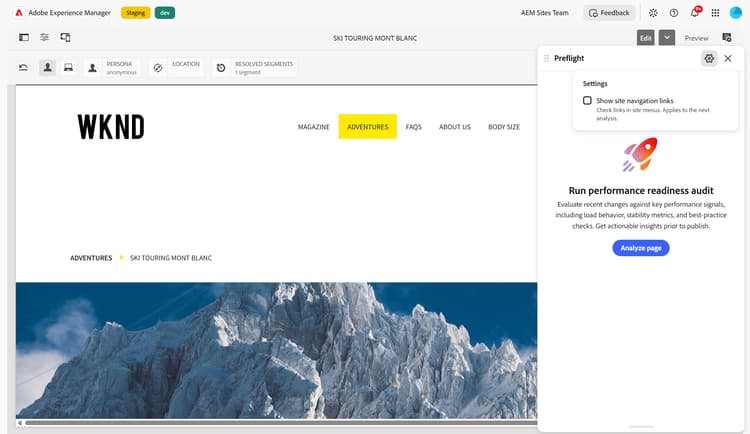
Show site navigation links controls which links the audit checks, not just which results it displays.
Changing the setting does not start an audit or change the results already on screen. When those results used a different setting, a dot appears on Reanalyze, with the label Reanalyze to apply new settings. Run the audits again to apply the change, or restore the previous setting to clear the dot.
Preflight saves the setting in your browser and retains it after you sign out. Tabs on the same site share the setting. To skip navigation links again, clear Show site navigation links before the next run.
The setting is not available while audits are running.
Filter the results
On the detail page, use the filter beside the Instances heading to show only some of the opportunities:
An insecure http:// link whose https:// version is broken has two opportunities on the same card. Broken shows only the broken-link opportunity, and Needs verification shows only the insecure-link opportunity. For more information, see Filter instances.
Known limitations
The audit runs in the AEM Sites Page Editor, in Adobe Managed Services (AMS), and in document-based authoring through the Sidekick. It is not currently available in the Universal Editor.
How to resolve
When the audit finds opportunities, each one describes the problem and the recommended change, and identifies the link involved. Use Highlight on page to jump to the link in your content, and use the Current URL section to copy the URL or open it in a new tab so you can confirm the problem for yourself. To learn how to review and resolve opportunities, see Audit results in Preflight.