Audit results in Preflight
When the audits complete, Preflight displays the results in the readiness dashboard. The dashboard shows an overall readiness meter and the opportunities it found, grouped by audit category. Within each category, individual audits identify specific items to review or fix.
Readiness meter
At the top of the dashboard, the readiness meter reflects the overall audit results. It shows a readiness score as a percentage, based on the proportion of audits that finished without opportunities, along with the total number of opportunities found across all audits. The readiness meter helps you gauge overall page health at a glance.
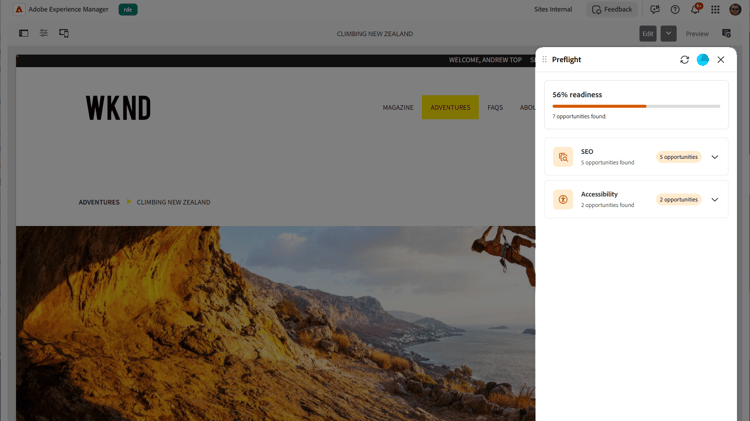
While the audits are still running, the readiness meter shows a progress bar with a status such as Running audits or the number of audits still running. When the audits complete, the meter shows the final readiness percentage and opportunity count.
Audit categories
Preflight groups related audits into categories, such as SEO and Accessibility. Each category appears as a card that shows the number of opportunities found, or indicates that all its audits passed with no opportunities.
Expand a category to see its individual audits. Each audit shows whether it passed or found opportunities, a short description, and a count of the opportunities found. Select an audit that found opportunities to open its detail page.
For the complete list of audit categories and the audits in each, see Preflight audit categories.
Opportunity details
The detail page shows the opportunities the selected audit found. When the same problem occurs in more than one place, each occurrence is called an instance. Use the navigator (Previous instance and Next instance) to step through them; it shows your position, for example 1 of 5 instances found.
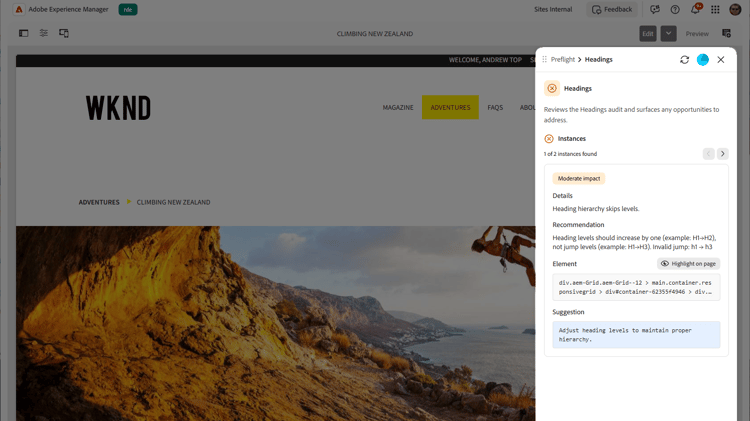
Each opportunity includes:
- A severity or impact badge that indicates how important the opportunity is.
- Details about the opportunity, such as a description of the problem, a recommendation, and, for accessibility, the related WCAG rule and conformance level.
- An Element section that shows the affected element on the page, with a Highlight on page button.
- A Suggestion section with a recommended fix. When the suggestion is generated by AI, it is marked as an AI-generated suggestion, and may include a short rationale explaining the suggested fix.
Highlight on page
After the audits complete, you can quickly locate and understand an opportunity by highlighting it directly on the page.
Preflight highlights the affected element in context, connecting the result in the panel to the exact location in your content. This makes it easier to review and resolve opportunities without manually searching through the page.
- Open the Preflight panel in the context of the page to audit, and select Analyze page to run the audits.
- Select an audit from the readiness dashboard, then select an opportunity to review.
- Select Highlight on page. The preview automatically scrolls to the relevant area and highlights the corresponding element, so you can easily identify and optimize the opportunity in context.
Job ID
Each Preflight run has a unique job ID, shown at the bottom of the panel. It is mainly useful when an administrator is troubleshooting a specific run. Hover over the ID and select the copy icon that appears to its right; the ID is copied to your clipboard and a confirmation message appears. Include this ID when you report a problem.