Review the full-stack AEM project’s ‘ui.frontend’ module aem-full-stack-ui-frontent
In, this chapter we review the development, deployment, and delivery of front-end artifacts of a full-stack AEM project, by focusing on the ‘ui.frontend’ module of the WKND Sites project.
Objectives objective
- Understand the build and deployment flow of front-end artifacts in an AEM full-stack project
- Review the AEM full-stack project’s
ui.frontendmodule’s webpack configs - AEM client library (also know as clientlibs) generation process
Front-end deployment flow for AEM full-stack and Quick Site Creation projects
Prerequisites prerequisites
- Clone the AEM WKND Sites project
- Built and deployed the cloned AEM WKND Sites project to AEM as a Cloud Service.
See the AEM WKND Site project README.md for more details.
AEM full-stack project front-end artifact flow flow-of-frontend-artifacts
Below is a high-level representation of the development, deployment, and delivery flow of the front-end artifacts in a full-stack AEM project.
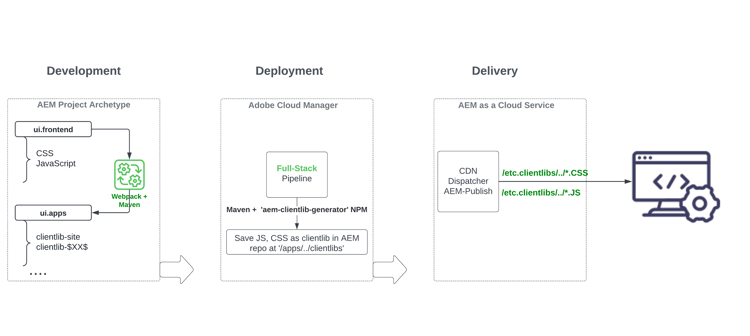
During the development phase, front-end changes like styling, and rebranding are carried out by updating the CSS, JS files from the ui.frontend/src/main/webpack folder. Then during build-time, the webpack module-bundler and maven plugin turn these files into optimized AEM clientlibs under ui.apps module.
Front-end changes are deployed to AEM as a Cloud Service environment when running the Full-stack pipeline in Cloud Manager.
The front-end resources are delivered to the web browsers via URI paths starting with /etc.clientlibs/, and are typically cached on AEM Dispatcher and CDN.
Review webpack configs in the WKND Sites project development-frontend-webpack-clientlib
-
There are three webpack config files used to bundle the WKND sites front-end resources.
webpack.common- This contains the common configuration to instruct the WKND resource bundling and optimization. The output property tells where to emit the consolidated files (also known as JavaScript bundles, but not to be confused with AEM OSGi bundles) it creates. The default name is set toclientlib-site/js/[name].bundle.js.
code language-javascript ... output: { filename: 'clientlib-site/js/[name].bundle.js', path: path.resolve(__dirname, 'dist') } ...webpack.dev.jscontains the development configuration for the webpack-dev-serve and points to the HTML template to use. It also contains a proxy configuration to an AEM instance running onlocalhost:4502.
code language-javascript ... devServer: { proxy: [{ context: ['/content', '/etc.clientlibs', '/libs'], target: 'http://localhost:4502', }], ...webpack.prod.jscontains the production configuration and uses the plugins to transform the development files into optimized bundles.
code language-javascript ... module.exports = merge(common, { mode: 'production', optimization: { minimize: true, minimizer: [ new TerserPlugin(), new CssMinimizerPlugin({ ...}) } ... -
The bundled resources are moved to the
ui.appsmodule using aem-clientlib-generator plugin, using the configuration managed in theclientlib.config.jsfile.
    ...
    const BUILD_DIR = path.join(__dirname, 'dist');
    const CLIENTLIB_DIR = path.join(
    __dirname,
    '..',
    'ui.apps',
    'src',
    'main',
    'content',
    'jcr_root',
    'apps',
    'wknd',
    'clientlibs'
    );
    ...
- The frontend-maven-plugin from
ui.frontend/pom.xmlorchestrates webpack bundling and clientlib generation during AEM project build.
$ mvn clean install -PautoInstallSinglePackage
Deployment to AEM as a Cloud Service deployment-frontend-aemaacs
The Full-stack pipeline deploys these changes to an AEM as a Cloud Service environment.
Delivery from AEM as a Cloud Service delivery-frontend-aemaacs
The front-end resources deployed via the full-stack pipeline are delivered from the AEM Site to web browsers as /etc.clientlibs files. You can verify this by visiting the publicly hosted WKND site and viewing source of the webpage.
    ....
    <link rel="stylesheet" href="/etc.clientlibs/wknd/clientlibs/clientlib-site.lc-181cd4102f7f49aa30eea548a7715c31-lc.min.css" type="text/css">

    ...

    <script async src="/etc.clientlibs/wknd/clientlibs/clientlib-site.lc-d4e7c03fe5c6a405a23b3ca1cc3dcd3d-lc.min.js"></script>
    ....
Congratulations! congratulations
Congratulations, you reviewed the full-stack project’s ui.frontend module
Next steps next-steps
In the next chapter, Update Project to use Front-end Pipeline, you will update the AEM WKND Sites Project to enable it for the front-end pipeline contract.