Test the solution
Last update: March 23, 2025
- Applies to:
- Experience Manager as a Cloud Service
- Topics:
- Adaptive Forms
CREATED FOR:
- Beginner
- Developer
After the code is deployed, create an adaptive form based on core components. Associate the adaptive form with the prefill service as shown in the screenshot below.
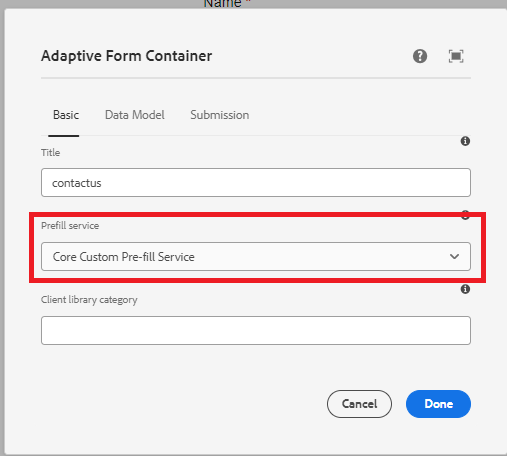
Every time the form is rendered, the associated prefill service will be executed and the form will be populated with the data returned by the prefill service.
For example to prefill the form with the data associated with the guid d815a2b3-5f4c-4422-8197-d0b73479bf0e, the following url is used.
The code in the prefill service will extract the value of guid parameter and fetch the data associated with the guid from the data source.
http://localhost:4502/content/dam/formsanddocuments/contactus/jcr:content?wcmmode=disabled&guid=d815a2b3-5f4c-4422-8197-d0b73479bf0e
Previous pageWrite prefill service
Next pageIntroduction
Experience Manager
- Overview
- Playlists
- Introduction to AEM as a Cloud Service
- Experience Hub
- AEM AI Assistant
- Experience Cloud integrations
- Underlying Technology
- Edge Delivery Services
- Cloud Manager
- Local Development Environment Setup
- Developing
- Debugging AEM
- Personalization
- AEM APIs
- Content Delivery
- Caching
- Accessing AEM
- Authentication
- Advanced Networking
- Security
- AEM Eventing
- Migration
- Content Transfer Tool
- Bulk Import of assets
- Moving to AEM as a Cloud Service
- Cloud Acceleration Manager
- Content Fragments
- Forms
- Developing for Forms as a Cloud Service
- 1 - Getting started
- 2 - Install IntelliJ
- 3 - Setup Git
- 4 - Sync IntelliJ with AEM
- 5 - Build a form
- 6 - Custom Submit Handler
- 7 - Registering servlet using resource type
- 8 - Enable Forms Portal Components
- 9 - Include Cloud Services and FDM
- 10 - Context aware cloud configuration
- 11 - Push to Cloud Manager
- 12 - Deploy to development environment
- 13 - Updating maven archetype
- Create Adaptive Form
- Custom submit service with headless form
- Create address block component
- Create clickable image component
- AEM Forms and Analytics
- Creating Countries Dropdown Component
- Creating Button Variations
- Using vertical tabs
- Using output and forms service
- Document Generation in AEM Forms CS
- Using Forms Document Services API
- Document Generation using Batch API
- PDF Manipulation in Forms CS
- Store Form Submissions with Blob Index Tags
- Prefill core component based form
- Azure Portal Storage
- Save and Resume form filling
- Create Review Workflow
- Acrobat Sign with AEM Forms
- Integrate with Microsoft Power Automate
- Integrate with Microsoft Dynamics
- Integrate with Salesforce
- Store form submissions in one drive and sharepoint
- Developing for Forms as a Cloud Service
- Asset Compute Extensibility
- Multi-step Tutorials
- Expert Resources