Find and remove deprecated APIs in AEM as a Cloud Service
Learn how to find and remove deprecated APIs in AEM as a Cloud Service.
Overview
To ensure that your application is secure and performant and that you can continue deploying code using Cloud Manager pipelines, remove deprecated APIs from your project.
In this tutorial, you learn how to find and remove deprecated APIs in your AEM as a Cloud Service environment using the AEM Analyser Maven Plugin.
Notifications about deprecated APIs
The deprecated APIs usage and attention to fix it is reported regularly, let’s review some examples.
-
AEM as a Cloud Service Actions Center notifies you about deprecated APIs in your project.
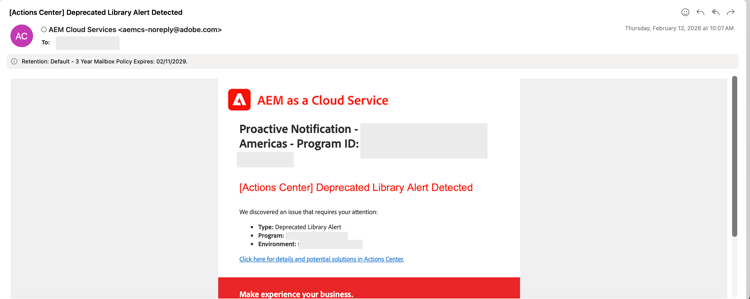
-
The Code Scanning step in the Cloud Manager pipeline reports deprecated APIs in your project, review the Download Details report to see the full list of deprecated APIs.

-
The Artifact Preparation step in the Cloud Manager pipeline reports deprecated APIs in your project, Download log and look for Analyser warnings in the log file.
code language-none 2026-02-20 15:40:48.376 Analyser warnings have been found 2026-02-20 15:40:48.376 The analyser found the following warnings for author and publish : 2026-02-20 15:40:48.376 [region-deprecated-api] com.adobe.aem.guides:aem-guides-wknd.core:4.0.5-SNAPSHOT: Usage of deprecated package found : org.apache.commons.lang : Commons Lang 2 is in maintenance mode. Commons Lang 3 should be used instead. Deprecated since 2021-04-30 For removal : 2021-12-31 (com.adobe.aem.guides:aem-guides-wknd.all:4.0.5-SNAPSHOT) 2026-02-20 15:40:56.458 Convert Merge Analyse finished.
How to find deprecated APIs
Follow these steps to find deprecated APIs in your AEM as a Cloud Service project.
-
Use the latest AEM Analyser Maven Plugin
In your AEM project, use the latest version of the AEM Analyser Maven Plugin.
-
In the main
pom.xml, the plugin version is usually declared. Compare your version with the latest released version.code language-xml ... <aemanalyser.version>1.6.16</aemanalyser.version> <!-- Latest released version as of 20-Feb-2026 --> ... <!-- AEM Analyser Plugin --> <plugin> <groupId>com.adobe.aem</groupId> <artifactId>aemanalyser-maven-plugin</artifactId> <version>${aemanalyser.version}</version> <extensions>true</extensions> </plugin> ... -
The plugin checks against the latest available AEM SDK. Use the latest AEM SDK version in your project’s
pom.xmlfile. It helps to surface the deprecated APIs as IDE warnings.code language-xml ... <aem.sdk.api>2026.2.24464.20260214T050318Z-260100</aem.sdk.api> <!-- Latest available AEM SDK version as of 20-Feb-2026 --> ... -
Ensure the
allmodule runs the plugin in theverifyphase.code language-xml ... <build> <plugins> ... <plugin> <groupId>com.adobe.aem</groupId> <artifactId>aemanalyser-maven-plugin</artifactId> <extensions>true</extensions> <executions> <execution> <id>analyse-project</id> <phase>verify</phase> <goals> <goal>project-analyse</goal> </goals> </execution> </executions> </plugin> ... </plugins> </build> ...
-
-
Run a build and check for warnings
When you run
mvn clean install, the analyzer reports deprecated APIs as [WARNING] messages in the output. For example:code language-shell ... [WARNING] The analyser found the following warnings for author and publish : [WARNING] [region-deprecated-api] com.adobe.aem.guides:aem-guides-wknd.core:4.0.5-SNAPSHOT: Usage of deprecated package found : org.apache.commons.lang : Commons Lang 2 is in maintenance mode. Commons Lang 3 should be used instead. Deprecated since 2021-04-30 For removal : 2021-12-31 (com.adobe.aem.guides:aem-guides-wknd.all:4.0.5-SNAPSHOT) ...It’s easy to overlook these messages when focusing on build success or failure.
-
Get a clear list of deprecated APIs
The above step also provides the same information. However, run the
verifyphase on theallmodule to see all [WARNING] messages in one place. For example:code language-shell $ mvn clean verify -pl allThe [WARNING] messages in the build output list the deprecated APIs in your project.
How to remove deprecated APIs
The AEM Analyser reports what is deprecated and provides the recommendation on how to fix it. However, use the table below to choose the right action, and follow the linked documentation when you need more detail.
Deprecated API remediation strategy
Practical guidance
- Treat analyzer warnings as future pipeline failures, not optional messages.
- Fix deprecated APIs locally using the latest AEM SDK.
- Keep the analyzer output clean to avoid problems during future AEM upgrades.
Fixing deprecated APIs early keeps your project upgrade-safe and deployment-ready.