Set up AI in AEM
In order to use AEM AI Assistant and Agents in AEM, you need to set up access in your Adobe Experience Manager environment. This guide will walk you through the necessary steps to enable these AI-powered features. You can also experiment with the AI Assistant in a playground environment.
AEM AI Assistant
Learn how to configure access to the AI Assistant in Adobe Experience Manager using Adobe Admin Console. This step is necessary for enabling users to get responses from the Assistant and leverage automatic ticket creation.
Agents in AEM
To use Agents in AEM, you must have AEM AI Assistant access configured first. Agents in AEM must be provisioned by Adobe. To request access to Agents in AEM, contact your Adobe representative or Adobe Support.
Playground
If you do not have access or the ability to set up AEM AI Assistant or Agents in AEM, you can still explore their capabilities in a playground environment.
AEM provides a playground environment where users can experiment with the AI Assistant’s capabilities, including the Agents in AEM, without affecting their production environment. This allows users to familiarize themselves with the features and functionalities of the AI Assistant in a safe setting.
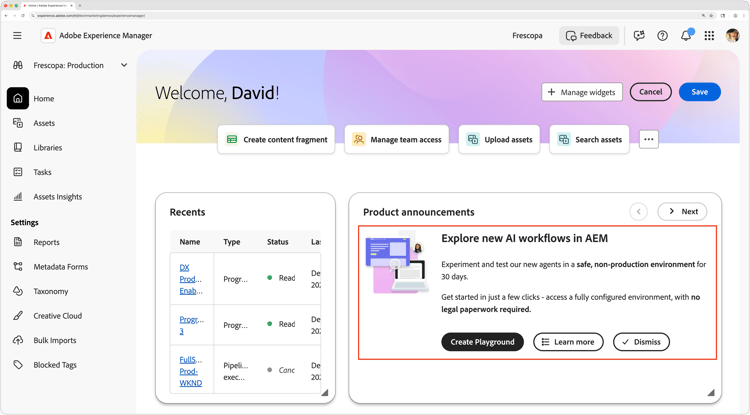
To create a playground, navigate to Experience Hub and select Create Playground in the Product Announcements panel. Once your playground is set up, you will receive an email with the details to access it.