Deployment and dispatcher configuration
This article provides information on how to deploy Experience Manager Guides as a Cloud Service and configure dispatcher.
Deploy Experience Manager Guides as a Cloud Service
You can start by deploying Experience Manager Guides via the Cloud Manager. To deploy the module follow the instructions mentioned in AEM Guides as a Cloud Service deployment.
<module>dox.installer</module> from file dox/pom.xml in your cloud manage git codebase before enabling Experience Manager Guides for your program.Perform the following steps to deploy the Experience Manager Guides module:
-
Login to Cloud Manager.
-
Edit the program for which you want to configure Experience Manager Guides.
-
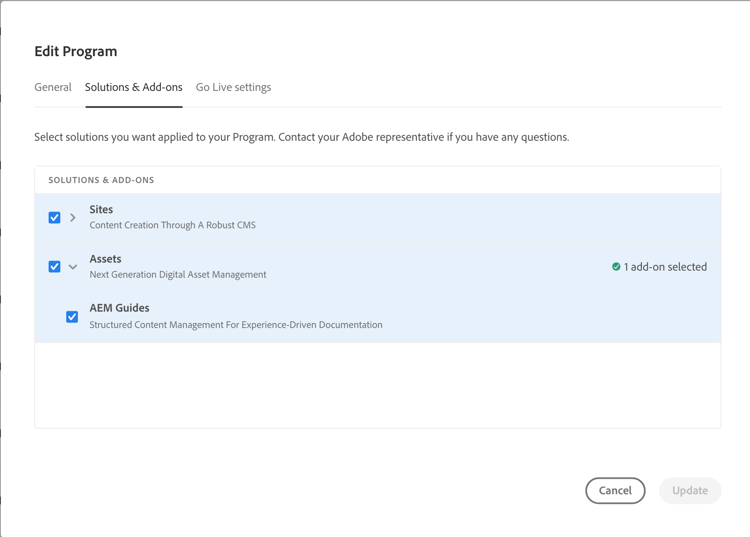
Switch to Solutions and Add-ons tab.
-
In the Solutions and Add-ons table, click on Assets.
-
Select Guides and select Save.
You have successfully configured your program for automatic provisioning of Experience Manager Guides solution.
Configure dispatcher
Dispatcher is Adobe Experience Manager’s caching and/or load balancing tool. For more details, refer to Dispatcher in the Cloud.
- For migrating dispatcher configuration from AMS to cloud service, refer to Migrating the Dispatcher configuration from AMS to AEM as a Cloud Service.
- For details on how to configure dispatcher, see Configuring Dispatcher.