Configure Reference store cleanup
Set up the Reference store cleanup job and manage the Guides BTree deletion setting to keep your system optimized and storage clean.
Configure Reference store cleanup job
The following tabs provide instructions to configure Reference store clean up job based on your Experience Manager Guides setup: Cloud Service or On-Premise.
-
Use the instructions given in Configuration overrides to create the configuration file.
-
In the configuration file, provide the following (property) details:
table 0-row-3 1-row-3 PID Property Key Property Value com.adobe.guides.utils.schedulers.GuidesBTreesCleanupSchedulerJobcronExpressionDefault value: “0 0 0 * * ?”
-
Open the Adobe Experience Manager Web Console Configuration page.
The default URL to access the configuration page is:
code language-http http://<server name>:<port>/system/console/configMgr -
Search for and select the com.adobe.guides.utils.schedulers.GuidesBTreesCleanupSchedulerJob bundle.
-
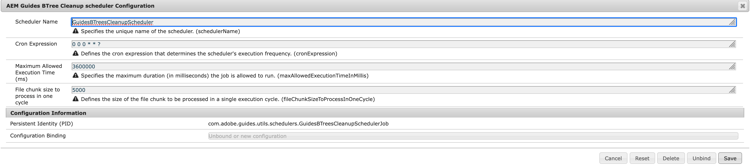
Update the cron expression to set up the Reference store cleanup scheduler job run frequency.
-
Configure the Reference store clean up scheduler as shown below.
-
Select Save.
Configure Guides B-tree deletion enable setting
The following tabs provide instructions to enable the setting based on your Experience Manager Guides setup: Cloud Service or On-Premise.
-
Use the instructions given in Configuration overrides to create the configuration file.
-
In the configuration file, provide the following (property) details:
table 0-row-3 1-row-3 PID Property Key Property Value com.adobe.fmdita.config.ConfigManagerbtree.deletion.enabledDefault value: “True”
-
Open the Adobe Experience Manager Web Console Configuration page.
The default URL to access the configuration page is:
code language-http http://<server name>:<port>/system/console/configMgr -
Search for and select the com.adobe.fmdita.config.ConfigManager bundle.
-
Enable the setting Guides btree deletion enabled (btree.deletion.enabled).

-
Select Save.