AI Assistant in AEM 6.5 about-ai-assistant-in-aem
AI Assistant in AEM 6.5/AEM 6.5 LTS offers a conversational interface designed to streamline finding answers to your Adobe Experience Manager-related queries. It helps you get instant answers to your AEM product-related questions (available to all users), and automate support ticket creation (available to Support Admins).
AI Assistant supports AEM as a Cloud Service, including the following solutions:
- Experience Hub overview page
- Edge Delivery Services
- Sites
- Assets
- Forms
- Dynamic Media
- Cloud Manager
It is directly embedded in AEM and accessible from AEM Experience Hub, Cloud Manager, and Author UI.
The following 3-minute, 25-second video delivers a step-by-step walkthrough of AI Assistant in AEM.
Get access to AI Assistant in AEM get-access
To get access to AI Assistant in AEM, customers must have the following:
- Access to Product Knowledge, which lets you ask product-related questions in AI Assistant chat. This access is available to all users in your organization by default.
- Permission to open support tickets, which requires the Support Admin role.
To get access to AI Assistant in AEM:
-
Customers must have an additional agreement in place to access most AI-powered and agentic capabilities in Adobe Experience Manager. Contact your Adobe representative for details. For how generative AI enablement works, see Generative AI in CX Enterprise Applications.
-
Once your organization has this agreement, all users can use AI Assistant for Product Knowledge by default. No additional per-user or per-group permission is required.
Scope scope
The current scope of AI Assistant in AEM focuses on addressing Product Knowledge questions for AEM as a Cloud Service. This scope includes comprehensive support for key areas.
- Surfaces: Available across AEM Experience Hub, Author UI, Cloud Manager.
- Capabilities: Product knowledge and primary resource for troubleshooting and guidance, automated creation of support tickets, and ticket lookup.
- Value: Saves time, accelerates learning and adoption, reduces the need to create support tickets manually, and improves efficiency in creating support tickets.
Privacy, Security, and Governance privacy-security-governance
AI Assistant in AEM is designed with a strong emphasis on privacy, security, and governance.
This article outlines the trust-centered features that you can expect from AI Assistant in AEM:
- AI Assistant in AEM does not use personal data, including for training purposes.
- AI Assistant in AEM does not have access to consumer data.
- Explicit permission is required to interact with AI Assistant in AEM.
- User-provided prompts (questions, queries, and so on) are not shared with other customers.
Learn about the AI Assistant in AEM for product knowledge and automated support ticket creation ai-prod-insights
Product knowledge encompasses concepts and topics derived from Adobe Experience League documentation. These questions can be categorized into the following sub-groups:
Examples
- What is the Universal Editor?
- How do I create a program in Cloud Manager?
- How do I use Universal Editor?
- Is there a way to copy content from one environment to another?
- Why can’t I access the Universal Editor?
- Why is my pipeline failing?
Examples
- Create a support ticket for me.
- Show me all the support tickets that I have opened.
- Show me the status of ticket “E-----------”
How to write effective questions ai-craft-questions
To receive the most accurate responses from AI Assistant in AEM, it is important to phrase your questions with clarity and context. Use the following tips to ensure that your queries are clear and well-structured:
- Clearly state your task or question in a concise manner.
- To improve understanding, avoid ambiguous wording or overly complex syntax.
- Include relevant context about your task or question, as this helps the AI Assistant in AEM provide more precise and relevant answers.
For example, in your prompt, name the AEM solution you are working with.
Examples of unsupported questions ai-unsupported-questions
- How many development environments exist in my tenant?
- Who started the last production pipeline?
- Why is my production pipeline failing?
- Configure a code quality pipeline from a dev branch for me.
Use AI Assistant in AEM ai-use
Start an AI Assistant in AEM conversation
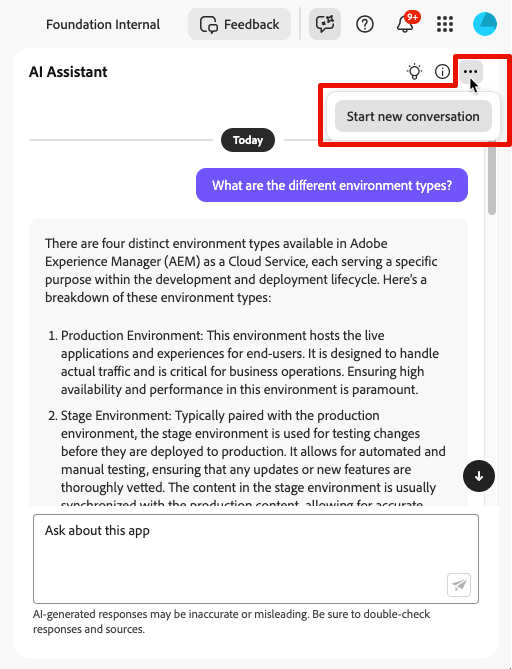
You can reset the AI Assistant in AEM and start a new conversation when you want to change topics. This feature is especially useful when troubleshooting queries that are failing or providing inaccurate information.
To start an AI Assistant in AEM conversation:
-
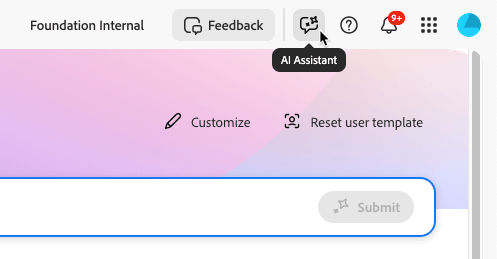
Near the upper-right corner of the AEM user interface (either from Cloud Manager pages or the author instance of the AEM environments), click the AI Assistant icon.
-
In the AI Assistant panel text box near the bottom, type your question or prompt, then press
Enteror click.
note NOTE Personal data should not be included in your inputs, as it is unnecessary for using this tool. 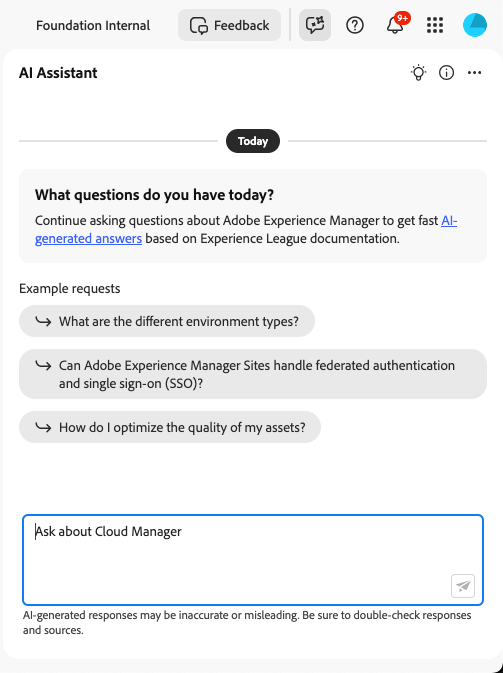
-
To start a new conversation (new topic or a change in the topic), click
Discover prompts by category
AI Assistant in AEM includes a discoverability feature to help you explore supported topics and categories.
To discover prompts by category:
-
In the AI Assistant panel, click

Panel showing prompt categories in AI Assistant. -
Select a category to view a list of related prompts.
-
Select a prompt to see examples of the types of questions the AI Assistant can answer.
-
To hide the prompt discovery panel, click
Share your feedback on AI Assistant in AEM
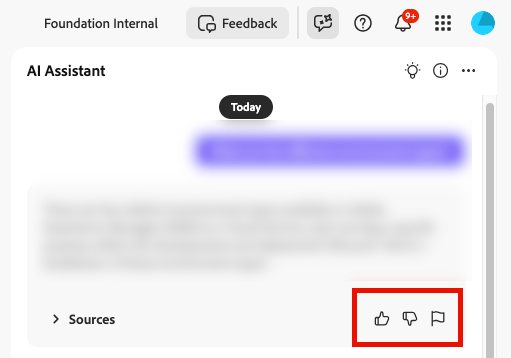
Your input helps Adobe improve AI Assistant for better performance and accuracy.
Share your feedback on your experience with AI Assistant in AEM through the following options:
Frequently asked questions about AI Assistant in AEM ai-faq
Here are answers to some common questions about AI Assistant:
- Is the information from AI Assistant in AEM real-time?
No. AI Assistant sources its content from Adobe Experience League documentation. Updates to the content take some time to reflect in its responses. - Which Adobe applications does AI Assistant in AEM support?
Currently, AI Assistant supports Product Knowledge inquiries in AEM as a Cloud Service. - What are the capabilities of AI Assistant in AEM?
AI Assistant in AEM is designed to answer queries related to Adobe Product Knowledge. - Does the AI Assistant in AEM use personal information for training data?
No. AI Assistant in AEM does not use personal information for training purposes. Avoid sharing personal information about yourself or others, including names or contact details, with the AI Assistant in AEM.