Main Menu (Categories) not displayed on subpages with Fastly enabled
This article explains how to fix the issue where the Main Menu (or the Category Top Navigation menu in our user guide) does not display on storefront subpages (for example, blog/page) when Fastly or Varnish is enabled.
Description description
Environment
- Adobe Commerce on-premises 2.X.X
- Adobe Commerce on cloud infrastructure 2.X.X
- Fastly or Varnish
Issue/Symptoms
- The Main Menu (Category Top Navigation) is not displayed on storefront subpages (for example,
blog/page). - The issue occurs only when Fastly or Varnish caching is enabled.
Cause
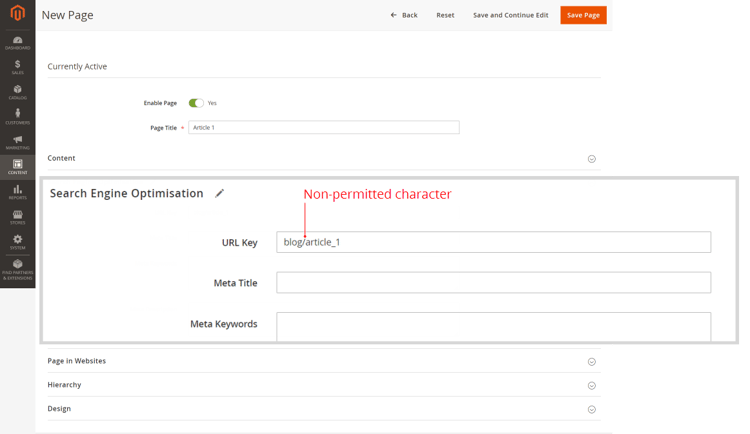
The issue is caused by the non-permitted ‘/’ character (slash) in the URL Key parameter of the page (Search Engine Optimization settings). This happens when the URL Path (the full page location) is mistakenly specified instead of the URL Key.
For example:
- Incorrect:
blog/page_name - Correct:
page_name
Resolution resolution
Remove the / character (slash) from the URL Key parameter for all pages of your store.
In other words, use URL Key instead of URL Path: mention just the page name with no parent resource/directory.
Recommendations on page hierarchy and SEO
To set the page hierarchy, use the Hierarchy section of the Edit Page menu.
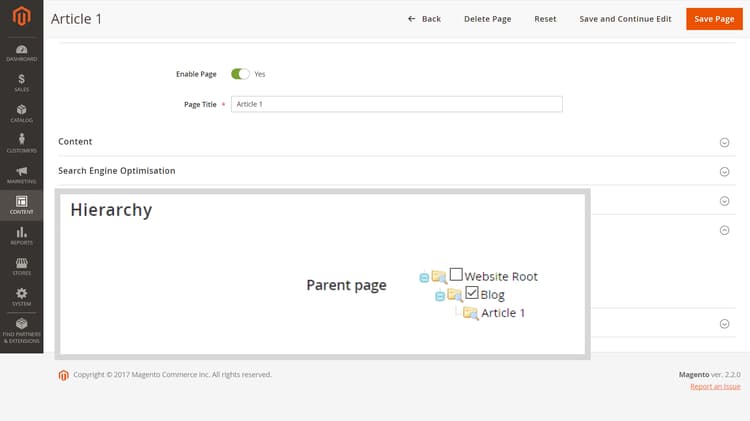
You may also use the Content > Elements > Hierarchy menu – for more complex hierarchy solutions.
For SEO purposes on product pages, use URL Rewrites (Marketing > SEO & Search > URL Rewrites).
Related reading
The URL Key parameter for SEO:
Page Hierarchy: